Web Chat layers

Z-index & layers: how Quidget Web Chat stacks on your website

Sometimes your site UI (sticky headers, menus, cookie banners, etc.) can visually overlap the Quidget Web Chat.

This guide explains how z-index works, what z-index values Quidget uses, and how you can control which elements appear above or below the widget.


Quidget Web Chat z-index layers

Quidget Web Chat v2 runs inside an isolated iframe, controlled by a loader script. The widget uses fixed-position layers with stable z-index values:

  • 902 — Quidget chat button
  • 921 — Quidget chat window
  • 903+ — anything you want above the button
  • 922+ — anything you want above the chat window

Quick reference

Quidget elementz-indexYour element must be
Chat button902903+ to appear above it
Chat window921922+ to appear above it

Recommended approach

Decide which UI should be above what

Most sites want:

  • Chat above sticky header (so close button is always usable)
  • Full-screen elements (modals, menus) above chat when opened

So, usually:

  • Header: below chat → set header z-index < 921
  • Menus/modals: above chat → set those to >= 922

Practical examples

Example 1: Fix sticky header covering the chat

If your sticky header overlaps the chat header on mobile, make the header layer lower than the chat window.

✅ Solution: set header z-index below 921

/* Your sticky header */
.site-header {
  position: sticky; /* or fixed */
  top: 0;
  z-index: 900; /* < 921 so Quidget chat stays on top */
}

Example 2: Put your floating button above the Quidget chat button (but not above the chat window)

Use this if you want your UI above the widget button, but you still want the chat window to cover it when opened.

.my-floating-button {
  position: fixed;
  right: 24px;
  bottom: 96px;
  z-index: 903; /* above button (902), below chat window (921) */
}

Example 3: Make your side menu or modal appear above the chat window

Use this for mobile menus, modals, or full-screen overlays:

.mobile-menu,
.modal-overlay {
  position: fixed;
  inset: 0;
  z-index: 922; /* above chat window (921) */
}

Share this article

Troubleshooting

Troubleshooting: Quidget Web Chat doesn’t appear on your website

If you’ve added the Quidget Web Chat snippet but the widget doesn’t show up (or doesn’t work correctly), this guide walks you through the most common causes and fixes.

Quidget Web Chat V2 runs in an isolated iframe and is controlled by a small loader script.


Quick install checklist

Make sure all of the following are true:

  • ✅ You pasted the full snippet right before the closing </body> tag.
  • ✅ The snippet exactly matches the code from the Test & Install page.
  • ✅ You don’t have a strict Content Security Policy (CSP) that blocks the widget.
  • ✅ You don’t have lazy-loading enabled for iframes or scripts that affects the Quidget Web Chat.

✅ You don’t have global CSS rules that affect the widget button or the iframe element.

CSP / security policy blocks Quidget

Symptoms

Console errors like:

  • “Refused to load the script … because it violates the Content Security Policy”
  • “Refused to frame … because it violates the following Content Security Policy directive…”

Fix

Add (or merge) the following directives into your site’s Content-Security-Policy to allow Quidget Web Chat resources:

{
  description: 'Quidget AI Widget',
  entries: [
    {
      directive: 'connect-src',
      values: [
        'https://quidget.ai',
        'wss://api.quidget.ai',
        'https://us.i.posthog.com',
        'https://sentry.supportyourapp.com',
      ],
    },
    {
      directive: 'img-src',
      values: [
        'https://cdn.quidget.ai',
      ],
    },
    {
      directive: 'frame-src',
      values: [
        'https://quidget.ai',
        'https://*.quidget.ai',
      ],
    },
  ],
}

Referrer policy (required to pass referrer to the iframe)

To ensure the iframe receives referrer information (minimum required), set:

Referrer-Policy: strict-origin-when-cross-origin

Still having issues?

If your web chat still doesn’t work after applying the steps above, you may be running into a site-specific or infrastructure-level issue.

Please contact Quidget Support at
📧 support@quidget.ai

Share this article

Web Chat V2

Quidget Web Chat Widget – Migration Guide

We’ve released Version 2.0 of the Quidget WebChat widget. It’s visually and functionally identical to v1.0, but offers significant improvements in code isolation, style encapsulation, and security.

If you’re currently using v1.0 (script-only installation from w.quidget.ai), you’ll need to migrate to v2.0 (iframe + script installation from quidget.ai/webchat).

Use this code before </body>


Version 1.0 (Legacy – Deprecated)

Widget loads via a single JavaScript file that dynamically creates UI elements directly in your site’s DOM.

<script
  async
  src="https://w.quidget.ai/quidget.loader.js"
  data-id="YOUR_QUIDGET_INTEGRATION_ID"
></script>

Version 2.0 (Current – Recommended) ⭐

Widget runs inside an isolated iframe with a script controller for behavior management.

<iframe
  src="https://quidget.ai/webchat/chat-iframe.html?id=YOUR_QUIDGET_INTEGRATION_ID"
  id="quidget-chat-iframe"
  height="620"
  width="380"
  style="position: fixed; z-index: -1"
>
</iframe>
<script
  async
  src="https://quidget.ai/webchat/quidget.loader.js"
  data-id="YOUR_QUIDGET_INTEGRATION_ID"
></script>

Comparison Table

Featurev1.0 (Script Only)v2.0 (Iframe + Script)
CSS Isolation❌ Style conflicts possible✅ Complete isolation
JavaScript Isolation❌ Shared global scope✅ Separate execution context
Z-index Conflicts⚠️ Can interfere✅ Controlled
Third-party Scripts⚠️ Can break widget✅ Isolated

How to Migrate

  1. Step: Find your current widget code (v1.0)
  2. Step: Replace it with the v2.0 code.
    (You can copy your new code on app.quidget.ai -> Sidebar -> “Test & Install” page)
  3. Step: Test the widget on your site

Migration time: ~5 minutes


📌 Note: Version 2.0 is already the default in our WordPress Plugin.

Also, a number of users have already completed the migration successfully.


Share this article

Web Chat API

Overview

The Quidget Web Chat provides a simple JavaScript API that allows you to control the chat widget programmatically from your website.

Prerequisites

Before using the API, ensure that the Quidget Web Chat is fully installed and initialized on your page. The chat widget must be properly loaded and ready to function.

Available Methods

MethodDescription
showChat()Opens the chat widget, making it visible to users
hideChat()Closes the chat widget, hiding it from users
startChat()Opens the chat and skips the home screen if it exists

window.quidget.api.showChat()

Description: Opens the chat widget, making it visible to users. This method is equivalent to clicking the chat button.

Usage: Call this method when you want to display the chat interface to your users.


window.quidget.api.hideChat()

Description: Closes the chat widget, hiding it from users. This method is equivalent to clicking the close button on the chat interface.

Usage: Call this method when you want to hide the chat interface from your users.


window.quidget.api.startChat()

Description: A comprehensive method that not only opens the chat but also skips the home screen if it exists. This is the most common method for initiating a chat conversation.

Usage: Use this method when you want to directly start a chat conversation, bypassing any welcome or home screen content.


Implementation Examples

Add a button to your page that opens the chat when clicked:

<button onclick="window.quidget.api.startChat()">OPEN CHAT</button>

Custom Event Integration

Trigger the chat based on user interactions:

// Open chat when user scrolls page
window.addEventListener('scroll', function() {
    if (your_condition) {
        window.quidget.api.startChat();
    }
});

Error Handling

If the chat widget is not properly initialized, API calls may not work as expected. Always ensure the chat is fully loaded before attempting to use these methods.

// Check if chat is available before using
if (window?.quidget?.api) {
    window.quidget.api.startChat();
} else {
    console.warn('Quidget Chat is not yet loaded');
}
Share this article

Appearance

Customizing appearance of the Web Chat

The Appearance tab allows you to tailor the look of your Web Chat, including its view mode, color scheme, widget position, and logo.


Chat view

You can choose between the “Permanent” and “Widget” view of the Web Chat. The “Permanent” view displays the Web Chat in a window that remains active on the page where the Chat script is inserted in the </body> section. The “Widget” view will display the Web Chat in the form of a bubble that expands when clicked (the Web Chat script must also be inserted into the </body> of the page).


Action color

You can change the color used in notification bubbles, buttons, and links. Enter the desired color in the #HEX field, or choose it from the palette by clicking on the color picker.


Header color

You can change the color used in the header and on the main screen. You can leave it as “Default” if you prefer the default header style, or choose “Custom” and enter the desired color in the #HEX field or select it from the palette by clicking on the color picker.


Widget position

You can choose the location of the widget on your website in the “Widget” view of Web Chat. Select either “Left” or “Right” positioning of the Web Chat on your page.


Custom widget logo

Add a custom logo for your embedded Web Chat. Upload an image from your media library or drag and drop to set it as the logo for the Web Chat widget.

Share this article

Home Screen

Customizing the Home Screen

The Home Screen tab allows you to personalize key aspects of your chatbot’s initial interface, creating a welcoming experience for users.


Background

Customize the background to match your brand identity. Change the color by entering the desired color in the #HEX field, or select it from the palette by clicking on the color picker. You can also choose Gradient and customize the transition between colors as you like, or upload a picture if desired.


Greeting

Enter your keyword phrase, which will be displayed in a large size, so your customers never miss it.


Introduction

Write all the necessary details about your chatbot to describe its role and functions.


Start button text

Customize the name of the “Start chat” button. Be careful as it retains its call-to-start function.

Share this article

Visibility

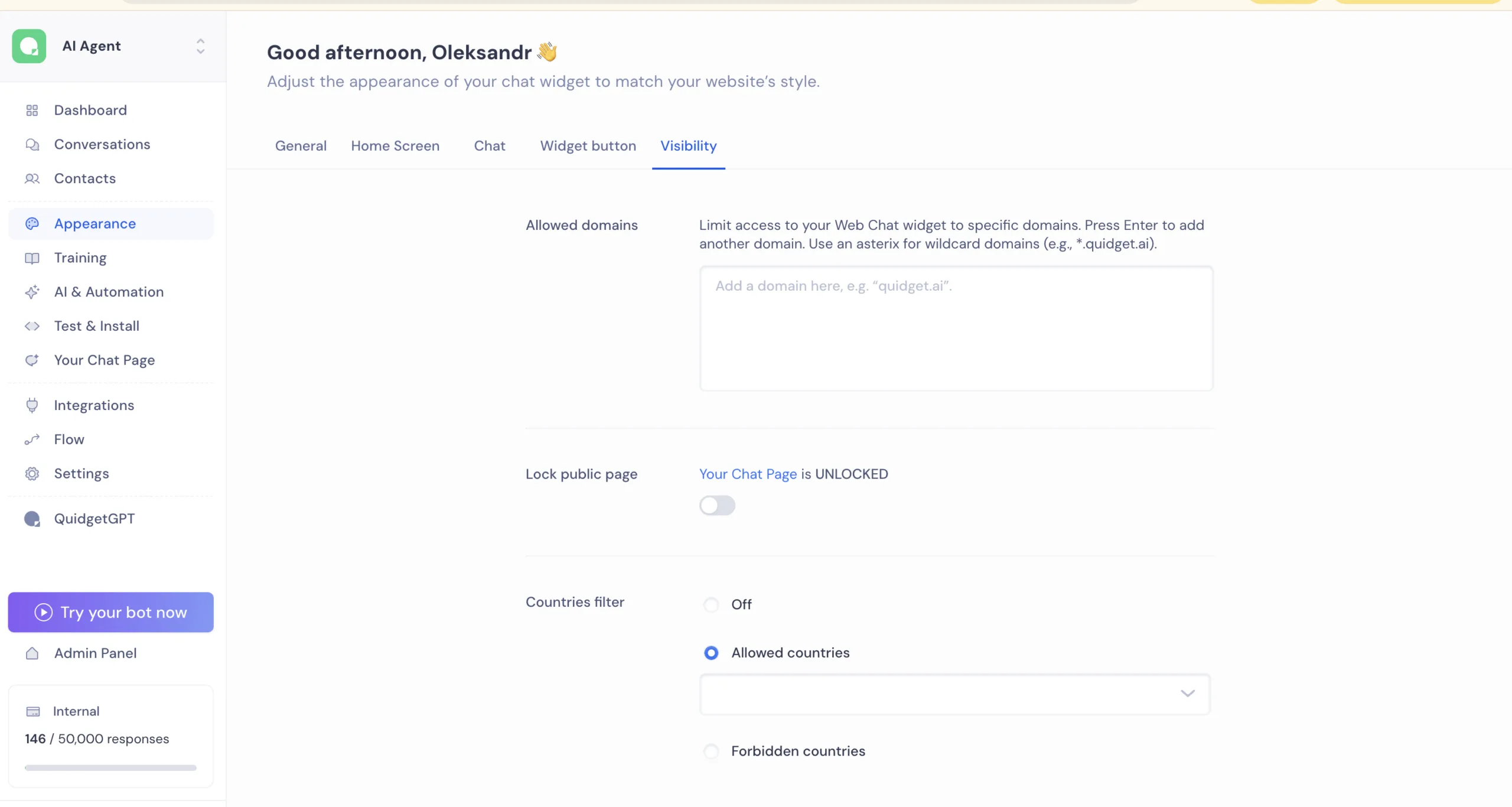
Configuring Visibility settings

On Appearance tab, we have Visibility tab which offers features to enhance the safety of your Web Chat.


Allowed domains

Restrict the use of Web Chat to specific domains by selecting only the ones you need. This ensures your safety and the safety of your customers.


Lock public page

Toggle the visibility of your WEB Chat Page. Locking the page hides the chat from visitors, while unlocking makes it publicly accessible.


Country filter

In case you need to restrict the use of Web Chat to certain countries, you can choose one of two options: Allowed countries and Forbidden countries, which indicate the allowed or prohibited countries for Web Chat to be displayed.


Allowed / Forbidden countries

Depending on the option you choose, all selected countries will either be listed as “Allowed” (indicating that Web Chat will only work in those countries) or “Forbidden” (indicating that Web Chat will not be shown in those countries).

Share this article