


AI agent platforms are transforming how businesses manage customer communication, sales, and support. Unlike traditional chatbots, these platforms use natural language understanding and intent-based reasoning to perform tasks like qualifying leads, booking appointments, and resolving issues – without requiring coding skills. They reduce repetitive workloads, improve efficiency, and allow teams to focus on complex tasks.
Key Takeaways:
- No-Code AI Agents: Build and deploy AI agents without technical expertise using platforms like Quidget.
- Core Features:
- Train agents using existing FAQs, documents, or website content.
- Automate up to 80% of routine customer inquiries.
- Integrate easily with CRMs, Slack, and email systems.
- Business Impact:
- Handle customer support, lead qualification, and sales inquiries faster.
- Reduce ticket volumes by up to 35%.
- Support multiple channels and over 45 languages.
- Market Growth: By 2026, 40% of enterprise applications will use AI agents, with the market projected to grow from $10.91 billion in 2026 to $182.97 billion by 2033.
Platforms like Quidget simplify deployment with visual tools, pre-built templates, and quick integrations, making automation accessible for businesses of all sizes.
You’re Not Behind (Yet): How to Build AI Agents in 2026 (no coding)
sbb-itb-58cc2bf
What Is an AI Agent Platform?
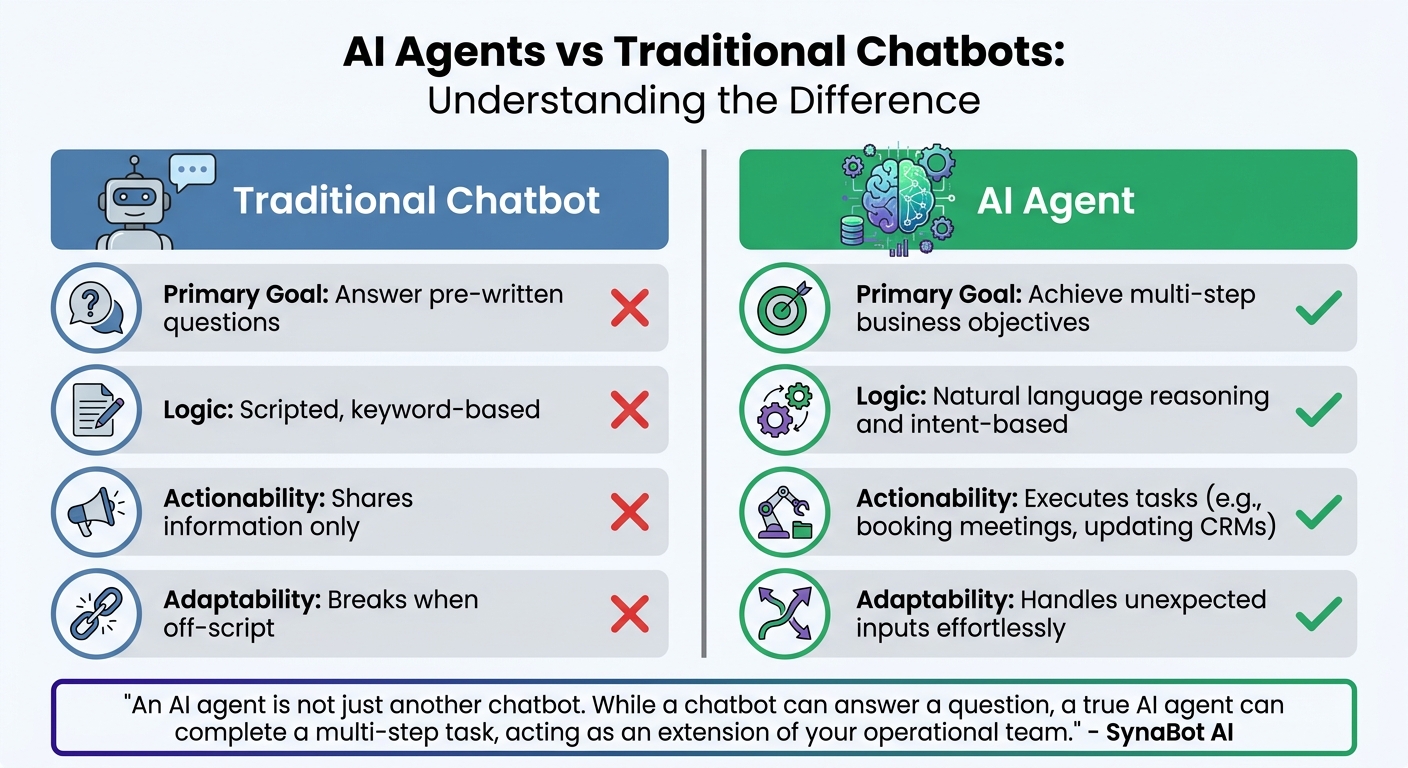
AI Agents vs Traditional Chatbots: Key Differences
An AI agent platform is a software tool that allows you to design, train, and deploy digital workers without needing to write code. Think of it as a command center where you create AI-powered digital assistants capable of handling complex tasks, like qualifying leads or scheduling appointments.
These platforms combine four key components to function effectively. The brain is powered by a large language model (LLM) that processes natural language and makes decisions. The memory serves as the knowledge base, pulling from resources like FAQs, documentation, or website content to ensure accurate and relevant responses. The job description outlines workflows that guide the AI through specific tasks. Finally, the hands are integrations with tools such as CRMs, Slack, or email systems, enabling the AI to take direct actions in the real world. Together, these elements make it possible for businesses to create AI agents without requiring technical expertise.
When triggered – for instance, by a visitor landing on your website or a new support email – the AI agent processes inputs, consults the knowledge base, and follows the necessary workflow. Unlike traditional chatbots that rely on keyword matching, AI agents can interpret intent, adapt to unexpected inputs, and autonomously complete tasks. This capability highlights the leap from basic chatbots to a more advanced, autonomous system.
How AI Agents Differ from Traditional Chatbots
Traditional chatbots operate on rigid, pre-set scripts. They recognize specific keywords and respond with predefined answers. However, if a customer asks something outside the script, the chatbot often fails. AI agents, on the other hand, can think through problems, handle ambiguous requests, and adjust dynamically.
The main distinction lies in autonomy versus reactivity. While chatbots respond to individual messages and wait for the next, AI agents work toward a goal – like qualifying a sales lead – and figure out the necessary steps independently. For example, an AI agent might ask follow-up questions, check your CRM for existing records, and forward qualified leads to your sales team, all without requiring human oversight.
| Feature | Traditional Chatbot | AI Agent |
|---|---|---|
| Primary Goal | Answer pre-written questions | Achieve multi-step business objectives |
| Logic | Scripted, keyword-based | Natural language reasoning and intent-based |
| Actionability | Shares information only | Executes tasks (e.g., booking meetings, updating CRMs) |
| Adaptability | Breaks when off-script | Handles unexpected inputs effortlessly |
"An AI agent is not just another chatbot. While a chatbot can answer a question, a true AI agent can complete a multi-step task, acting as an extension of your operational team." – SynaBot AI
This ability to adapt and complete tasks sets AI agents apart, making them an increasingly popular choice for businesses.
Why Businesses Need AI Agent Platforms
The global market for AI agents is expected to grow from $7.8 billion in 2025 to $52.62 billion by 2030, with an annual growth rate of 46.3%.
Companies turn to AI agent platforms to address three key challenges. First, these platforms reduce bottlenecks in customer support by handling up to 80% of repetitive inquiries, such as "Where is my order?" or "How do I reset my password?". Second, they ensure round-the-clock lead capture and qualification, so no potential customer is missed, even after business hours. Third, they free up human teams to focus on more complex, creative tasks that require judgment and expertise. These advantages show how using a no-code AI agent builder can lead to measurable business improvements.
For example, in 2025, Softorino adopted Quidget’s AI agent platform to manage Tier-1 customer support. Alex Novak, the company’s Customer Success Manager, oversaw the implementation. The AI system took over 60% of first-level support responses, reducing the overall ticket volume by 35%. This allowed the human team to concentrate on more challenging customer issues.
"Setting up Quidget was surprisingly quick – It now handles 60% of our first-level responses, slashing wait times and letting our team focus on real customer needs. It’s been a game-changer for us." – Alex Novak, Customer Success Manager, Softorino
What Does an AI Agent Builder Do?
An AI agent builder is essentially your command center for creating, training, and deploying AI agents using straightforward, plain-language inputs. It takes care of tasks like gathering your business data, setting up workflows, and rolling out agents across various platforms. The best part? You don’t need to hire developers or wrestle with complicated tech setups – visual tools make it possible to get an agent up and running in just minutes.
These builders pull data from sources you already use – like PDFs, website links, FAQs, internal wikis, or even pasted text. This content becomes the knowledge base your agent uses to respond to queries. You can fine-tune the agent’s tone, decide when it should escalate issues to a human, and connect it to tools like Zendesk, Slack, or your CRM with pre-built integrations. No need to mess with API keys or servers. Let’s explore the main tasks these builders handle and how they simplify your workflow.
Core Functions of an AI Agent Builder
AI agent builders handle four primary tasks to transform raw business data into a smart, functional agent:
- Knowledge ingestion: Upload documents, sync wikis, or connect website URLs to instantly create a custom knowledge base.
- Workflow design: Use visual tools to map out triggers (like receiving an email or form submission) and actions (like updating a CRM or sending a Slack notification).
- Behavior customization: Adjust the agent’s tone, personality, and rules using natural language instructions. You can even set specific guidelines, like when to escalate an issue to a human.
- Tool integration: Easily link the agent to business software like HubSpot, Salesforce, or Slack using pre-built connectors.
Modern no-code AI agent builders take this a step further by offering over 2,800 app integrations and 200+ pre-built templates. These templates make it easy to start with a setup designed for tasks like lead qualification or customer support. You can tweak it to fit your needs and have it live in under 10 minutes. This shift from instruction-based computing (where you spell out every step) to intent-based computing (where you describe the outcome you want) makes automation accessible to anyone, no matter their technical background.
"The gap between ‘I should automate this’ and ‘it’s automated’ used to be a hiring decision. Now it’s a 10-minute project." – Arahi AI
With these features, deploying an AI agent becomes quick and hassle-free.
How a No-Code AI Agent Builder Simplifies Deployment
A no-code AI agent builder removes the technical roadblocks that used to require weeks of development and a team of engineers. Instead, users configure agents with natural language inputs, and tools are connected in seconds through simple OAuth-based "Connect" buttons. Deployment is just as easy – you can embed a chat widget on your website, share a standalone link, or integrate directly with messaging apps like WhatsApp and Telegram, all without worrying about server management.
By cutting deployment times from weeks to minutes and slashing costs from thousands of dollars to affordable subscription fees, these platforms are reshaping how businesses communicate. Plus, the platform takes care of maintenance, so you don’t have to deal with server updates, API changes, or security concerns.
Gartner forecasts that by 2026, 40% of enterprise applications will include task-specific AI agents, a huge leap from less than 5% in 2025. This growth is largely fueled by the accessibility of no-code tools.
Take Quidget, for example. This platform allows businesses to train an AI agent on their existing content in just 2 to 3 minutes. Simply paste your website URL or upload a few FAQs, and the agent can instantly handle up to 80% of repetitive customer questions. For anything more complex, the agent triggers a human handoff, transferring the full chat history to a live agent to ensure no customer is left hanging. This seamless deployment lets businesses focus on more strategic tasks while the AI handles the repetitive stuff.
Business Use Cases for AI Agent Platforms
An AI agent platform is more than just a tech upgrade – it’s a practical solution that tackles real challenges in customer support, sales, and lead generation. By automating repetitive tasks, these platforms save time and allow teams to focus on more complex, high-value work. businesses benefit from quicker responses, lower costs, and better customer experiences by using the top AI-powered tools for customer service. Let’s dive into how these platforms are reshaping workflows in key areas.
Customer Support Automation
AI agents are particularly effective at managing repetitive customer inquiries – think pricing questions, shipping updates, password resets, or basic troubleshooting. By training these agents on FAQs, help center content, and internal documents, businesses can resolve up to 80% of common "Tier-1" support issues without needing human involvement. This means faster responses, no weekend backlogs, and round-the-clock support with accurate answers.
One standout feature is human handoff. When an AI agent encounters a complex issue – like a billing dispute or a technical problem – it seamlessly transfers the conversation to a live agent, complete with the full chat history. Customers avoid repeating themselves, and support teams get the context they need to resolve issues efficiently. This hybrid approach keeps costs in check while ensuring quality for problems that require human judgment.
The impact is clear in real-world use. Businesses using AI agents report a 35% drop in support ticket volumes and automate 60% of first-level responses. This allows teams to simplify operations and create tailored AI agents that meet their specific needs without requiring advanced technical expertise.
Lead Generation and Qualification
AI agents are transforming lead generation by engaging potential customers instantly. Instead of waiting for a sales rep to respond during business hours, AI agents interact with website visitors in real time, ask qualifying questions, and rank leads based on factors like company size, role, or budget. High-value prospects are forwarded directly to sales with all relevant data, while lower-priority leads receive automated follow-ups.
This process works seamlessly across multiple channels – whether it’s web chat, WhatsApp, Telegram, or email. Qualified lead data is automatically synced with CRMs like HubSpot, Salesforce, or Zendesk, eliminating the need for manual data entry and ensuring sales teams focus on the leads that matter most. For companies running paid ad campaigns or handling high web traffic, this ensures every lead is addressed, even when the team is offline.
The ability to quickly deploy these tools through a no-code AI agent builder makes them accessible for businesses of all sizes. The trend is undeniable: 73% of enterprises now use at least one AI agent for customer-facing tasks, and the market has surged 340% year-over-year, reaching $47 billion.
Sales Assistance and Faster Response Times
AI agent platforms don’t just capture leads – they also speed up sales processes. These agents provide instant answers to questions about pricing, product features, or availability by pulling information directly from your knowledge base. This eliminates delays and keeps prospects engaged, reducing the chances they’ll turn to competitors.
AI agents also enhance sales workflows. They can recommend products based on the conversation, integrate with tools like Calendly to schedule demos, and even draft personalized follow-up emails using CRM data. On average, sales reps save 10 to 15 hours per week by automating routine tasks like research and outreach, giving them more time to focus on closing deals.
Multilingual capabilities add another layer of value. Platforms like Quidget support over 45 languages, enabling small teams to serve international prospects in their native language without hiring additional staff. A U.S.-based SaaS company, for instance, can now engage leads in Spanish, German, or Japanese just as effectively as in English – all using the same AI agent platform.
The results speak volumes. Businesses report resolving inquiries five times faster than teams relying solely on human support, along with a 68% reduction in operational costs. For growing companies, this can be the difference between scaling successfully and being overwhelmed by demand.
How to Build an AI Agent for Business Without Coding
You don’t need a technical background or a team of developers to create an AI agent for your business. Thanks to modern no-code AI agent builders, you can design, train, and deploy intelligent agents using your existing business content. The process is simple: upload your knowledge base, define how the agent should interact, and launch it across platforms where your customers are active. You can have your AI agent up and running in less than an hour. Many businesses now use AI agent platforms to simplify customer self-service and improve workflow efficiency. Here’s how to train your AI agent effectively.
Training the Agent on Business Knowledge
To start, feed your agent the key information about your business. With a no-code AI agent builder, you can upload existing resources like PDFs, website links, internal documentation, or help center articles. For example, if you operate a SaaS business, you might include product manuals, pricing pages, FAQs, and internal how-to guides. The agent uses this input to build a knowledge base, enabling it to handle about 80% of repetitive customer inquiries.
Before going live, test the agent with 5–10 real customer questions to fine-tune its responses. This trial phase helps you identify areas where the agent might need additional training materials or adjustments. If it struggles with specific queries, you can upload more content or refine the existing data. According to Gartner, by 2026, 40% of enterprise applications will include task-specific AI agents.
Setting Rules, Tone, and Behavior
Once trained, it’s time to define how your AI agent communicates. Think of it as briefing a new team member. You can set the tone, personality, and boundaries to match your brand. For instance, you might instruct the agent to “be empathetic and professional,” “avoid discussing features we don’t offer,” or “always ask for an email before scheduling a demo.”
Customization doesn’t stop at tone. You can also adjust the agent’s appearance and behavior to align with your brand identity – whether casual, formal, or somewhere in between. It’s crucial to establish clear escalation rules for human intervention, such as when a customer mentions billing issues or requests a refund. Many platforms also allow you to set confidence thresholds, ensuring the agent only responds when it’s certain of the information.
Most builders recommend a "test and refine" strategy. Run the agent in preview mode, review its responses, and make adjustments before launching it fully.
Launching Across Multiple Channels
Deployment is where your AI agent begins to shine. Modern no-code AI agent builders allow you to launch on multiple channels, such as your website, app, or messaging platforms like WhatsApp, Telegram, or Slack. Using embeddable widgets, APIs, or OAuth integrations, you can ensure your agent delivers consistent answers across all platforms.
It’s best to start small – deploy the agent on one channel or assign it to handle specific tasks. Monitor its performance, verify its accuracy, and address any integration issues promptly. Once you’re confident, expand its reach. Many platforms also support contextual awareness, enabling the agent to maintain conversation history and integrate with tools like calendars or CRMs to handle tasks like booking appointments or updating records.
For instance, one company reduced its support ticket volume by 35% after deploying an AI agent. The ease of multi-channel deployment without technical hurdles makes these platforms a game-changer for small teams and solo entrepreneurs. As Arahi AI puts it:
"The gap between ‘I should automate this’ and ‘it’s automated’ used to be a hiring decision. Now it’s a 10-minute project".
This seamless deployment process highlights why no-code AI agent builders are becoming indispensable for businesses of all sizes.
Key Features to Look for in an AI Agent Platform
When it comes to AI agent platforms, not all options are created equal. The best platforms are those that address real business needs rather than dazzling you with flashy demos. If you’re exploring how to build an AI agent for business, focus on solutions that let you launch quickly, integrate easily with your existing tools, and scale without needing a dedicated development team.
No-Code Setup and Customization
A genuine no-code AI agent builder removes technical hurdles entirely. With these platforms, you can simply describe your requirements in plain English, and the system handles the rest. This approach, known as intent-based computing, allows you to focus on your goals while the platform manages the implementation.
Customization is another essential feature. You should have the ability to adjust the agent’s tone, appearance, and behavior to align with your brand identity – whether you prefer a professional or casual style. Additionally, setting confidence thresholds ensures the agent only responds when it’s confident in its answer, reducing the risk of incorrect or awkward replies. These features let you fine-tune the agent’s personality and decision-making processes without ever needing to write a line of code.
Human Handoff and Multilingual Support
Even the most advanced AI agents can’t handle everything. That’s why human handoff is a must-have feature. When the agent encounters a particularly complex issue – like a billing dispute or a refund request – it should seamlessly transfer the conversation to a live agent. Platforms that integrate with tools like Zendesk, Freshdesk, or Slack make this process smooth. Importantly, the handoff includes the full conversation history, so customers don’t have to repeat themselves.
For businesses operating globally, multilingual support is equally essential. Top platforms can handle 45+ languages and automatically detect the customer’s language. This means a single AI agent can manage inquiries from diverse regions without breaking a sweat. Together, these features ensure smooth customer experiences, no matter the complexity or language of the interaction.
Integrations and Analytics
The real power of an AI agent platform for companies lies in its ability to integrate with the tools you already depend on. For example, connections to CRMs like HubSpot or Salesforce allow the agent to update lead statuses in real time. Integrations with tools like Calendly even let the agent schedule meetings directly through chat. Unlike basic chatbots, these AI agents can actually perform tasks rather than just answer questions.
Analytics take things a step further by providing insights into how well your agent is performing. Metrics like resolution rates, common customer challenges, and time savings help you measure the platform’s impact. The best platforms also include dashboards that highlight automated resolution rates, frequently unanswered questions, and ROI metrics like hours saved. When choosing a platform, look for one that offers robust integration options and error-routing capabilities to handle issues quickly. These features collectively enable businesses to automate processes like support, sales, and lead qualification – simplifying operations without adding technical complexity.
Common Mistakes to Avoid When Choosing an AI Agent Builder
Selecting the right AI agent builder can save you both time and money, but it’s easy to stumble into common traps along the way. One frequent misstep is overcomplicating the initial scope. Many businesses aim to create an "all-in-one" agent right out of the gate. This almost always backfires. A better approach? Start small. Focus on a single, repetitive task with a clear trigger and outcome. If you can’t sum up your agent’s role in one sentence – like “When a new lead fills out the form, score them and post to Slack” – your scope is likely too broad. Narrowing your focus early on builds a solid foundation for your agent’s long-term success.
Another mistake to watch out for is providing unclear instructions. Vague directives, such as "handle emails" or "help customers", often lead to unpredictable or ineffective agent behavior. AI agents thrive on specifics: What tone should they use? When should they escalate an issue? What decisions require human input? Without these clear boundaries, you risk deploying an agent that either underperforms or makes costly errors. Arahi AI puts it bluntly:
"A bad agent deployed confidently is worse than no agent at all – it quietly corrupts your data while you assume it’s working".
Skipping the testing phase is another major pitfall. Some teams rush to launch without testing the agent in real-world scenarios. Before going live, run your agent through 5–10 actual customer inquiries to uncover logic gaps and unexpected responses. During the first week, consider using a "draft-only" mode, where the agent generates responses for human review instead of sending them directly. This precaution can save you from early missteps.
Overlooking scalability and integrations can cause headaches later. If your builder doesn’t support native connectors for tools like your CRM, helpdesk, or communication platforms, you’ll face the hassle of managing APIs manually. With Gartner forecasting that 40% of enterprise applications will include task-specific AI agents by 2026, it’s crucial to choose a builder that can grow with your needs. Look for platforms with robust integration options and the flexibility to add new channels without starting from scratch.
Lastly, neglecting performance monitoring after launch is a recipe for missed opportunities. During the first week, set up failure alerts and review run logs daily. This helps you catch and fix issues early, fine-tuning your agent based on real-world interactions. Without active monitoring, silent failures can go unnoticed, leaving customers frustrated and your processes disrupted.
Why Quidget Is a Practical No-Code AI Agent Builder for Businesses
Quidget is a no-code AI agent builder that simplifies the process for businesses looking to deploy AI solutions quickly. With this platform, teams can create and launch a fully functional AI agent in just 2 to 3 minutes. All it takes is uploading documents, adding content, or providing a website URL for instant training. This rapid setup not only accelerates deployment but also equips support systems to handle repetitive tasks efficiently.
Quidget is designed to tackle up to 80% of repetitive customer issues, such as pricing inquiries, shipping questions, and basic troubleshooting. For more complex issues, it automatically routes cases to human agents through integrated helpdesk tools or Slack. If the AI isn’t confident about an answer, it forwards the entire chat history to your team, ensuring customers always receive seamless support.
In 2025, Softorino adopted Quidget to manage its Tier-1 support and saw a 35% reduction in overall support tickets. Alex Novak, Customer Success Manager at Softorino, shared:
"Setting up Quidget was surprisingly quick – It now handles 60% of our first-level responses, slashing wait times and letting our team focus on real customer needs. It’s been a game-changer for us."
Quidget also enhances global operations with support for 45+ languages and automatic language detection, making it ideal for businesses with international customers. Once trained, the same AI agent can be deployed across multiple platforms, including website widgets, WhatsApp, Telegram, Slack, and standalone links, all from a single setup. Additionally, it integrates seamlessly with tools like Zendesk, Freshdesk, Calendly, and various CRMs, ensuring it works smoothly with your existing systems.
Backed by SupportYourApp‘s 14+ years of customer support expertise, Quidget is trusted by over 250 companies and adheres to enterprise-grade security standards, including GDPR, ISO, and PCI compliance. The platform offers a free tier to help businesses get started, with paid plans that scale based on response volume and features. Whether you’re a small team looking to automate support or a growing business managing lead qualification, Quidget provides an accessible way to build an AI agent for business – no developers required. Its combination of speed, reliability, and integration capabilities makes it a valuable tool for businesses aiming to streamline their operations.
Conclusion
An AI agent platform is a game-changer for businesses looking to scale customer support, boost sales, and automate lead qualification – all without needing a development team. Unlike older chatbots, today’s AI agent builder tools rely on intent-based reasoning and tailored business knowledge to handle up to 80% of repetitive inquiries. They also ensure smooth transitions to human teams for more complex cases. Plus, these platforms don’t require coding skills like Python or managing APIs, allowing companies to deploy agents in just minutes.
This shift reflects a broader trend toward intent-based computing, which is replacing traditional instruction-based workflows. Instead of focusing on how to build something, teams can now simply describe what they need. By 2026, it’s predicted that 40% of enterprise applications will feature task-specific AI agents, with businesses already seeing a 68% drop in operational costs after adopting these tools. Whether you’re a solo entrepreneur, a growing SaaS team, or a large enterprise managing global operations, finding the right AI agent platform for companies means prioritizing features like no-code setup, seamless human handoff, multi-channel deployment, and integration flexibility.
For businesses ready to embrace automation without the technical hurdles, Quidget offers a compelling example. With a free tier, a 2-minute setup, and proven success across more than 250 companies, it’s designed to help teams streamline support, qualify leads, and enhance customer communication. The leap from “we should automate this” to “it’s automated” has never been smaller.


