


Creating an AI chatbot in 2026 is faster, easier, and more accessible than ever. Businesses can now launch intelligent, no-code chatbots in minutes, automate up to 80% of customer inquiries, and integrate seamlessly with tools like CRMs, messaging apps, and calendars. These platforms are ideal for improving customer support, qualifying leads, scheduling appointments, and scaling operations globally.
Here’s a quick rundown of the top no-code AI chatbot platforms in 2026:
- Quidget: Quick 2-minute setup, handles 45+ languages, and automates customer support and sales tasks.
- Landbot: Drag-and-drop builder, ideal for WhatsApp bots and lead generation.
- Tars: Focused on website lead generation with 1,000+ templates.
- ChatGPT API: Highly customizable for general-purpose chatbots using OpenAI’s advanced models.
- ManyChat: Tailored for social media automation on platforms like Instagram and WhatsApp.
- Botpress: Open-source platform with extensive developer customization options.
- Drift: Designed for B2B sales and marketing, with lead qualification and scheduling features.
- Rasa: Enterprise-grade platform for custom workflows and strict business logic.
These platforms cater to various needs, from small businesses to large enterprises. Whether you’re looking to automate FAQs, engage website visitors, or streamline support, there’s a solution for you.
Quick Comparison
| Platform | Best Use Case | Starting Price | Key Features |
|---|---|---|---|
| Quidget | Support & Sales Automation | Free Trial | Multilingual, 2-minute setup, document training |
| Landbot | WhatsApp & Lead Gen | Free Plan | Visual builder, reusable components |
| Tars | Website Lead Gen | Paid Only | Pre-built templates, CRM sync |
| ChatGPT API | General Purpose | Free / $20/mo | Advanced AI models, flexible integrations |
| ManyChat | Social Media Automation | Free Plan | Instagram/WhatsApp bots, audience segmentation |
| Botpress | Developer Customization | Free Plan | Open-source, modular design |
| Drift | B2B Sales & Marketing | Custom Pricing | Lead qualification, conversational sales tools |
| Rasa | Enterprise Workflows | Free/Enterprise | Open-source, custom NLU, dialogue management |
These platforms simplify chatbot creation and offer solutions for businesses of all sizes. Whether you’re managing customer support, driving sales, or improving engagement, these tools deliver results with minimal effort.
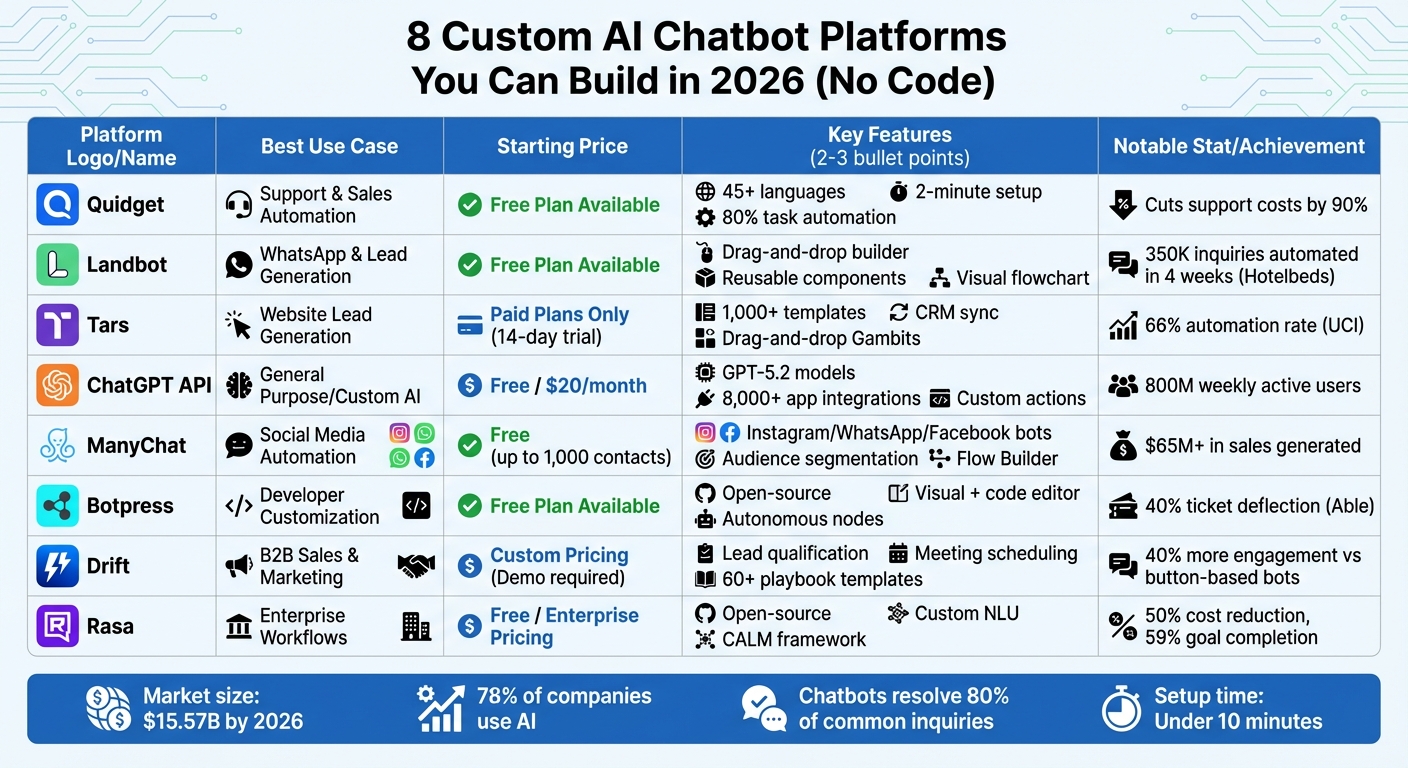
8 No-Code AI Chatbot Platforms Comparison 2026: Features, Pricing & Use Cases
1. Quidget – AI Agent Builder for Customer Support & Sales
No-Code Setup Process
Quidget makes setting up an AI agent incredibly simple with its 2-minute, no-code process. All you need to do is connect your existing resources, such as website URLs, FAQs, PDFs, or documentation files. The AI then trains itself on this data within minutes, enabling it to respond naturally using your business-specific information.
For more advanced workflows, Quidget features a node-based visual builder. This tool allows you to map out chatbot conversation design flows by connecting nodes, adding buttons, and defining logic actions – all without touching a single line of code. When you’re ready to deploy, you have multiple options: embed the bot on platforms like WordPress, Shopify, Wix, or Squarespace using a snippet or Google Tag Manager, or share it as a standalone assistant via a unique link. The entire deployment process takes less than 15 minutes. Plus, the platform supports seamless integrations for added functionality.
"Setting up Quidget was quick – It now handles 60% of our first-level responses, slashing wait times and letting our team focus on real customer needs." – Alex, Customer Success Manager, Softorino
Integration Capabilities
Quidget integrates effortlessly with leading CRM and help desk platforms, including Zendesk, Freshdesk, Intercom, and Freshchat. It also connects with popular messaging apps like WhatsApp, Slack, Telegram, Viber, Facebook Messenger, and Instagram. For e-commerce teams, integrations with Shopify and WooCommerce enable real-time order updates, making it a valuable tool for customer interactions.
The platform extends its functionality with Calendly integration for automated appointment scheduling and links to over 5,000 apps via Zapier. If the AI encounters a question it can’t handle, the system transfers the full conversation context to human agents through Slack, email, or your help desk system. This ensures that while routine queries remain automated, more complex issues get the attention they deserve.
Customization Options
Quidget offers a high degree of customization to align with your brand. You can modify the bot’s appearance by adding custom logos, colors, and fonts, and the workflow builder allows you to craft personalized user journeys through multi-step sales funnels or support escalation paths using modular components. Want your bot to have a specific personality? The Custom Instructions feature lets you define its tone – whether friendly, professional, or humorous – and set specific rules, like restricting it to your Knowledge Base to avoid misinformation.
Training the AI is flexible, too. You can upload documents, paste text, or sync with company wikis and websites. To streamline workflows, you can set trigger words (like _failure or pricinghelp) that automatically route conversations to specific flows, such as booking a demo or escalating to sales. With support for over 45 languages and auto-translation for messages, Quidget is ready for global operations.
Pricing Plans and Scalability
Quidget offers a 7-day free trial so you can explore its features risk-free. After that, the pricing tiers are designed to suit different business needs:
- Pro Plan: Starting at $79/month (or $948/year, saving $240), it includes 10,000 AI responses monthly, 5 chatbots, 2,000 training sources per bot, and 3 seats per chatbot. Additional features include API access, advanced analytics, web crawler functionality, and integrations with tools like Zendesk and Calendly.
- Pro Plus Plan: At $210/month (or $2,520/year, saving $480), this plan scales up to 50,000 responses monthly, supports 50 AI chatbots, removes "Powered by Quidget" branding, and adds advanced lead-generation tools with CRM syncing.
- Enterprise Plan: Designed for larger organizations, it starts at $599/month and offers flexible usage limits, custom integrations for internal tools, dedicated account managers, and tailored onboarding.
Businesses using Quidget have reported cutting support costs by up to 90% while automating 80% of repetitive tickets.
2. Landbot – Conversational AI for Websites and Messaging Apps
No-Code Setup Process
Landbot makes chatbot creation incredibly straightforward with its visual drag-and-drop builder. Using a flowchart-style interface and reusable components called "Bricks", you can design conversation flows in just minutes. These "Bricks" are pre-built elements that streamline the process, allowing you to replicate common workflows effortlessly. For those seeking AI-powered interactions, the "AI Agent Block" combines rule-based logic with conversational AI for more dynamic responses.
"I’ve never built a chatbot faster than I have with Landbot." – A. Benz, CEO, Lead Laundry
Once your bot is ready, Landbot integrates seamlessly with various tools, expanding its capabilities without extra hassle.
Integration Capabilities
Landbot works hand in hand with leading CRMs like HubSpot, Salesforce, Mailchimp, and SendGrid. It can be deployed across platforms like WhatsApp, Facebook Messenger, and websites, whether through embedded widgets, popups, or full-page experiences. For productivity, it syncs with tools such as Google Sheets, Airtable, Slack, and Calendly. Additionally, it connects to over 4,000 apps via Zapier and supports 500+ integrations through n8n. Custom connections are also possible using Webhooks, REST API, or the Code Block feature.
For e-commerce businesses, Landbot integrates directly with Shopify and Stripe. A great example of its impact is FASTA, a financial services company, which implemented an AI assistant on WhatsApp in 2025. This move reduced their reliance on traditional phone and email support by 20%.
Customization Options
Landbot doesn’t just stop at functionality – it offers extensive customization options to match your brand. You can tweak fonts, colors, logos, and message styles for web-based bots, with support for custom CSS and JavaScript. For messaging app bots, the focus shifts to fine-tuning conversational tone and logic. The workflow builder includes conditional logic and a "Jump To" feature, enabling smooth transitions between AI-driven conversations and structured, rule-based flows.
Training your AI agent is straightforward. You can upload PDFs, input up to 50,000 characters of text, or scrape content directly from URLs to build a Knowledge Base. For instance, in 2025, e-commerce brand Emma launched a product recommendation bot using Landbot, which led to an 18% increase in their average order value.
Pricing Plans and Scalability
Landbot offers a free Sandbox Plan, perfect for testing simple bots without any financial commitment – no credit card required. For more advanced needs, the Pro Plan (which includes a free trial) unlocks features like premium integrations, advanced workflows, and higher chat quotas. Paid tiers offer additional perks such as AI Agents, WhatsApp integration, and connections to platforms like Salesforce and Slack.
Today, over 12,000 businesses trust Landbot. A standout example is Hotelbeds, which managed to automate 350,000 inquiries in just four weeks using the platform.
3. Tars – Lead Generation Chatbot for Websites
No-Code Setup Process
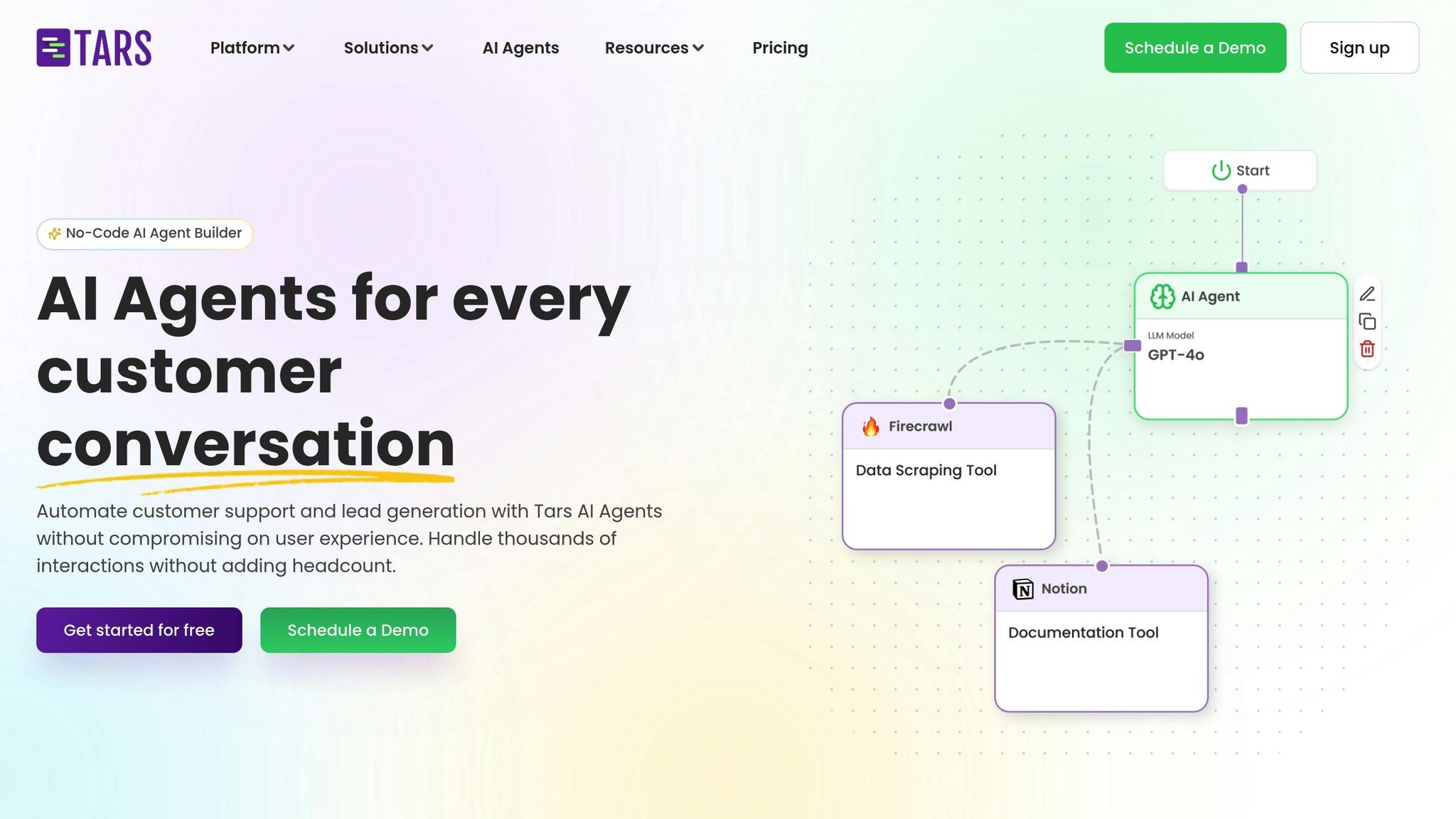
Tars is all about turning website visits into meaningful conversations that drive conversions. It uses a drag-and-drop flowbuilder built around "Gambits", which are the building blocks of each interaction. By linking multiple Gambits, you create a complete conversational journey. If starting from scratch feels daunting, don’t worry – Tars has over 1,000 pre-built templates tailored to various industries and use cases. You can pick a template, tweak it to suit your needs, and get started. For more advanced, AI-driven conversations, you can set up an "AI Agent" Gambit. This involves defining the bot’s role and tone with a base prompt and linking it to a Knowledge Base, where you can upload documents or URLs to provide context for the chatbot’s responses.
"The chatbot builder UI is simple to use and the chatbots themselves are easy to launch and modify." – Michael Kupfer, Director of Marketing, Harvard Business Solutions
When building your chatbot, start small – use 3–5 Gambits to begin. Make sure each Gambit is connected with a "pipe" to ensure smooth execution. Before launching, test every conversation path in Preview Mode to catch any potential issues.
Integration Capabilities
Tars doesn’t just stop at user-friendly design; it also connects effortlessly with your existing tools. It integrates with over 600 platforms, including popular CRMs like HubSpot and Salesforce. For real-time syncing, there’s an API Integration Gambit. Need more options? With Zapier, you can link Tars to thousands of additional apps. On the messaging side, Tars offers native WhatsApp support, so you can use the same chatbot on your website and WhatsApp. Plus, it works with marketing tools like Google Analytics (GA4), Google Ads, Facebook Pixel, and AdWords conversion tracking.
The platform has delivered impressive results. For instance, the State of Indiana reduced call volumes by over 4,000 per month. The UCI Paul Merage School of Business automated 66% of its customer service interactions, managing over 5,000 conversations. Even American Express saw 49.3% of its conversations automated through Tars.
Customization Options
Tars offers plenty of ways to make your chatbot fit your brand. You can adjust headers, fonts, message bubbles, and chat backgrounds using solid colors, gradients, or images. The widget’s icon, size, shape, and position on the screen can also be customized.
For conversation workflows, you can design linear paths, branching options, or even cyclic flows using the drag-and-drop canvas. Advanced tools like the Categorizer help with intent-based branching, while the Data Collector is perfect for gathering specific details like emails or phone numbers. If you’re using an AI Agent, you can train it by uploading files like URLs, PDFs, CSVs, or Q&A pairs. The system uses semantic search to pull accurate answers and avoid mistakes. Additionally, the AI Agent can be set to self-loop, allowing users to ask multiple questions in a single session without interruptions.
"The ability to drop in a new gambit and easily de-link and re-link gambits before and after it saves HOURS of time lost if I had to regenerate from scratch." – Aaron Rittmaster, Founder
Pricing Plans and Scalability
Tars provides a free starter option, including a 14-day trial of its Prime AI chatbot builder. Paid plans unlock access to over 60 advanced LLM models, such as GPT-4o-mini. The platform has been widely adopted, with over 800 global brands using Tars to automate more than 60 million customer conversations. These deployments have achieved impressive results, including 20% monthly growth and a 5% drop in contact center call volume. Tars also meets compliance standards like SOC 2, GDPR, ISO, and HIPAA, ensuring chatbot data security and privacy.
4. ChatGPT API by OpenAI – Custom AI Chatbot Integrations
No-Code Setup Process
OpenAI’s Agent Builder makes creating multi-step chatbot workflows a breeze with its visual, no-code interface. You can drag and drop logic nodes, use pre-built templates for tasks like customer support or HR onboarding, and deploy quickly using ChatKit by simply pasting a workflow ID. OpenAI takes care of backend hosting and scaling, while tools like Evals help test performance, and the Prompt Optimizer fine-tunes responses.
Integration Capabilities
The ChatGPT API connects seamlessly with over 8,000 apps through Zapier, including CRMs like HubSpot and Salesforce, messaging platforms such as Slack and Twilio, and productivity tools. It also allows for Custom Actions to pull external data via APIs. With support for the Model Context Protocol (MCP), your chatbot can interact with third-party services and databases, offering both read-and-write capabilities. These integrations enable extensive customization to tailor your chatbot to specific needs.
Customization Options
You can train your chatbot for context-specific tasks using Retrieval-Augmented Generation (RAG). This involves uploading files, PDFs, URLs, or database extracts to provide the bot with tailored knowledge. The API also supports fine-tuning and the development of multi-agent reasoning systems for handling complex subtasks. Additionally, the OpenAI Apps SDK allows you to adjust the chatbot’s personality, tone, and even its visual design to align with your brand.
Pricing Plans and Scalability
OpenAI operates on a pay-as-you-go pricing model, determined by the models used (e.g., GPT-5.2) and token usage. Hosting and scaling are managed by OpenAI, ensuring smooth performance. To deploy a custom GPT model, you’ll need a paid subscription – options include ChatGPT Plus, Team, or Enterprise. Enterprise plans provide advanced governance features and higher usage limits.
5. ManyChat – AI Chatbot for Social Media and E-Commerce
Easy Setup in Three Steps
Getting started with ManyChat is refreshingly simple. First, sign up for a free trial. Next, connect your social media accounts – whether it’s Instagram, WhatsApp, TikTok, or Messenger. Finally, launch your chatbot. The Flow Builder Assistant streamlines this process by asking a few quick questions and generating automation flows tailored to your needs. You can then refine these flows using the drag-and-drop Flow Builder, adding AI Steps and defining intents along the way.
With AI Steps, you can specify the scenario, the result you’re aiming for, and even the tone of your brand – whether it’s friendly, casual, or sprinkled with Gen Z slang. To train the bot, define intents (like “store hours”) using sample phrases and provide up to 250,000 characters of detailed business context. This setup ensures your chatbot is ready to deliver meaningful interactions right out of the gate.
Seamless Integrations
ManyChat connects effortlessly with major platforms like Instagram, WhatsApp, TikTok, Messenger, and SMS. Beyond social media, it integrates with popular e-commerce and marketing tools such as Hotmart, HubSpot, Klaviyo, and MailChimp. Need to log contact data? The Google Sheets integration has you covered. And with Zapier, you can expand its functionality even further by linking to over 7,000 additional apps.
"We’ve used Manychat to generate over $65 million in sales for digital product and e-commerce businesses." – Natasha Willis, Founder
Tailored Customization
The Flow Builder puts you in control of how conversations unfold. Add AI Steps to define the context, desired outcomes, and the voice of your brand. To handle customer queries effectively, train the bot’s Intention Recognition by setting clear intents like “What are your store hours?” and providing real-world examples of how users might phrase their questions. You can also upload up to 250,000 characters of business-specific information, ensuring the bot’s responses are accurate and aligned with your goals.
Flexible Pricing for Businesses of All Sizes
ManyChat offers a Free plan that supports up to 1,000 contacts with basic features. For growing businesses, the Pro plan starts at $15/month for 500 contacts, scaling to $145/month for 25,000 contacts and $435/month for 100,000 contacts. The Pro plan also unlocks advanced AI features like Intention Recognition and removes ManyChat branding. For enterprises, the Elite plan offers custom pricing, unlimited team members, priority support, and a dedicated Success Manager.
6. Botpress – Open Source No-Code AI Chatbot Platform
No-Code Setup Process
Getting started with Botpress is simple. After signing up, click "Build my agent" and follow the guided steps to set up your chatbot in just a few minutes. The platform features a visual drag-and-drop tool called Botpress Studio, where you can design conversation flows without needing to write a single line of code. If you’re unsure where to begin, pre-built templates tailored for use cases like customer support or lead generation can help you hit the ground running.
For an even quicker setup, Autonomous Nodes let you define your agent’s purpose using plain text, eliminating the need for manual mapping. This feature enables your bot to handle complex queries with ease. Once your bot is ready, you can test it using a shareable Webchat link before making it live.
From here, you can dive into how Botpress integrates with your existing tools and communication channels.
Integration Capabilities
Like many no-code platforms, Botpress makes connecting to other tools and channels effortless. It supports direct integration with popular platforms such as WhatsApp, Slack, Facebook Messenger, Telegram, and Zendesk, giving you the flexibility to operate across multiple messaging apps. Beyond these, the platform’s Hub links to external tools like Zapier, CRMs, and business databases, making it easy to sync customer data, automate tasks, and trigger workflows across your tech stack.
For example, in early 2025, Able used Botpress to automate customer interactions, achieving an impressive 40% ticket deflection rate. Around the same time, Extendly incorporated Botpress AI agents into their communication systems, which led to a 30% reduction in overall call volume.
Customization Options
Botpress allows you to tailor your chatbot to align with your brand. Its Webchat custom frontend gives you full control over the bot’s appearance. For standard workflows, you can rely on the visual flow builder, while advanced users can inject custom JavaScript for more complex logic. Training your bot is also straightforward – upload documents, paste text, or sync external data sources into the Knowledge Base. The platform automatically processes and vectorizes this information, enabling your bot to deliver context-aware responses.
"We have found Botpress’s pre-built workflows and ability to execute AI tasks particularly valuable. Instead of spending time training a model from scratch, we can quickly deploy AI capabilities that meet our exact needs."
- Bogdan Alexandru, Head of Support, Ruby Labs
In 2025, Ruby Labs utilized Botpress’s pre-built workflows to handle customer support tasks like cancellations and refunds. This approach achieved a 90% resolution rate without requiring extensive model training.
Pricing Plans and Scalability
Botpress offers a generous free tier, making it accessible for developers and small projects. For those with more advanced needs, the paid plans include the Plus tier, priced at $79–$89 per month, and the Team tier, which costs $445–$495 per month. These plans include features like role-based access and real-time collaboration. Enterprise customers can opt for custom pricing, which includes advanced options such as SOC II compliance, Single Sign-On (SSO), and dedicated support.
The platform’s managed infrastructure is designed to scale automatically, capable of handling millions of LLM tokens per hour. With a community of over 26,000 builders worldwide, Botpress continues to support projects of all sizes.
sbb-itb-58cc2bf
7. Drift – Conversational AI for B2B Sales and Marketing
No-Code Setup Process
Drift Bots make creating chatbots a breeze, even for those without coding experience. These bots can either assist in live conversations or work independently to gather prospect details. To get started, you can choose from over 60 pre-configured topics or AI playbook templates tailored for common B2B tasks like lead qualification, scheduling meetings, or showcasing product demos. With a foundation built on insights from more than 100 million B2B buying conversations, Drift ensures accurate and context-aware interactions right from the start. Setup is quick – taking just minutes – and the AI training process is up to five times faster. Plus, an "AI conversational review and rating" system fine-tunes the bot’s performance for better results.
Integration Capabilities
Now integrated into the Salesloft Revenue Orchestration Platform, Drift combines AI chat agents with tools for sales engagement, revenue intelligence, and deal management. It seamlessly connects with your CRM and other tools in your revenue tech stack, ensuring customer data stays synchronized. One standout feature, "Fastlane", uses your existing tech stack to identify and qualify high-value buyers in real time. Drift also automates the management of conversations, contacts, and accounts – no custom development required. According to user feedback, Drift’s AI chatbots deliver 40% more customer engagement compared to button-based systems, and users have reported a 30% quarter-over-quarter increase in pipeline influenced by the platform.
Customization Options
Drift’s AI aligns with your brand voice by analyzing your website and marketing materials. The "GPT Suggested Replies" feature crafts contextually relevant responses based on your content, while "Playbooks" provide pre-built conversation paths for common B2B scenarios. Need to communicate with international visitors? Drift supports GPT-powered language translation, enabling instant conversations in the visitor’s preferred language. For developers, there’s flexibility to programmatically control the chat widget, initiate conversations, or trigger meeting scheduling. To further refine performance, you can run A/B tests on different playbook messages to see what resonates best with visitors. The "AI Insights" feature also highlights recurring topics, helping you make informed adjustments to your sales strategy.
"Drift enables real-time conversations and lead qualification. It helps us engage with prospects, answer their questions, and guide them through the buyer’s journey, ultimately driving conversions and revenue growth."
- Misaa Becker, Digital Marketing Consultant
These features form the backbone of Drift’s scalable pricing plans.
Pricing Plans and Scalability
Drift’s AI engagement score helps prioritize accounts based on interaction frequency and relevance, making account management more efficient.
8. Rasa – Enterprise-Grade AI Chatbot with Custom Workflows
No-Code Setup Process
Rasa Studio provides a user-friendly visual interface that allows business users and designers to create chatbots without writing a single line of code. With its drag-and-drop functionality, users can effortlessly build business rules and conversational flows. Prebuilt starter packs and example flows make getting started even easier. Plus, the built-in conversation testing panel ensures you can preview and fine-tune changes before going live.
This simple setup process integrates seamlessly with powerful backend systems, making it a practical choice for businesses.
Integration Capabilities
Rasa supports deployment across web, mobile, and messaging apps, ensuring consistent interactions across platforms. Its Voice Gateway includes IVR features such as automatic turn-taking, timeouts, and latency control, while backend hooks enable smooth coordination with systems, APIs, and CRMs. The Model Context Protocol allows for scalable backend API integrations, and multi-LLM routing ensures tasks are distributed across models to balance performance and cost.
One notable example comes from a service hub that used a Rasa chatbot to handle about 50% of service desk inquiries independently, cutting the need for human agents by roughly 30%:
"Since the chatbot based on Rasa CALM can process around 50% of service desk inquiries independently, we reduced the need for human agents by approximately 30%."
- Roland Csibi, Service Hub Owner – User Support Service Hub
These integration capabilities make Rasa well-suited for enterprise-level requirements.
Customization Options
Rasa’s CALM (Conversational AI with Language Models) framework blends the conversational capabilities of large language models with strict business logic. This ensures the chatbot can handle complex conversations while adhering to important business rules. The Flows feature guarantees compliance with high-stakes rules, even as LLMs improve conversational fluency. Teams can also customize branding, tone, and language support through centralized content management. For more technical needs, a pro-code interface lets developers create custom components, adjust conversation pipelines, and even access the platform’s source code.
Enterprise teams using Rasa have reported significant benefits, including a 50% reduction in operational costs and a 59% goal completion rate per conversation.
Pricing Plans and Scalability
Rasa offers a free Developer Edition, which supports up to 1,000 external conversations per month (or 100 per month for internal, employee-facing agents). This tier includes one bot per company and access to the community forum for support. For larger organizations, the Enterprise Edition – available after a custom demo – provides full access to Rasa Studio, 24/7/365 premium support, advanced security features, and unlimited scalability. High-growth businesses can take advantage of Kubernetes (via Helm), multi-node concurrency with Redis, and a Kafka-powered conversational data pipeline. Rasa can also be deployed as a managed service, on-premises, or in a private cloud to meet stringent data compliance requirements.
3 Ways to Build an AI Chatbot for Your Business No Coding Required
Platform Comparison Table
Choosing the right custom AI chatbot platform depends on your specific goals – whether it’s customer support, lead generation, social media engagement, or managing enterprise workflows. Below is a comparison of eight platforms, highlighting their best use cases, pricing, and standout features.
The chatbot market is projected to hit around $15.57 billion by 2026, with over 78% of companies worldwide already leveraging AI in some form. This table simplifies the decision-making process by breaking down essential details.
| Platform | Best Use Case | Starting Price | Key Features |
|---|---|---|---|
| Quidget | All-around Support & Sales | Free plan | No-code setup, supports 45+ languages, automates 80% of tasks, trains on docs/URLs in 2 minutes |
| Landbot | WhatsApp & Lead Gen | Free plan | Visual drag-and-drop builder, human takeover |
| Tars | Website Lead Generation | Paid only | 1,000+ templates, CRM synchronization |
| ChatGPT API | General Purpose/Research | Free / $20/month | GPT-5.1 models, Deep Research mode, Agent mode for multi-step tasks |
| ManyChat | Social Media Marketing | Free (up to 1,000 contacts) | Automates Instagram, Facebook, and WhatsApp; audience segmentation |
| Botpress | Developer Customization | Free plan | Open-source, modular design, visual flow editor with code-level control |
| Drift | B2B Sales & Marketing | Custom (Demo required) | Lead qualification, meeting scheduling, conversational sales tools |
| Rasa | Enterprise Workflows | Free / Enterprise pricing | Open-source, custom NLU, full dialogue management control |
Quidget stands out for its quick 2-minute setup and multilingual capabilities, making it a great fit for global operations. If you need full technical customization, Rasa and Botpress are excellent choices. For businesses focused on turning website visitors into leads, Drift and Landbot are highly effective. Social media marketers will appreciate ManyChat for its automation capabilities, while ChatGPT API shines with its conversational flexibility and access to OpenAI’s advanced models, which now cater to an estimated 800 million weekly active users.
Each platform addresses distinct business needs, offering tailored solutions that align with varying objectives. These insights build on earlier discussions, helping you pinpoint the best option for your requirements.
Conclusion
No-code AI chatbot platforms have completely changed the game when it comes to automation. By 2026, creating and launching a custom AI chatbot can take less than 10 minutes – no coding required. These platforms effortlessly manage repetitive tasks like answering the top 50 FAQs, qualifying leads, and offering 24/7 customer support. This allows your team to focus on handling more complex and meaningful interactions.
AI chatbots are incredibly efficient, resolving up to 80% of common customer inquiries, cutting support ticket volumes in half, and slashing response times to just seconds. Businesses that embrace these tools often see measurable gains in efficiency, scalability, and customer satisfaction.
When selecting a chatbot platform, it’s essential to align your choice with your business goals. Define clear, measurable outcomes based on your key metrics. Think about integration needs, whether you require support in over 100 languages, and how the platform manages human handoffs for more complex cases. Smaller teams might prioritize affordability and simplicity, while larger enterprises may need advanced security features like SOC 2 compliance and GDPR adherence.
Today’s AI chatbots are powered by advanced models like GPT-5 and Claude, moving beyond rigid, rule-based systems to context-aware tools that understand intent and deliver natural conversations. Whether you’re automating Instagram DMs, engaging website visitors, or creating internal HR bots, these platforms provide the flexibility to grow without adding to your team. Many platforms offer a 7-day free trial, letting you test premium features using your real documentation and customer queries. During this trial, review interactions manually, fine-tune your knowledge base, and schedule monthly retraining to ensure ongoing accuracy. These tools are ready to transform the way you operate.
FAQs
What should I look for in a no-code AI chatbot platform?
When choosing a no-code AI chatbot platform, ease of use should be your top priority. Opt for tools that offer simple features like drag-and-drop builders and pre-made templates, making it possible to design and launch chatbots without any technical know-how. Equally important are the platform’s AI capabilities, such as natural language processing (NLP) and machine learning, which ensure your chatbot can provide accurate, conversational responses.
Another crucial aspect is integration. The platform should work smoothly with your existing tools – whether that’s your CRM, messaging apps, or website builder – so you can streamline workflows and share data without a hitch. On top of that, robust customization and training options are essential. These features allow you to refine the chatbot’s responses using your own data, such as FAQs or past customer conversations.
Finally, don’t overlook security and compliance for safeguarding sensitive customer data. Features like scalability and multilingual support are also key if you want your chatbot to grow with your business and serve a diverse audience. By focusing on these elements, you can create a chatbot that’s reliable, efficient, and perfectly suited to your business goals.
How do integrations improve the functionality of custom AI chatbots?
Integrations play a key role in boosting the capabilities of custom AI chatbots, allowing them to seamlessly interact with different systems, platforms, and tools. This connection empowers chatbots to access live data, handle repetitive tasks automatically, and deliver responses that are both personalized and context-aware. The result? A smoother user experience and greater operational efficiency.
For instance, linking a chatbot to a website, CRM, or third-party applications can simplify tasks like tracking orders, managing customer support, or qualifying leads. With advanced integrations like APIs, chatbots can tackle more sophisticated functions – think retrieving up-to-the-minute information or updating records in real time. These features make chatbots a powerful asset for businesses, offering tailored solutions that align with unique operational needs, all while enhancing customer interaction and cutting down on manual effort.
How can I customize a chatbot to match my brand’s identity?
To make your chatbot truly reflect your brand, start by customizing its visual design. This means incorporating your brand’s colors, logo, and overall aesthetic into the chatbot’s interface. It’s a simple yet effective way to make your bot feel like an extension of your brand.
Next, adjust the tone and language to match your brand’s voice. Whether your style is formal, playful, or somewhere in between, aligning the chatbot’s communication style with your brand ensures a consistent and relatable experience for your audience.
You can also enhance the chatbot’s functionality by integrating brand-specific content. Add things like FAQs, product details, or company policies so the bot can deliver accurate and relevant responses. For a more tailored experience, consider setting up personalized conversation flows and response templates. These advanced features help create a smooth, branded interaction that reinforces your brand identity in every customer touchpoint.


