


In 2026, AI live chat tools are essential for customer support teams to deliver fast, 24/7 service while reducing costs. These tools resolve up to 69% of customer inquiries without human intervention, boost sales by 25%, and increase customer conversion rates by 30%. Here’s a quick overview of six top tools:
- Quidget: No-code setup, multilingual support (45+ languages), and multi-channel deployment. Plans start at $99/month.
- Tidio: Handles 67% of inquiries, integrates with Shopify/WordPress, and offers a free plan with 50 conversations per month.
- Zendesk AI: Resolves 80% of inquiries, supports 80+ languages, and integrates seamlessly with various platforms. Pricing starts at $19/agent/month.
- Zoho SalesIQ: Includes Zobot™ for easy chatbot creation, real-time chat translation, and plans starting at $7/operator/month.
- Boost.AI: Advanced intent management, supports 95+ languages, and achieves ROI within 3–6 months.
- UltimateAI: Automates 80% of interactions, supports 80+ languages, and integrates into Zendesk. Pricing begins at $55/agent/month.
These tools help businesses automate repetitive tasks, reduce response times, and allow human agents to focus on complex issues.
BEST Way to Build a 24/7 AI Customer Support System in 2025
If you’re ready to start building, follow our chatbot development guide for a complete roadmap.
1. Quidget – AI Agent Builder for Customer Support & Sales
Quidget makes creating AI agents incredibly simple with its no-code setup, enabling support teams to launch an AI agent in just 90 seconds to 2 minutes. There’s no need for coding – just train the AI using your website URLs, FAQs, and documents. The platform also features a visual customization tool that allows you to tweak chat colors and add your logo.
No-code setup
With Quidget, deployment is straightforward. It integrates natively with platforms like WordPress, Shopify, Wix, and Google Tag Manager. Pre-built templates are included for workflows such as Lead Generation, Sales, and Customer Service. For example, in 2025, Softorino adopted Quidget to handle customer interactions. Alex, their Customer Success Manager, shared:
"Setting up Quidget was surprisingly quick – it now handles 60% of our first-level responses, slashing wait times and letting our team focus on real customer needs".
Multilingual support
Quidget supports 45+ languages, including Chinese, French, and Spanish, without requiring additional training. The AI automatically detects the customer’s language and continues the conversation in that language. For human agents, the platform offers instant chat translation, converting incoming and outgoing messages in real time to eliminate language barriers during live support.
Multi-channel deployment
Quidget integrates seamlessly with messaging apps like WhatsApp, Slack, Telegram, and Viber. It also connects with helpdesk tools such as Zendesk and Freshdesk, as well as productivity tools like Calendly, ensuring all conversations sync with your team’s primary CRM or helpdesk. The AI can automate up to 80% of routine inquiries, potentially cutting support costs by 90%.
AI handoff to humans
For complex queries that the AI cannot resolve, Quidget ensures a smooth handoff to a human agent. It transfers the conversation with full context and chat history, allowing the human agent to pick up seamlessly. This hybrid approach lets the AI handle repetitive tasks 24/7 while keeping human agents available for more nuanced issues.
Pricing starting points
Quidget offers a Free Trial including all features in Pro plan for a week. The Pro plan starts at $99/month (billed annually) and includes 10,000 AI responses per month, 5 AI chatbots, and 3 seats per chatbot. The Pro Plus plan is priced at $210/month (billed annually), offering 50,000 AI responses per month, 10 AI chatbots, and 5 seats per chatbot. For businesses with higher needs, the Enterprise plan begins at $599/month, providing flexible limits and a dedicated account manager. Additionally, a $500 Concierge Service is available, where the Quidget team builds your first bot and workflows for you.
Next, we examine Tidio’s features.
2. Tidio
Tidio powers over 300,000 businesses worldwide with its Lyro AI Agent, which handles an impressive 67% of customer inquiries on average. It’s a popular choice among small and medium-sized businesses, thanks to its quick setup – just 5 minutes – and an even faster 90-second account creation and plugin installation process.
No-code setup
Tidio makes setup effortless with dedicated plugins for Shopify and WordPress. You can install it directly from your website dashboard in just 90 seconds. Training the Lyro AI Agent is straightforward – simply share support URLs, upload PDFs, or import Zendesk articles.
Isabella Wålinder Isovic, an Inbound Marketing Specialist, highlights the platform’s impact:
"We chose Tidio because it allows us to interact with our customers in real time. This immediate interaction enhances our customer service for website visitors, resulting in increased sales."
For added customization, teams can use a visual drag-and-drop builder to create automation paths without any coding. Personalizing the chat widget with your branding and avatars takes only about 3 minutes.
Multilingual support
The Lyro AI Agent supports several languages, including English, Spanish, French, Portuguese, and German. The chat widget automatically detects a visitor’s browser language and displays the welcome message accordingly. This feature is especially valuable, as over 75% of customers prefer shopping in their native language.
Multi-channel deployment
Tidio simplifies communication by unifying messages from Live Chat, WhatsApp, Instagram, Messenger, and Email into a single inbox. Shopify users get additional perks, like viewing customer carts, checking order history, and even processing refunds – all directly from the chat panel.
Max Sealey, Support Services Manager at Gecko Hospitality, shares his experience:
"At present, about 90% of conversations are handled by Lyro, and in the vast majority of cases the responses have been perfect."
AI handoff to humans
Lyro knows when to step aside. Complex queries are automatically redirected to human agents, who can take over seamlessly. The platform boasts an average response time of just 1 minute and even offers a Resolution Rate Guarantee, ensuring resolution rates of at least 50% or your money back. Monitoring these chatbot analytics metrics helps teams verify such performance claims.
Pricing starting points
Tidio offers flexible pricing to suit different needs:
- Free plan: Includes 50 billable conversations and 100 Flows visitors for $0/month.
- Starter plan: Priced at $24.17/month (billed annually) with 100 billable conversations.
- Growth plan: Costs $49.17/month (billed annually), offering 250+ billable conversations and features like live typing.
- Plus plan: Designed for larger teams, starting at $749/month, with custom limits and a dedicated success manager.
- Lyro AI Agent add-on: Available as a standalone option starting at $32.50/month for 50 AI conversations.
Monthly response limits
Tidio’s billing is user-friendly. A conversation is only "billable" when a human agent sends a message – automated Lyro or Flows responses don’t count. Depending on the plan, Lyro AI conversation limits range from 50 one-off conversations on the Free plan to over 3,000 conversations on premium plans. Flows visitor limits span from 100 visitors on the Free plan to over 100,000 visitors on the Plus plan. All self-serve plans accommodate up to 10 team seats.
Next, we’ll dive into Zendesk AI to see how it compares as part of your live chat toolkit.
3. Zendesk AI
Zendesk AI stands out in the world of AI live chat tools by combining extensive language capabilities with seamless integrations to elevate customer service. Built on insights from 18 billion customer interactions, Zendesk AI supports over 160,000 companies globally and can autonomously resolve more than 80% of customer inquiries.
No-code setup
Zendesk AI simplifies deployment with a no-code setup that allows support teams to launch AI agents in just three clicks. It integrates effortlessly with your existing help center or external resources like Confluence to generate automated responses. A user-friendly drag-and-drop builder lets admins design conversational workflows and personalize bot personas. The AI comes pre-trained for various industries, including financial services, retail, IT, HR, and hospitality. This quick setup pairs well with the platform’s advanced features.
James Billett, Customer Experience Manager at Jigsaw, shared:
"We had our AI agent up and running in no time and we’re improving it on a daily basis. And I feel confident that it gives customers the right answer."
Multilingual support
With support for over 80 languages, Zendesk AI adapts to customers’ preferred languages automatically. It links with your knowledge base to handle up to 30% of requests right from day one.
Multi-channel deployment
Zendesk AI works across multiple platforms, including web, mobile, email, WhatsApp, Facebook Messenger, Slack, and Microsoft Teams. For queries requiring human intervention, the AI efficiently routes issues to the right team, providing full conversation context. This triage process saves 45–60 seconds per ticket.
AI handoff to humans
Businesses like HelloSugar, a salon chain, use Zendesk AI to automate 66% of customer queries, which has allowed them to double their locations without increasing staff and save $14,000 monthly. Similarly, Lush saves around 5 minutes per ticket and 360 agent hours each month by having the AI manage routine inquiries and gather customer details in advance.
Stacey Zavattiero, Customer Experience Manager, highlighted:
"Zendesk AI has changed the way we speak to our customers, because now we can actually match their tone in conversation, whether they like to have fun using emojis or prefer the conversation to be more formal."
Pricing starting points
Zendesk AI offers straightforward pricing with two tiers: Essential (included in all Suite and Support plans) and Advanced (available as an add-on). Pricing starts at $1.00 per automated resolution. For example, the Support Team plan begins at $19 per agent/month (billed annually), while the Suite Team plan starts at $55 per agent/month (billed annually). Higher tiers include Suite Professional at $115 per agent/month and Suite Enterprise at $169 per agent/month.
Monthly response limits
Zendesk AI’s pricing model is designed to accommodate different business needs. Plans include a set number of Automated Resolutions (AR), and additional resolutions cost $2 each if you exceed your monthly limit. The Essential tier supports 30 languages, while the Advanced tier extends support to over 79 languages.
Next, we’ll dive into Zoho SalesIQ and its unique approach to AI-driven customer engagement.
4. Zoho SalesIQ
Zoho SalesIQ is the engine behind live chat for over 465,000 businesses globally, cutting support costs by 12% and automating 30% of customer queries.
No-code setup
With Zoho SalesIQ’s Zobot™, teams can design custom chatbot workflows using a simple drag-and-drop interface. Industry-specific templates for sectors like ecommerce, real estate, and SaaS make setup quick and painless. The Answer Bot enhances this by tapping into your knowledge base or FAQs to deliver instant, natural-language responses.
Mohammad Masoumi, ERP Product Owner at 416-Flowers, praised the ease of setup:
"Building the bot using SalesIQ’s codeless bot builder is easy as a pie. It has helped us respond to the queries in under a second."
This user-friendly design is ideal for businesses with global reach.
Multilingual support
Zoho SalesIQ offers real-time chat translation in 28 languages for human agents and allows chatbots to detect and respond in up to 30 languages, making it a strong choice for international operations.
Multi-channel deployment
The platform supports deployment across websites, mobile apps (iOS, Android, React Native), and messaging platforms like WhatsApp, Instagram, Facebook Messenger, Telegram, LINE, and WeChat. A standout feature, Typing Preview, lets agents view customer inputs as they type, enabling faster and more accurate responses.
And when a chatbot hits its limits, Zoho SalesIQ ensures a smooth transition to human agents.
AI handoff to humans
Using sentiment analysis, Zoho SalesIQ identifies complex customer queries and routes them to human agents with full conversation context. By combining rule-based workflows with Generative AI (ChatGPT), the platform handles natural language queries seamlessly.
Rodrigo Ferrer, CTO at Pró-Laudo, highlighted its impact:
"With Zoho SalesIQ, we have raised the bar of customer relationship. Our customer support has never been so efficient."
Pricing starting points
- Free: Includes 3 operators and 100 chat sessions per month.
- Paid plans: Start at $7 per operator/month (Basic), $12.75 (Professional), and $20 (Enterprise) when billed annually. Monthly billing is slightly higher.
Monthly response limits
For Professional and Enterprise plans, operator chat sessions are unlimited. However, bot chat sessions are capped at 25,000 (Basic), 50,000 (Professional), and 200,000 (Enterprise) per month. Visitor tracking ranges from 10,000 visitors on the Free plan to 200,000 on the Enterprise plan.
sbb-itb-58cc2bf
5. Boost.AI
Boost.AI earned recognition as a Leader in the 2025 Gartner® Magic Quadrant™ for Conversational AI Platforms, achieving ROI targets in just 3–6 months. Like other top AI-powered tools for customer service, it simplifies support processes but stands out with its advanced intent management and smooth human handoff capabilities.
No-code setup
The platform’s Conversational Builder allows teams to craft efficient customer journeys without coding expertise. Its Smart Intent Management system organizes an intent hierarchy, guiding interactions and enabling dynamic adjustments. The AI continually learns from user interactions, improving responses over time and reducing the need for manual updates.
Multilingual support
Boost.AI’s multilingual agents support over 95 languages, providing instant, native-language responses. This feature doesn’t require extra configuration, making it easy to handle global customer volumes effectively.
AI handoff to humans
When the AI reaches its limits, Boost Human Chat ensures a smooth transition to human agents. Customers are routed to the appropriate departments, such as technical support or pricing, and are kept informed with updates on wait times and their position in the queue.
"We offer a cost-effective live chat software alternative that’s built right into our conversational AI platform. Deliver seamless virtual and human agent synergy when things need that ‘human touch.’" – Boost.ai
Additionally, the platform includes conversation analytics tools like quality ratings, tagging, and filters. These features help managers assess agent performance and pinpoint areas where customer journeys could be improved.
6. UltimateAI

UltimateAI is an AI platform designed to handle customer interactions autonomously, adapting its responses as conversations progress. Fully integrated into the Zendesk Resolution Platform, it aims to automate more than 80% of customer interactions independently. Let’s take a closer look at its standout features.
No-code setup
UltimateAI offers a no-code setup that gets you up and running in just three clicks – no tech expertise required. By connecting it to existing resources like your help center, the system can automate 30% of customer requests from day one. For instance, James Billett, Customer Experience Manager at Jigsaw, shared that his team saw a 35% drop in ticket volume and a 20% cut in response times after adopting the platform.
Multilingual support
With support for over 80 languages, UltimateAI communicates with native-level fluency and automatically switches languages based on customer input. This feature is a game-changer for teams managing global audiences, eliminating the complexity of language barriers.
Multi-channel deployment
The platform works seamlessly across multiple channels, including web, mobile, social media, email, and even voice. Its Voice AI agents can handle phone support entirely on their own – from authentication to workflow actions – without requiring human involvement. If an issue needs escalation, the AI ensures a smooth handoff by transferring the full conversation context to the appropriate human team.
Pricing starting points
UltimateAI’s pricing is structured around Automated Resolutions (AR), with plans tailored to different needs. As part of the Zendesk ecosystem, pricing aligns with its standard tiers: Suite Team starts at $55 per agent/month, Suite Professional at $115 per agent/month, and Suite Enterprise at $169 per agent/month.
Feature Comparison Table
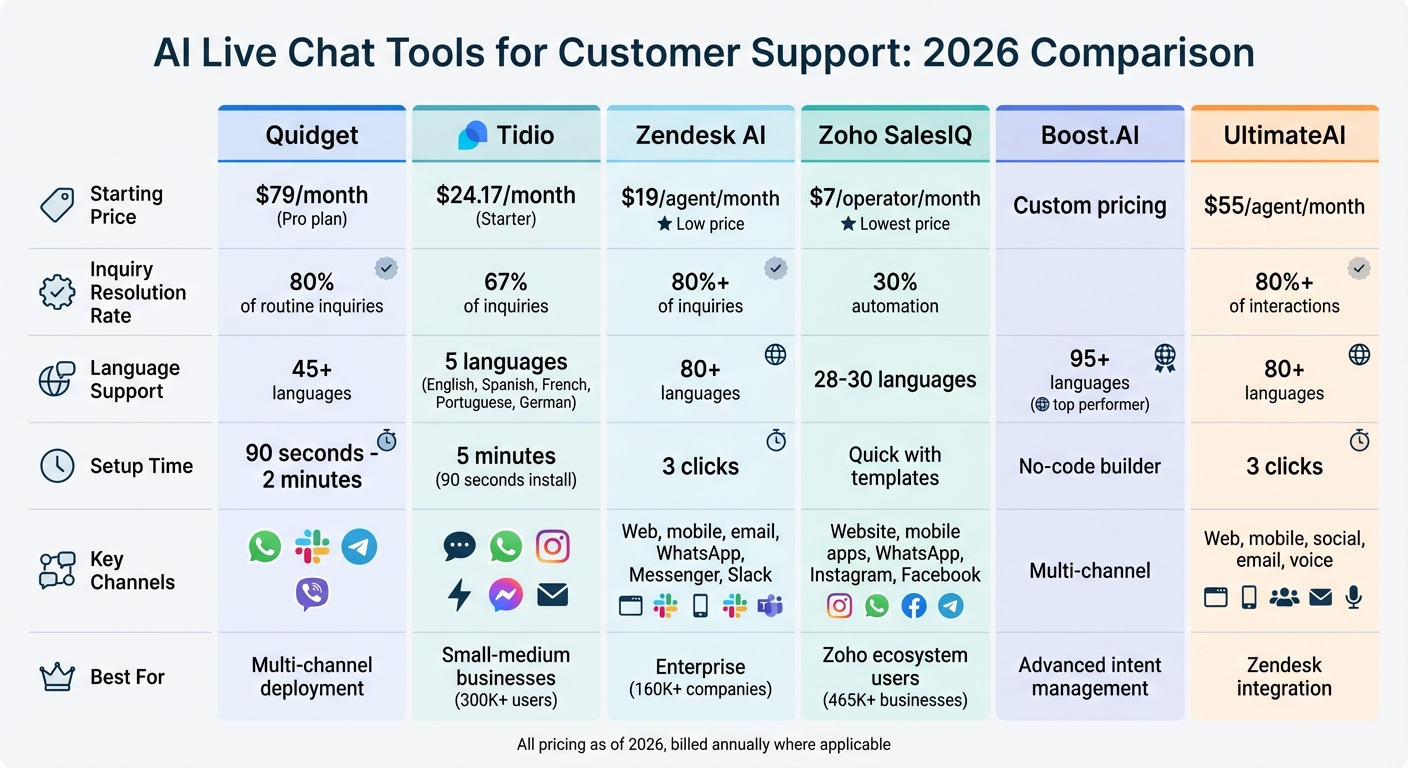
AI Live Chat Tools Comparison: Features, Pricing, and Language Support
The table below provides a quick overview of the main features for each tool, making it easier to compare their strengths side by side.
| Feature | Quidget | Tidio | Zendesk AI | Zoho SalesIQ | Boost.AI | UltimateAI |
|---|---|---|---|---|---|---|
| Setup Requirements | No-code; quick install on WordPress & Shopify | Easy setup; AI learns from FAQ/knowledge base automatically | Medium learning curve; ideal for Zendesk users | Standard integration with Zoho ecosystem | – | Modular integration with existing systems |
| Language Support | 45+ languages with auto-detection | – | 50+ languages with high accuracy | Multilingual support available | – | Multilingual support available |
| Channel Options | Website, app, WhatsApp, Slack, Telegram, Viber | Website, app, social media | Omnichannel: website, mobile, voice, email, WhatsApp, Messenger | Website, app, visitor tracking | – | – |
| Human Handoff | AI responds first; agents step in anytime | Facilitates seamless human takeover | Intelligent Triage routes tickets by intent & sentiment | Available with live chat | – | – |
| Starting Price | $79/month (Pro plan) | – | – | – | – | – |
| Response Limits | $10K (Pro) / $50K (Pro Plus) | – | Based on agent seats, not responses | – | – | – |
Pricing and usage caps can differ significantly between tools. For more detailed information on costs and specific features, check their individual reviews.
Conclusion
By 2026, AI live chat tools are expected to provide round-the-clock support, resolving over 80% of customer queries on their own. These tools also contribute to business growth, increasing average order values by up to 25% and boosting conversions by 30%.
The six tools highlighted in this guide each bring their own advantages, whether it’s offering multilingual support or integrating smoothly with CRMs. This variety makes it easier to find a solution that fits both your budget and your specific requirements. From here, focus on the key factors that will impact integration and deployment.
Look for platforms that seamlessly connect with your CRM, e-commerce system, and communication channels to ensure personalized and accurate responses. Linking the tool to your knowledge base from the start will help deliver consistent and reliable information. Keep an eye on sentiment analysis and performance metrics to address emerging issues quickly and improve automation as needed. For tasks requiring extra care, select tools with human-in-the-loop workflows, allowing AI to seek human approval when necessary. By keeping these priorities in mind, you can confidently choose the AI live chat tool that best fits your needs.
Take the time to evaluate your options, test the tools that align with your goals, and select a solution that provides faster, tailored support while allowing your team to focus on more complex challenges.
FAQs
How do AI live chat tools improve customer support efficiency?
AI live chat tools make customer support more efficient by offering quick, personalized, and around-the-clock assistance. They handle common questions automatically, easing the workload for human agents so they can focus on tackling more complex problems. Many AI chatbots can resolve a large number of customer inquiries on their own, leading to faster responses and happier customers.
These tools work seamlessly across various platforms – like websites, messaging apps, and social media – ensuring customers get a consistent experience no matter where they reach out. Features like sentiment analysis and real-time insights help teams understand customer needs better and respond more effectively. By automating repetitive tasks, these tools not only cut costs but also boost team productivity, creating a smoother and more satisfying customer journey.
What should I look for when selecting an AI live chat tool?
When picking an AI live chat tool, it’s important to focus on the features that match your business goals. Look for tools that offer automation to streamline responses, multilingual support to cater to diverse customers, and easy integration with platforms like CRMs or help desk software. Usability matters too – choose tools with straightforward setup processes, user-friendly interfaces, and no-code options so your team can get started quickly, no matter its size.
Don’t overlook the pricing structure. Check for flexible plans, free trials, or tiered options that let you test the tool before making a long-term commitment. Finally, assess the tool’s performance and reliability. This includes how accurately it responds, its ability to manage more complex questions, and how smoothly it transitions to a human agent when necessary. Keeping these factors in mind will help you select a tool that improves your customer support experience.
How do AI live chat tools work with CRM systems?
AI live chat tools connect with CRM systems by syncing customer interactions and data in real time. This integration helps make support more efficient and tailored to individual customer needs. Many of these tools include built-in connectors or APIs, which allow them to integrate smoothly with popular CRM platforms like Salesforce, Microsoft Dynamics, and Zendesk. This ensures that customer data flows seamlessly between systems, enabling support agents to access detailed customer profiles during conversations. The result? More accurate and personalized responses.
These tools also take automation to the next level by handling tasks such as updating customer records, triggering workflows, and generating reports. This not only cuts down on manual effort but also helps reduce operational costs. For businesses with unique CRM requirements, many AI chat solutions offer custom integration options, allowing for a setup that aligns perfectly with their needs.
By bridging AI chat tools with CRM systems, businesses can enhance customer support, improve lead management, and create more meaningful, context-aware interactions with their customers.


