

How to choose an AI support agent instead of a classic chatbot: a 2026 checklist

AI support agents outperform older chatbots in customer service. They solve 70–85% of issues compared to 30–40% for chatbots, thanks to advanced reasoning, context retention, and integration with company systems. If you’re tired of bots escalating most inquiries to human agents, it’s time to switch.
Key Takeaways:
- AI agents handle multi-step tasks, retrieve answers from updated knowledge bases, and execute actions like refunds or scheduling.
- Chatbots rely on rigid scripts, escalate 60–70% of queries, and lack memory for follow-ups.
- AI agents deliver better customer satisfaction (85%+ vs. 65%) and ROI (3x higher).
What to Look for in an AI Support Agent:
- Contextual Understanding: Must track conversation history and handle follow-ups.
- Task Execution: Should perform actions (e.g., refunds) beyond simple Q&A.
- Knowledge Integration: Syncs with your documentation for accurate responses.
- Omnichannel Support: Works across platforms like WhatsApp, email, and Slack.
- Smooth Handoffs: Transfers conversations (with context) to human agents.
Quick Comparison:
| Feature | AI Support Agent | Chatbot |
|---|---|---|
| Decision Making | Autonomous reasoning | Script-based |
| Task Scope | Multi-step workflows | Single-turn Q&A |
| Integration | Deep API/database access | Limited (read-only) |
| Context Retention | Maintains across interactions | Lacks memory |
| Resolution Rate | 70–85% | 30–40% |
| Customer Satisfaction | 85%+ | ~65% |
Switching to AI agents like Quidget can transform your support strategy by solving complex issues faster and more effectively.
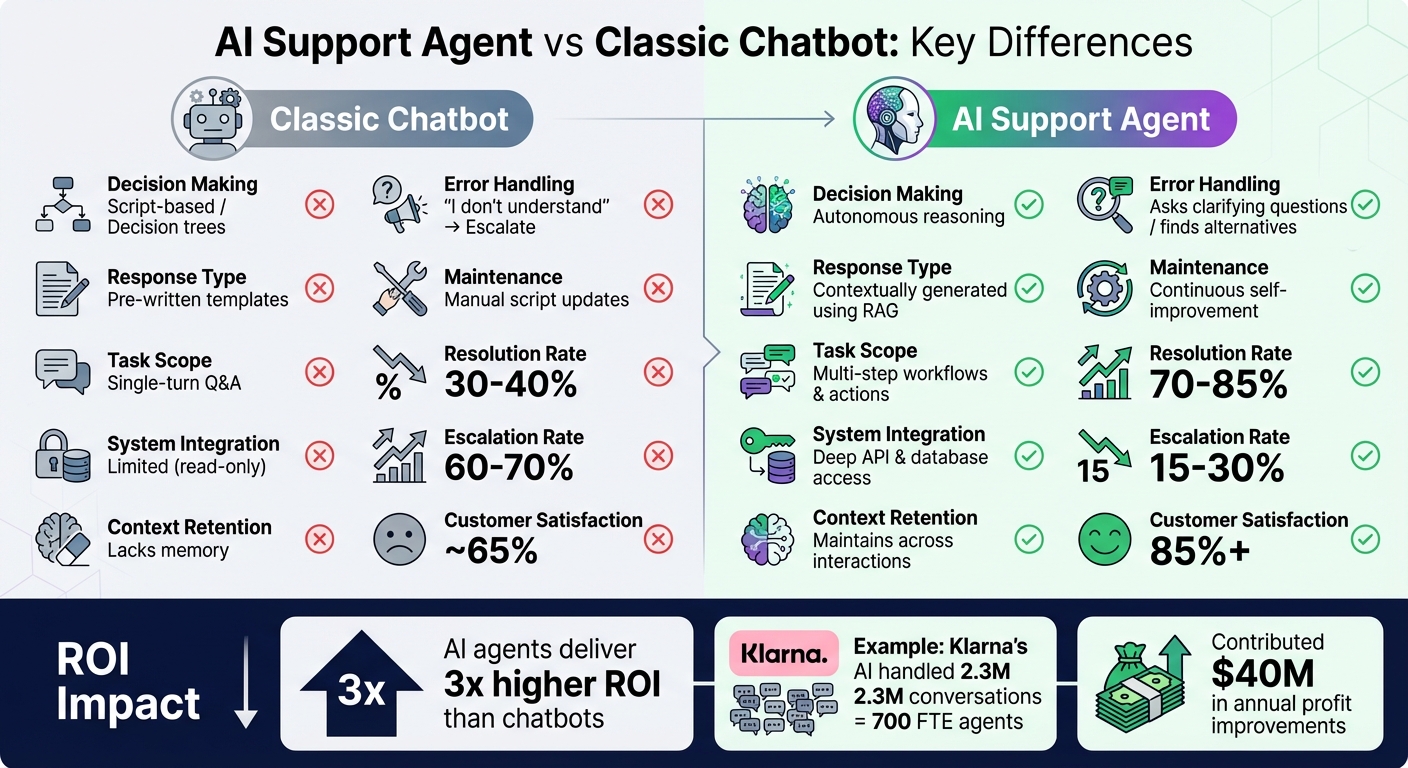
AI Support Agent vs Classic Chatbot: 2026 Performance Comparison
AI Agent vs Chatbot Explained | Key Differences, Examples & Use Cases (2026)
sbb-itb-58cc2bf
Classic Chatbot vs AI Support Agent: What’s the Difference?
When deciding between a classic chatbot and an AI support agent, it’s essential to understand how they operate. Classic chatbots rely on rigid decision trees, guiding users through pre-set scripts based on keyword recognition. If a query falls outside its script, the chatbot is stuck. On the other hand, AI support agents utilize autonomous reasoning, enabling them to deliver multi-step, context-aware solutions – whether it’s troubleshooting a DNS issue or resolving an SSL error.
Here’s the key difference in action: a traditional chatbot provides surface-level answers, while an AI support agent works through problems from start to finish. The chatbot shares information; the AI agent actively solves problems by keeping track of the conversation and executing complex workflows.
"Chatbots respond. AI agents reason and act. This is not a matter of degree – it’s a fundamental architectural difference." – BuiltABot Team
These distinctions address common customer frustrations, illustrating why older systems often fall short.
Feature Comparison: Chatbot vs AI Support Agent
| Capability | Classic Chatbot | AI Support Agent |
|---|---|---|
| Decision Making | Script-based / Decision trees | Autonomous reasoning |
| Response Type | Pre-written templates | Contextually generated using RAG |
| Task Scope | Single-turn Q&A | Multi-step workflows & actions |
| System Integration | Limited (read-only) | Deep API & database access |
| Error Handling | "I don’t understand" → Escalate | Asks clarifying questions / finds alternatives |
| Maintenance | Manual script updates | Continuous self-improvement |
Classic chatbots typically resolve 30-40% of inquiries, escalating the remaining 60-70% to human agents. In contrast, AI support agents resolve 70-85% of issues, often achieving customer satisfaction scores above 85%, compared to around 65% for traditional bots.
This comparison underscores why businesses are moving toward AI agents that go beyond static responses.
Why AI Support Agents Work Better in 2026
The shift to AI support agents is driven by evolving customer expectations. People no longer want to navigate through outdated "Press 1 for billing, Press 2 for technical support" menus. They want to explain their issue naturally and receive a direct, meaningful answer.
AI support agents excel at addressing nuanced questions that would trip up a traditional chatbot. They maintain context across multiple exchanges, so when a customer asks, "What about the other option?" the system knows exactly what they mean. By leveraging retrieval-augmented generation (RAG), these agents pull answers directly from your up-to-date documentation, ensuring responses align with your policies – not outdated or generic training data.
For SaaS companies, where 55-65% of support inquiries are technical in nature, this contextual capability is a game-changer. An AI agent can reference specific API documentation, guide users through multi-step integrations, and even perform actions like updating accounts or issuing refunds. Companies like Klarna have demonstrated the impact: their AI assistant handled 2.3 million conversations, equating to the workload of 700 full-time agents, and contributed an estimated $40 million in annual profit improvements.
Quidget represents this new breed of AI support agent. It’s trained on your knowledge base, capable of managing complex workflows, and smart enough to escalate issues to human agents when necessary. It’s the ideal solution for businesses that have outgrown the limitations of traditional chatbots and need a system that can genuinely solve customer issues.
With these advantages in mind, let’s take a closer look at the essential features modern AI support agents should offer.
Why Classic Chatbots Fall Short in 2026
By 2026, traditional chatbots are struggling to keep up with what customers expect. Businesses relying on these older systems face three major challenges: inflexible workflows that can’t adjust to real-world needs, frustrating customer experiences that harm brand loyalty, and an inability to function seamlessly across multiple channels. These issues make it clear why businesses need to move toward AI-powered support agents that can handle modern demands.
Too Rigid for Real Customer Questions
Classic chatbots operate on keyword-based scripts. If a customer asks something outside the pre-programmed flow, the bot either gets stuck in a loop, gives an irrelevant answer, or displays the dreaded "I don’t understand." This kind of rigidity is a huge issue when customers need detailed, step-by-step help.
For example, someone troubleshooting an API integration or dealing with a complex billing question doesn’t need a canned response – they need a system that can think through the problem logically. Unfortunately, traditional chatbots aren’t built for that.
These bots also come with a major upkeep headache. Every time there’s a new product feature, policy change, or seasonal campaign, someone has to manually update the scripts. It’s no surprise that in a 2025 review analysis, 33% of complaints cited "wrong answers" as a major issue.
"A chatbot reduces minor workload but it does not own outcomes. And that is the key difference!" – Qaul.ai
Weak Customer Experience
The problems don’t stop at incorrect answers. Classic chatbots also lack memory, meaning they can’t retain context from one message to the next. If a customer provides details in one message and asks a follow-up question, the bot won’t remember the earlier information.
This lack of context leads to poor performance. Traditional chatbots only resolve 30-40% of customer inquiries without human help, leaving 60-70% of cases to be escalated to human agents. Their customer satisfaction scores hover around 65%, far below the 85%+ achieved by modern AI agents. Instead of being a helpful tool, these bots often feel like roadblocks, frustrating customers who just want quick solutions.
Another major issue is how these bots handle escalation. Many stick to giving unhelpful responses for too long before finally passing the customer to a human agent. And when they do escalate, they often send the customer into a generic queue without any context, forcing them to start from scratch with a human agent.
Can’t Scale Across Multiple Channels
In addition to poor interaction quality, classic chatbots fail to meet the needs of today’s multi-channel world. Customers in 2026 expect to connect with businesses on their preferred platforms – whether it’s a website, email, WhatsApp, or Slack. But most traditional chatbots are limited to a single channel, usually a website widget. Even when they claim multi-channel functionality, conversations remain disconnected. For instance, a chat started on your website doesn’t carry over to email, and the bot won’t update your CRM with any of the details.
Imagine a customer begins a conversation on your website, follows up via email, and later reaches out on WhatsApp. A traditional chatbot treats each interaction as separate, with no continuity or shared context. This disjointed experience makes it impossible to deliver a seamless customer journey.
The technical shortcomings go even further. Classic chatbots can display information but can’t take meaningful actions like processing refunds, updating account settings, or creating tickets with all the necessary details. Essentially, they’re stuck answering questions instead of solving problems – something that modern support teams can’t afford.
Quidget addresses these gaps by providing multi-channel support across platforms like WhatsApp, Slack, Telegram, and Viber. It maintains context across conversations and integrates deeply with your existing tools, making it a solution for businesses that need more than just a basic FAQ bot.
These limitations make it clear why businesses are turning to advanced systems like Quidget to meet the demands of modern customer support.
What an AI Support Agent Should Do
A capable AI support agent is more than just a chatbot. It understands context, uses real company data, ensures smooth transitions to human agents, and operates across multiple channels. These qualities set modern AI agents apart from traditional chatbots, helping them meet the increasing demands of customer support.
Understand Natural Language and Maintain Context
Modern AI support agents can process natural language, keep track of previous interactions, and remember details customers have shared. For instance, if a customer says, "I tried that already" or "What about the other option you mentioned?", the agent understands the reference and responds accordingly.
This ability comes from autonomous reasoning – an approach that enables the agent to grasp intent, plan appropriate actions, and execute them across systems. Unlike older chatbots that rely on matching keywords to pre-written scripts, advanced AI agents use Retrieval-Augmented Generation (RAG). This method pulls information directly from your company’s resources, such as documentation and knowledge bases, reducing the chance of errors or "hallucinations", which account for 33% of complaints about traditional AI tools.
These agents can handle complex, multi-step tasks like troubleshooting an API configuration or completing a refund process, rather than just answering one-off questions.
By managing context effectively, an AI support agent can seamlessly integrate with your content and human support teams.
Learn from Your Content and Transition to Human Agents
AI support agents should be trained on your existing content – your website, help center, FAQs, product documentation, and internal knowledge base. Using RAG, the agent ensures its responses match your brand’s tone and accuracy by pulling directly from these sources.
When the AI reaches its limits – whether due to a complex billing issue, a security concern, or a question it can’t confidently answer – it should initiate a "warm handoff" to a human agent. This involves transferring the entire conversation history, including what the customer has already attempted and the reason for escalation. This way, customers won’t need to repeat themselves, enhancing their overall experience.
To ensure accuracy, test your AI agent with real-world support queries, aiming for at least 85% accuracy on topics from your knowledge base. Tools like Quidget simplify this process by allowing you to train the AI using web crawlers and document imports. Quidget also provides built-in analytics to monitor performance.
"The moment a chatbot fails to answer a question is the most critical moment in the customer experience. How the chatbot handles that failure – the escalation – determines whether the customer feels supported or abandoned." – Jonathan Bar, Founder, Corebee
Operate Across Channels and Languages
In today’s world, customers interact with businesses through various channels. They might start a conversation on your website, follow up via email, and later message you on WhatsApp. A good AI support agent ensures seamless interactions across all these platforms while maintaining context and continuity.
This multi-channel capability isn’t just about convenience; it prevents customers from getting stuck in one channel and flooding another out of frustration. A unified AI system ensures consistent responses, whether the customer reaches out via web chat, email, Slack, or social media.
For global companies, multilingual support is equally important. For example, in 2024, Klarna launched an AI assistant capable of communicating in 35 languages. This assistant managed 2.3 million conversations in its first month, performing the work of 700 full-time agents and contributing an estimated $40 million in annual profit improvements. Such results are only possible when AI can handle multiple languages without relying on manual translations or separate systems.
Platforms like Quidget offer support in 45+ languages and integrate with tools like WhatsApp, Slack, Telegram, and Viber. They also work with systems like Zendesk and CRMs, ensuring every interaction – regardless of the channel – is properly logged and tracked. This makes it easier for businesses to meet customers wherever they are.
The 2026 Checklist for Choosing an AI Support Agent
As AI support agents become more advanced, it’s essential to evaluate them against key performance and integration standards. This checklist highlights the critical features and considerations to ensure you’re choosing a solution that meets 2026 expectations.
Must-Have Features to Check
Start by putting the AI agent to the test. Use real scenarios from your customer support history – around 20 queries – and see how it performs. If it doesn’t hit at least 85% accuracy on existing topics, it might not be ready for production use. This is also a good way to confirm if the agent uses genuine Retrieval-Augmented Generation (RAG) or just basic keyword matching.
Next, focus on action-oriented capabilities. The best AI agents don’t just chat – they get things done. Whether it’s processing refunds, updating account details, or checking order statuses, these tools can achieve resolution rates of 70–85%, far outperforming traditional rule-based chatbots that only manage 30–40%.
Evaluate the handoff process for when the agent reaches its limits. A smooth "warm handoff" should include a transcript of the conversation, a summary of the issue, intent analysis, and any customer-provided data. This ensures seamless transitions to human agents. You’ll also want to set clear rules for escalation, like routing billing disputes or security issues directly to a person.
Check for omnichannel support. The agent should work consistently across platforms like web chat, email, WhatsApp, and Slack, while maintaining context throughout. For businesses with a global reach, built-in multilingual capabilities are a must. For example, Quidget supports 45+ languages and integrates with apps like WhatsApp, Telegram, and Viber to deliver consistent responses across channels.
Assess the agent’s knowledge integration. It should sync automatically with your help center, FAQs, and other documentation using RAG technology, avoiding the need for manual updates. This approach minimizes "hallucinations" – incorrect answers that account for 33% of complaints about older AI tools. Platforms like Quidget simplify this process by using web crawlers and document imports to train the AI on your content.
Finally, review the agent’s analytics and reporting features. You’ll want insights into resolution rates, customer satisfaction, escalation trends, and conversation topics. Be on the lookout for "over-deflection", where the agent closes tickets without solving the issue, leading to repeat contacts. Companies using AI support tools report 17% higher CSAT scores compared to pre-AI levels.
Once you’ve confirmed these features, consider how quickly the solution can be implemented and tailored to your needs.
Setup Speed and Customization Options
In 2026, no-code deployment is standard. Modern AI agents should be operational within 15–30 minutes by syncing with your existing content – no lengthy manual setup required. Request a demo to test how quickly the tool can import your documentation.
Customization is equally important for maintaining your brand identity. The agent should allow you to define a specific persona and tone that matches your company’s voice, whether professional, friendly, or technical. You should also have control over response boundaries, ensuring the agent doesn’t answer questions outside its expertise or your policies. Quidget, for instance, offers customizable widget designs with full control over colors, fonts, and behavior, as well as adjustable response settings for brand alignment.
Test the agent’s ability to handle your top 10 manual tasks, such as checking order statuses or updating shipping addresses. Make sure it integrates seamlessly with your back-end systems, which often requires API access and compatibility with CRMs, databases, and support platforms.
Growth Potential and Pricing
Pricing models vary, so calculate costs based on your expected usage. Some vendors charge per resolution – like Intercom Fin at $0.99 per resolution – while others offer flat rates, such as Corebee at $99/month, or per-agent pricing, like Zendesk AI’s $50/month add-on. If your business experiences high-volume spikes, be cautious of potential "bill shock" with consumption-based models.
"The cheapest AI chatbot is the one that works. A $40/month tool that resolves 30% of conversations costs more than a $99/month tool that resolves 70% when you factor in human agent time."
- Jonathan Bar, Founder, Corebee
Scalability is another critical factor. The AI should grow with your business, handling communication across web, email, voice, and social channels without requiring separate setups. Adding new knowledge sources or expanding to additional languages should be straightforward and not require costly custom development. For example, Quidget’s Pro plan starts at $79/month, offering 10,000 AI responses, multi-channel support, and advanced integrations, making it ideal for businesses planning to scale.
Lastly, consider outcome-based pricing. The industry is moving toward models that charge based on "automated resolutions" rather than seat licenses or message counts. This approach ensures you’re paying for results, not just access. AI agents typically deliver a 3x ROI multiplier compared to traditional chatbots, making them a smart investment when they effectively resolve customer issues instead of merely deflecting them.
Red Flags When Evaluating AI Support Agents
When choosing an AI support agent, it’s crucial to be on the lookout for signs that the tool might not deliver on its promises. Many vendors rebrand basic chatbots with AI buzzwords, but these tools often fail to provide the seamless, intelligent support businesses need. Spotting these warning signs early can save you time, money, and frustration.
Fake AI That’s Just Decision Trees
One of the clearest red flags is when the so-called "AI" is just a basic decision tree wrapped in marketing hype. If the tool requires manual scripting for every new scenario or FAQ update, it lacks the ability to learn and adapt on its own.
You can test this during a demo by asking layered or multi-step questions, like following up a troubleshooting query with a billing issue. Basic chatbots often struggle with such complexity because they lack contextual understanding. Tools that frequently escalate inquiries are likely relying on rigid decision-tree logic rather than true AI reasoning. In contrast, genuine AI agents typically resolve 70–85% of inquiries, compared to just 30–40% for traditional chatbots.
"Chatbots respond. AI agents reason and act. This is not a matter of degree – it’s a fundamental architectural difference."
- BuiltABot Team
Another test is to ask if the tool can write data back to your systems, like processing a refund or updating a shipping address. If it can only display information without taking action, you’re likely dealing with a chatbot pretending to be an AI agent.
On top of these limitations, a true AI support agent should integrate seamlessly with your existing content. If it doesn’t, that’s another red flag.
No Real Knowledge Base or Multi-Channel Support
A capable AI agent should be able to learn from your existing content, such as your help center or FAQ pages. If the platform can’t sync with these resources automatically, you’ll be stuck manually updating scripts, wasting valuable time. True AI agents use Retrieval-Augmented Generation (RAG) to dynamically pull answers from your content.
During a demo, ask questions that fall outside your help center’s scope. A reliable agent will admit its limits or escalate appropriately, rather than fabricating answers. If it confidently provides incorrect information, that’s a sign of poor quality – an issue flagged in 33% of reviews.
"An AI chatbot that confidently gives incorrect information is worse than no chatbot at all – it actively damages trust."
- Jonathan Bar, Founder, Corebee
You should also verify whether the tool provides source attribution. If it can’t show which internal documents or articles it used to generate an answer, it likely lacks the deep integration needed for accurate support.
Another critical feature is omnichannel support. If the AI agent only works on your website and doesn’t extend to email, WhatsApp, or social platforms, customers will likely flood other channels, increasing your team’s workload. For instance, tools like Quidget support multiple platforms, including WhatsApp, Telegram, and Slack, ensuring consistent responses across all channels.
Limited Analytics and Customization
Even if the agent integrates well and supports multiple channels, poor analytics and limited customization options can severely undermine its effectiveness. Without detailed analytics – like failure patterns or repeat contact rates – you won’t know what’s going wrong or how to improve.
"If you cannot see failure patterns, you cannot fix them."
A good AI support agent should allow you to customize its tone, escalation rules, and behavior without requiring extensive development work. If these settings are inflexible, you’ll struggle to refine its performance.
Lastly, transparency is non-negotiable. If the platform can’t explain why it gave a specific answer or took a particular action, trust erodes quickly – both for your team and your customers. An audit trail is essential for maintaining accountability and compliance, especially in industries with strict regulations.
How Quidget Meets the 2026 Requirements
Now that you’ve got a clear checklist, let’s see how Quidget stacks up against the 2026 requirements. This section breaks down whether Quidget provides the must-have features for today’s support teams.
What Quidget Offers
Quidget takes a different approach by using autonomous reasoning instead of relying on rigid, pre-scripted flows. It leverages Retrieval-Augmented Generation (RAG) to pull answers directly from your company’s resources – like your help center, FAQs, or product documentation. This means it can handle even the more technical queries, which typically account for 55–65% of support tickets, without requiring constant manual updates.
The platform supports over 45 languages, making it ideal for global businesses. It integrates seamlessly with key platforms like WhatsApp, Slack, Telegram, and Viber, ensuring conversation context is maintained across all channels. If the AI can’t resolve an issue, it hands off to a human agent, complete with the full conversation history. This ensures customers don’t have to repeat themselves, improving the overall experience.
All these features are paired with a quick setup process and scalable options to grow with your business.
Fast Setup and Room to Grow
Quidget’s no-code setup makes it easy to deploy AI agents in as little as 15–30 minutes. All you need to do is connect your knowledge sources, tweak the tone and behavior, and the agent is ready to go.
The platform offers three pricing tiers to suit different needs:
- Pro plan: $79/month, includes 10,000 AI responses, five AI agents, and detailed analytics.
- Pro Plus plan: $210/month, scales up to 50,000 responses and 50 AI agents, and adds branding removal and priority support.
- Enterprise plan: $599/month, designed for large-scale operations with custom integrations, account management, and flexible usage limits.
All plans come with a 7-day free trial, and no credit card is required to get started.
This fast setup process, combined with scalable pricing options, makes Quidget accessible for businesses of all sizes.
Better Support Experience and Performance Tracking
Quidget delivers a 70% resolution rate, far surpassing the 30–40% typical of traditional chatbots. This strong performance comes from its ability to understand context, handle follow-up questions, and pull accurate responses from up-to-date knowledge sources. These features align perfectly with the checklist criteria for resolution rates and performance tracking.
The platform also provides detailed analytics, allowing businesses to monitor failure patterns, repeat contacts, and overall performance. This level of insight makes it easier to fine-tune the AI for better outcomes over time.
Beyond support, Quidget enhances sales and lead generation workflows. It can capture leads directly from conversations, integrate with tools like Calendly to schedule meetings, and sync with your CRM. This creates a seamless system for automating both customer support and conversion efforts in one platform.
Conclusion
By 2026, the real question isn’t whether automation is necessary – it’s whether your automation effectively addresses customer problems instead of relying on outdated scripted interactions. Traditional chatbots, designed for a simpler time, often depend on rigid flows and keyword matching. But in today’s fast-paced environment, they frequently become obstacles, leaving customers frustrated and unable to resolve their issues efficiently.
AI support agents mark a major leap forward, shifting the focus from basic conversations to genuine problem-solving. These agents use autonomous reasoning to handle complex workflows, retrieve precise answers from your knowledge base through retrieval-augmented generation (RAG), and execute tasks across platforms like CRMs, payment systems, and helpdesks. They maintain context throughout interactions, facilitate seamless handoffs to human agents when needed, and improve continuously – achieving resolution rates as high as 85% while delivering a better return on investment.
This evolution pushes businesses to reevaluate their support strategies. If your team is bogged down by repetitive queries or your chatbot constantly escalates cases to human agents, it’s time to reconsider your approach. Use the 2026 checklist to assess solutions based on key factors like contextual understanding, strong knowledge integration, omnichannel capabilities, smooth handoffs, and cost-effective scalability. Prioritizing these elements ensures your support system provides real value through smarter, more adaptable assistance.
For businesses ready to move beyond basic bots, Quidget offers a straightforward solution. With features like autonomous reasoning, RAG-powered responses, support in over 45 languages, omnichannel integration, and a no-code setup that takes just 15–30 minutes, Quidget is tailored for teams seeking a support system that genuinely solves customer challenges.
FAQs
How can I test if a tool is a real AI support agent?
To determine if a tool is genuinely an AI support agent, focus on how well it manages complex, multi-turn conversations. Key indicators include its ability to demonstrate contextual understanding, rely on knowledge grounding for accurate responses, and execute a smooth handoff to human agents when needed – without sticking to pre-written scripts.
Evaluate if it can handle open-ended questions effectively, leverage your knowledge base to provide precise answers, maintain context throughout ongoing interactions, operate seamlessly across different communication channels, and escalate issues to human agents while preserving the full conversation history. These capabilities go beyond basic automation and reflect true AI-driven support.
What integrations should an AI support agent have in 2026?
In 2026, an AI support agent needs to work effortlessly with essential systems to keep operations running smoothly. Key integrations to focus on include:
- Omnichannel support: Be present across channels like website chat, email, WhatsApp, and social media to ensure customers can reach you wherever they prefer.
- CRM and help desk connections: Tap into customer data to deliver responses that are tailored and relevant.
- Knowledge base integration: Pull accurate answers directly from your website and internal documentation.
- Human handoff: Seamlessly transfer conversations to a human agent, providing all the necessary context to avoid repetition and maintain flow.
- Analytics: Offer actionable insights to help refine and improve workflows over time.
These integrations are crucial for delivering a cohesive and efficient customer support experience.
How do I set up human handoff without losing context?
To make sure the handoff from AI to a human agent goes smoothly and without confusion, set up your AI support agent to identify when it’s time to escalate an issue. When this happens, the AI should transfer the entire conversation history – including previous interactions, customer details, and any relevant context. Use a platform that integrates all channels into one system, making it easier to keep everything connected. Don’t forget to thoroughly test this process to ensure no important information gets left behind. This way, both the agent and the customer can pick up right where the AI left off.


