

5 Customer Support Shared Inbox Tools With AI (Gmail & Outlook) – Updated 2026

Looking for the best AI-powered shared inbox tools for Gmail and Outlook? Here’s a quick rundown of five options that can streamline your customer support, automate repetitive tasks, and boost team efficiency.
Key Takeaways:
- Quidget: AI drafts, email sorting, and routing for Gmail + AI Agents that handle customer support. Pricing starts at $99/user/month.
- Emailgistics: Built for Microsoft 365, it offers intelligent email routing and SLA tracking. Pricing starts at $11/user/month.
- Hiver: Works with both Gmail and Outlook, providing AI triage, sentiment analysis, and collaboration tools. Free plan available; paid plans start at $25/user/month.
- Missive: Combines email, SMS, and social media into one platform with advanced AI rules. Plans start at $18/user/month.
- SparrowDesk: Centralizes Gmail, Outlook, and chat support with AI triage and multilingual capabilities. Pricing begins at $16/user/month.
Quick Comparison:
| Tool | Gmail Support | Outlook Support | AI Features | Starting Price (Per User) | Free Plan |
|---|---|---|---|---|---|
| Quidget | Yes | In Progress | AI drafts, sorting, routing | $99/month | No |
| Emailgistics | No | Yes | Intelligent routing, SLAs | $11/month | No |
| Hiver | Yes | Yes | AI triage, sentiment analysis | $25/month | Yes |
| Missive | Yes | Yes | AI rules, sentiment detection | $18/month | Yes |
| SparrowDesk | Yes | Yes | AI triage, multilingual support | $16/month | No |
Each tool integrates AI to simplify email management, reduce response times, and improve team collaboration. Choose based on your platform (Gmail or Outlook), budget, and desired features. Start with free trials to test compatibility with your workflows.
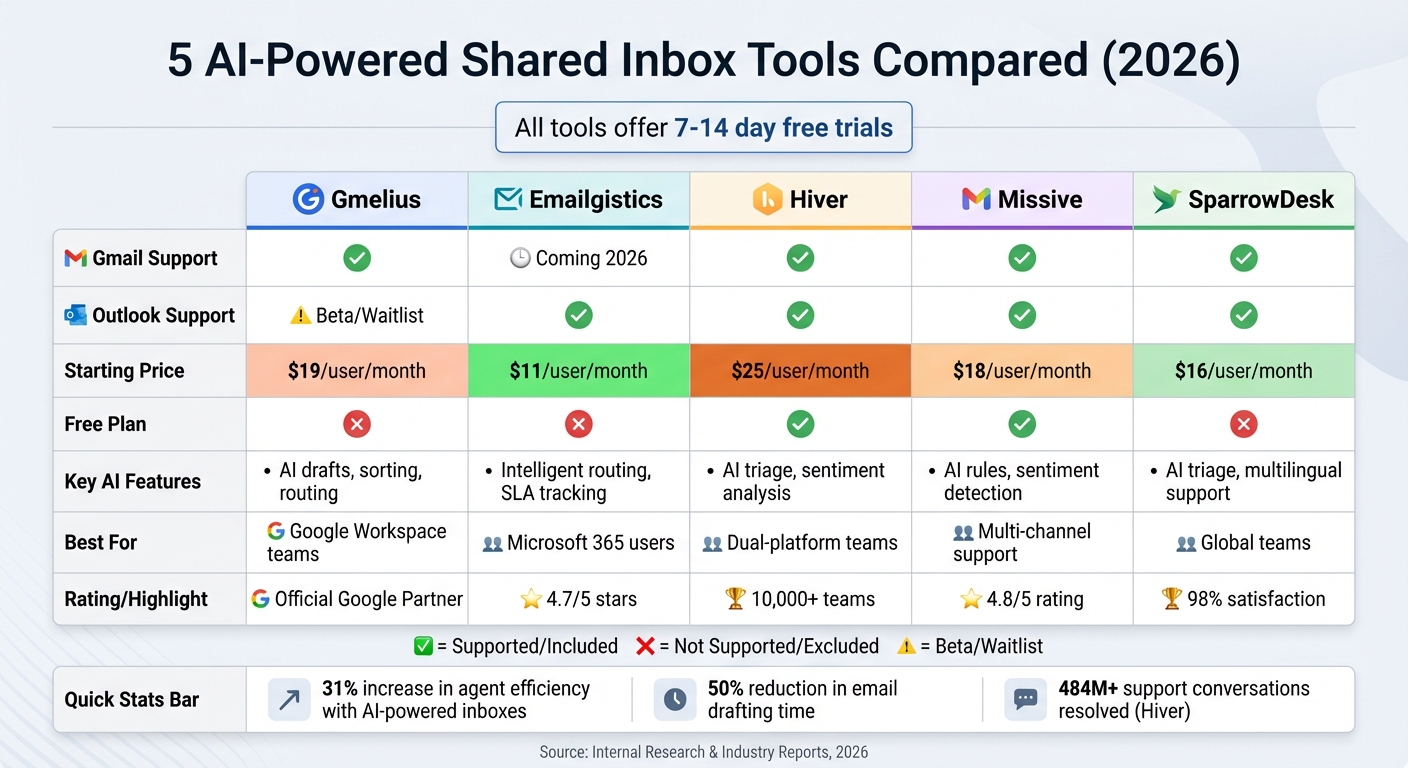
AI-Powered Shared Inbox Tools Comparison: Features, Pricing & Platform Support
Missive Q&A: Mastering shared inboxes, automation, and AI tools
1. Quidget
Quidget shows how AI can take real work off support teams by handling repeat conversations inside shared inboxes — without taking control away from humans.
It’s built for teams that want fewer emails to answer, faster replies, and clear handoff when something needs human attention.
Gmail Compatibility
Quidget connects directly to Gmail using official Google OAuth.
Teams work from the Gmail inbox they already use, with no new interface to learn and no passwords shared. Quidget reads and sends emails only within the permissions you approve, and everything stays inside your existing workflow.
AI Features
Quidget’s AI is designed for customer support, not general email writing.
It reads full email threads and drafts replies using your website, FAQs, help docs, and past conversations. Replies stay consistent with your tone and policies, and AI only handles questions it’s confident about.
When something needs judgment, context, or empathy, Quidget flags the conversation and hands it to a human with full context — no guessing, no lost history.
Over time, teams can improve results by adding new answers, uploading documents, or adjusting when AI should step aside.
Pricing
Quiddget offers 3 pricing plans, billed annually or mothly:
- Pro Plan: $99 per user/month
- Pro Plus Plan: $250 per user/month
- Enterprise Plan: Starting at $599 but can be customized tailored to your organization.
Collaboration Tools
Quidget supports team workflows inside shared inboxes.
Agents can see all conversations in one place, take over AI-handled threads when needed, and keep full context when replying. Conversations that require follow-up or manual handling are easy to identify, so nothing slips through the cracks.
Because Quidget works inside existing inboxes and tools, teams don’t need to move work elsewhere or retrain how they collaborate.
2. Emailgistics
Emailgistics provides a shared inbox solution built specifically for Microsoft 365, operating entirely within the familiar Outlook environment that teams already use every day.
Gmail and Outlook Compatibility
This platform is Microsoft 365-native, which means it integrates directly with Outlook without the need for additional portals or external servers. All emails and attachments remain securely stored on your Microsoft 365 server, minimizing risks associated with external forwarding. Plus, it doesn’t require any SMTP or DNS changes, making it straightforward for IT teams to deploy. While Gmail integration is currently marked as "coming soon" (anticipated by early 2026), the tool is particularly suited for organizations focused on Microsoft 365’s security and simplicity.
McPherson Oil saw dramatic improvements after adopting Emailgistics. Josh, their Customer Experience Manager, shared:
"We’ve been able to set targets for response times and have proof that we’re meeting those goals".
In fact, the company reduced its average reply time from over a day to just 1 hour and 20 minutes, representing a 94% improvement.
AI Features
Emailgistics includes AI-powered reply suggestions to help agents craft responses more quickly. It also uses intelligent routing features, like round-robin distribution and load balancing, to assign emails based on team availability. Automated workflows handle repetitive tasks such as tagging and routing, freeing up time for more complex work. Managers benefit from real-time SLA monitoring, with dashboards designed to alert them before any breaches occur. These features have helped teams achieve an impressive average close time of 6 hours and a 98% SLA success rate.
Pricing
Emailgistics offers a 14-day free trial of its "Pro" plan, allowing users to explore its features risk-free. The platform has earned a 4.7 out of 5-star rating from users, who often highlight its simplicity during setup. Riley, IT Supervisor at pc/nametag, remarked:
"The setup and maintenance of Emailgistics is by far the easiest we’ve dealt with".
Collaboration Tools
To prevent duplicate responses, Emailgistics includes collision detection, showing who is viewing or replying to messages in real time. Teams can also add shared notes and access full conversation histories for better coordination. Mariana, Operations Manager at Acquis, shared her experience:
"As someone who manages a team of 25 people, it’s much easier for me to know everything and deal with situations effectively".
The platform meets stringent security standards, being SOC 2-, GDPR-, and HIPAA-compliant, making it a reliable choice for organizations with strict compliance needs.
3. Hiver
Next up is Hiver, a tool designed to simplify managing shared inboxes by seamlessly integrating with Gmail and Outlook. With a setup time of just 15–20 minutes, Hiver connects email, live chat, WhatsApp, and voice support into one platform. Trusted by over 10,000 teams, Hiver has already helped resolve an impressive 484 million support conversations.
Gmail and Outlook Compatibility
Hiver works directly within Google Workspace and Microsoft 365, using a side panel that provides ticketing, automation, and collaboration tools. This means teams can manage support without leaving their familiar email interface, eliminating the need for separate help desk software. Nathan Strang, Ocean Freight Operations Manager, shared:
"Hiver is essentially an ‘additional person’ on my team. We have visibility into every issue’s resolution path and that’s cut down resolution times by 50%".
This seamless integration lays the groundwork for its powerful AI features.
AI Features
Hiver’s AI tools are built to make support workflows more efficient. These tools can summarize lengthy email threads, analyze sentiment to identify urgent messages, recognize ‘thank-you’ emails to stop unnecessary reopenings, automate repetitive tasks, trigger multi-step workflows, and even draft responses using its Copilot feature.
Emma Minnis, Interim Manager of Student Success, highlighted how Hiver’s automated triage and routing saved her team 533 hours each month while reducing tracking times by 90%. Similarly, Wes Gibson, Revenue Operations Manager, credited AI Tagging for saving 32 hours by automating manual tasks.
Pricing
Hiver offers a free plan for unlimited users, covering basic ticketing and collaboration features. For advanced functionality, there are three paid plans: the Growth plan at $25 per user per month (billed annually), the Pro plan at $65 per user per month, and the Elite plan at $105 per user per month. Users can also try the Elite plan with a 7-day free trial. Hiver meets compliance standards such as GDPR, SOC 2 Type II, ISO 27001, CCPA, and HIPAA.
Collaboration Tools
Hiver’s collaboration tools are designed to keep teams on the same page. Features like Collision Alerts notify users in real time when a colleague is viewing or responding to an email, avoiding duplicate replies. Internal Notes with @mentions allow for private discussions, while Shared Drafts enable managers to review responses before they’re sent. Automated email assignments – using either round-robin or skill-based routing – ensure workloads are evenly distributed. David Pinto, Business Development at Kiwi.com, remarked:
"I can see how much workload my team members have, their response time, and the average time to close. We never miss the SLA of 24 hours".
sbb-itb-58cc2bf
4. Missive
Missive combines Gmail, Outlook.com, and Office 365 accounts into a single interface, allowing users to manage emails, SMS, WhatsApp, and social media direct messages all in one place. Trusted by over 4,500 companies daily and boasting a 4.8/5 rating from more than 900 reviews, Missive has earned a reputation for being fast and dependable [27,29]. Jeremy Cai, CEO of Italic, highlighted its importance:
"Missive is more important to me than Slack. It’s a powerful solution to a deep-rooted challenge; no matter what you do internally, you will still have external communications."
Gmail and Outlook Compatibility
Missive integrates seamlessly with Google Workspace and Microsoft Office 365, syncing contacts and supporting Gmail’s search syntax and keyboard shortcuts. It adds a collaborative layer to your email, letting teams chat internally and use @mentions directly within email threads. This tight integration lays the groundwork for Missive’s advanced AI capabilities.
AI Features
Missive takes email management a step further with its advanced AI tools, designed to enhance customer support. Introduced in March 2025, the AI Rules engine, powered by the gpt-4o-mini model, analyzes email content to assess sentiment, urgency, and request types. It can identify upset customers, flag urgent deadlines, escalate issues, draft tailored responses, extract actionable items, and summarize conversations instantly. Florian B., who manages a customer service agency handling over 700 tickets daily, shared:
"I run a customer service agency handling over 700 tickets a day, and we manage everything inside Missive like it’s nothing… It’s honestly life-changing – I feel like I have superpowers."
To keep costs in check, Missive caches AI analysis results, allowing them to be reused across multiple rules, which reduces OpenAI API expenses.
Pricing
Missive offers a free Starter plan with limited features and history. For $18 per user per month, the Productive plan provides access to AI rules and full conversation history [32,34]. Teams needing advanced features like SAML SSO and IP restrictions can opt for the Business plan. Note that AI features require connecting your own OpenAI account and API key, with usage billed directly by OpenAI.
Collaboration Tools
Missive is designed to streamline teamwork and prevent duplicate efforts. It shows who is currently viewing or replying to emails, enabling real-time collaboration through @mentions and shared drafts. Conversations can be assigned manually or via routing options like round-robin or least-busy methods. Every action – whether it’s assigning tasks, adding labels, or replying – is fully logged for accountability. David Friedman from Ficks Music summed it up:
"We came for the shared inboxes. We stayed for the comments. The ability to use inline tagging and commenting completely changed the team’s workflow for the better."
5. SparrowDesk
SparrowDesk is an AI-driven shared inbox designed to bring customer inquiries from Gmail, Outlook, chat platforms, and social media into a single workspace. With a 98% customer satisfaction score and a 99.9% uptime SLA, it’s a dependable option for teams handling large volumes of support requests. Sarah Chen, Head of Support at TechFlow, shared her experience:
"Sparrow cut our response time by 60% in the first month. The AI suggestions are eerily accurate."
Here’s a closer look at SparrowDesk’s compatibility, AI features, pricing, and collaboration tools.
Gmail and Outlook Integration
SparrowDesk simplifies email management by consolidating Gmail and Outlook messages into one centralized inbox, eliminating the need to switch between platforms [36, 37]. It also integrates with over 50 tools like Slack, Salesforce, Jira, and HubSpot, making it adaptable to various workflows. Additionally, the built-in translation feature supports over 30 languages, ensuring seamless communication with global customers. Thanks to WebSocket technology, the platform delivers real-time updates with latency under 100 ms, allowing teams to instantly track message statuses and agent activities.
AI Capabilities
SparrowDesk leverages AI to streamline support operations:
- AI Triage: Automatically analyzes, categorizes, and routes tickets based on intent and history, cutting down manual work by up to 80%.
- AI Copilot: Summarizes lengthy email threads, offers context-aware draft suggestions, and recommends relevant knowledge base articles to improve response efficiency.
- Zoona AI Agent: Handles up to 60% of common customer queries independently while maintaining a consistent brand voice, boosting agent productivity by 5x.
Pricing
SparrowDesk provides three core pricing tiers, with optional AI add-ons:
- Starter Plan: $16 per seat per month (billed annually), includes a web widget, public help center, and customer portal.
- Professional Plan: $49 per seat per month (billed annually), adds custom email options, private help centers, and multilingual support.
- Enterprise Plan: $89 per seat per month (billed annually), offers white-labeling and advanced customization features.
AI tools are available as add-ons:
- Zoona AI Agent: Pay-per-success model at $0.70 per resolution.
- Zoona Co-pilot: $16 per seat per month for ticket summaries and suggested replies.
All plans include a free trial (7 or 14 days) [36, 37].
Collaboration Tools
SparrowDesk fosters teamwork with features like real-time presence detection and live typing indicators, allowing team members to see who’s active on a conversation. It also includes automated email assignment through round-robin distribution, internal notes for private discussions, @mentions for quick team communication, and collision detection to prevent duplicate responses. Marcus Rivera, CX Manager at GrowthLabs, praised the platform:
"Best support tool we’ve used. Clean, fast, and our team actually enjoys using it daily."
Feature and Pricing Comparison
To help you choose the right tool for your team, here’s a breakdown of core features, AI capabilities, pricing, and limitations. The table below highlights the key attributes of each option.
| Tool | Gmail/Outlook Support | AI Capabilities | Monthly Pricing (Per User) | Team Collaboration Features | Main Limitations |
|---|---|---|---|---|---|
| Gmelius | Gmail / Google Workspace only | AI drafts, summaries, AI Dispatching (routing), AI Sorting | Starting at $21/month | Real-time presence, collision detection, @mentions, shared labels | Limited to Google Workspace; no chatbot support for websites |
| Emailgistics | Outlook only | Round-robin routing, SLA alerts, automated folder assignment | Starting at $11/month | Automated assignment, SLA tracking, team dashboards | Outlook-only compatibility; lacks generative AI drafting |
| Hiver | Gmail and Outlook | AI-assisted replies, summaries, sentiment detection, AI QA | Free plan available; paid plans start at $25/month | Collision detection, @mentions, shared inboxes, notes | Basic AI features; limited automation capabilities |
Gmelius can save users up to an hour daily, thanks to its AI copilot, which improves issue resolution rates by 14%. It’s an excellent choice for Google Workspace teams seeking advanced AI automation.
Emailgistics offers an affordable starting price for Outlook environments, focusing on routing and SLA tracking. However, it lacks generative AI features, which might be a drawback for teams looking for deeper AI integration.
Hiver is ideal for teams using both Gmail and Outlook, with a free plan that makes it appealing for smaller teams exploring shared inbox solutions. While its AI tools are relatively basic, its dual-platform support and collaboration features make it a versatile option.
Each tool has its strengths, helping you streamline your support workflows based on your team’s specific needs.
Conclusion
The top AI-powered tools for customer service highlighted above each bring their own strengths to the table, offering AI features tailored to different team setups and workflows. The best choice for your team will depend on factors like your team size, budget, and the specific AI capabilities you need. For example, Gmelius is a solid option for Google Workspace teams looking for advanced automation. On the other hand, Emailgistics shines in Outlook environments with its effective email routing and SLA tracking. If your team works across both platforms, Hiver provides dual compatibility and even offers a freemium model to get started.
When narrowing down your options, it’s smart to take a hands-on approach. Free trials are an excellent way to see how well a tool handles your actual customer data. As support agent Pat Barlow wisely pointed out:
"I spend more than eight hours a day in this tool, so if it feels clunky, it will hinder productivity".
During your trial, focus on how easily the tool integrates with your existing systems and how quickly it can be deployed. Pay close attention to whether it aligns with your security standards and fits seamlessly into your workflow. For enterprise teams with more complex needs, scheduling a demo can help ensure the tool is up to the task.
AI-powered inboxes are proven to increase agent efficiency by 31% and reduce email drafting time by 50%. The key is to choose a solution that complements your team’s workflow and goals. Start with a trial, track the results, and let the data guide your decision instead of relying solely on feature lists.
FAQs
What key AI features do shared inbox tools offer for customer support?
Shared inbox tools in 2026 are taking customer support to the next level with AI-powered features that simplify workflows and boost efficiency. These tools can now handle tasks like generating automatic email summaries, suggesting responses, and even translating messages into multiple languages – making communication smoother and faster.
A standout feature is AI-driven routing, which intelligently prioritizes and assigns tasks, ensuring that customer inquiries are addressed promptly. Many shared inbox platforms also offer omnichannel support, bringing together email, chat, and social media interactions in one place. Real-time chatbots handle routine questions instantly, allowing support agents to focus on more complex problems.
By combining these capabilities, shared inbox tools are helping businesses reduce response times and offer more tailored, efficient customer service.
How do these tools work with Gmail and Outlook?
These AI-driven shared inbox tools work effortlessly with both Gmail and Outlook, blending right into the platforms you already use. For Gmail, many of these tools rely on browser extensions or add-ons, adding features like smart email organization, automated responses, and team collaboration tools directly within your inbox.
With Outlook, the integration typically involves add-ins or built-in features that tap into Microsoft 365’s AI capabilities. This enables tasks like drafting replies, managing shared inboxes, and automating repetitive processes. The goal is to enhance productivity while keeping your team’s workflow smooth and uninterrupted.
What is the most budget-friendly shared inbox tool for customer support teams?
For teams watching their budget, Help Scout strikes a great balance between cost and features. It comes equipped with AI-driven tools like email automation, smart suggestions, and translation capabilities – everything you need to make customer support more efficient without overspending.
What sets Help Scout apart is its simplicity and team-friendly collaboration features. It’s perfect for budget-conscious groups who still want access to powerful tools. By focusing on affordability, Help Scout helps you improve customer interactions and streamline workflows without putting a dent in your finances.


