


Want to deliver better customer support without hiring more people? Here’s how you can meet rising expectations in 2026 by working smarter:
- Automate repetitive tasks: Use AI to handle FAQs, refunds, and order tracking – saving time and cutting costs.
- Centralize communication: Manage all customer interactions (email, chat, social media) in one place for consistent responses.
- Leverage a knowledge base: Ensure both AI and agents provide accurate answers by using a single source of truth.
- Improve escalations: Seamlessly transfer complex issues to agents with full context to avoid frustrating customers.
- Provide 24/7 support: AI tools can handle after-hours queries instantly, keeping customers happy even when your team is offline.
With tools like Quidget, teams can handle up to 80% of inquiries automatically, reduce wait times by 60%, and focus on high-value cases – all without increasing headcount. Ready to improve support quality? Let’s dive in.
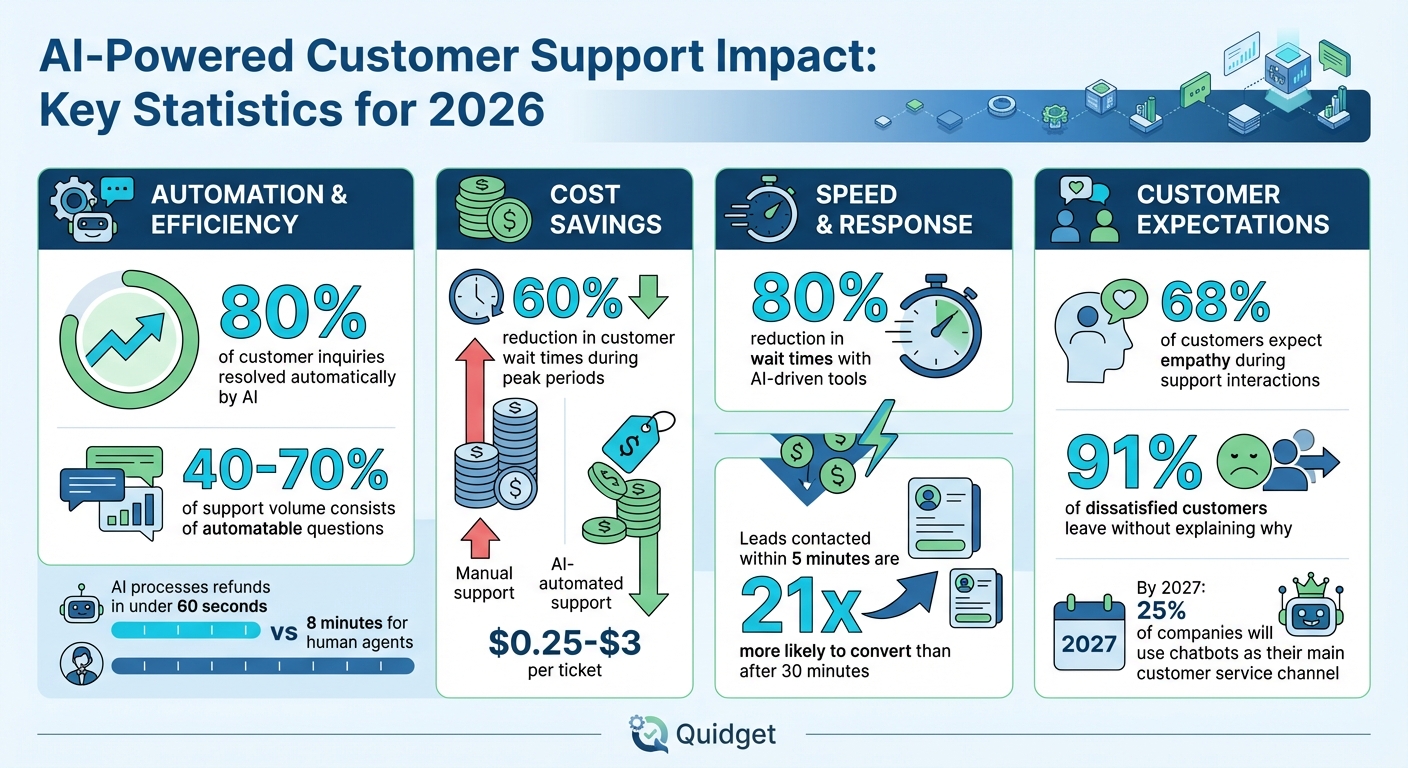
AI-Powered Customer Support Impact: Key Statistics for 2026
We Automated 80% of Customer Support With One AI Agent (No Code)
sbb-itb-58cc2bf
What Support Quality Actually Means
Support quality in 2026 is all about delivering quick resolutions, providing accurate information, and ensuring smooth escalations when issues become more complex. The most effective support systems blend AI-powered tools (not just chatbots, but solutions that actively resolve problems) with human empathy for high-stakes situations. Geoffrey Ryskamp, Vice President and Executive Advisor for Hospitality at Medallia, explains it well:
"What’s going to happen is we’ll go from countless service loops and conversations to real instant resolution."
The true measure of support quality lies in how well your team – both human and AI – delivers speed, consistency, and clarity in every interaction. Let’s break these elements down further.
Fast Response Times
Speed is the bedrock of customer trust. A slow response signals to customers that their time isn’t valued, and they’ll likely turn to a competitor who prioritizes their needs.
AI-driven tools are game-changers here, reducing wait times by up to 80%. During busy periods like product launches or holiday sales, AI has been shown to cut waiting times by 60%. Some leading platforms now resolve 80% of customer inquiries instantly. Quick responses are no longer a bonus – they’re the baseline. Techloy puts it plainly:
"Speed is not just a KPI. It is trust. Customers want resolution."
Accurate and Consistent Answers
Speed alone doesn’t cut it if the information provided is wrong or inconsistent. Imagine being told by one agent that a refund takes three days, only to hear from another that it’s seven. That’s a trust killer – especially when it comes to critical issues like refunds, shipping, or account access.
Ensuring accuracy in 2026 requires a unified knowledge base that both AI and human agents rely on. This "single source of truth" guarantees that every response – from a bot or a person – aligns with the same policies, procedures, and data. It eliminates the frustrating "re-contact cycle", where customers have to reach out multiple times due to conflicting answers. A well-maintained knowledge base not only builds trust but also boosts efficiency by reducing manual errors and avoiding unnecessary follow-ups.
An outdated knowledge base, on the other hand, weakens both AI and human responses. AI performs best when it’s grounded in clean, up-to-date documentation. Beyond just being accurate, clear communication ensures that when automation can’t resolve an issue, the transition to a human agent is smooth and effective.
Clear Communication and Effective Escalation
When an issue requires human involvement, the quality of the handoff is critical. Customers expect "contextual memory" – they don’t want to repeat their problem to a human agent after already explaining it to a bot.
A strong escalation process ensures that human agents receive a detailed summary, complete history, and all relevant information from the AI interaction. This avoids the frustration of starting over and reassures customers that they’re in good hands. As Techloy notes:
"If escalation feels like starting from scratch, customers hate it. If the agent receives a clean summary, full context, and the relevant links, customers feel taken care of."
With 68% of customers expecting empathy during support interactions, effective escalation is non-negotiable. It ensures that complex or emotionally charged issues are handled with the human touch they deserve, while still benefiting from the speed and efficiency AI brings. This balance between automation and empathy sets the stage for modern, efficient support systems.
Why Support Quality Drops When Teams Get Busy
Support teams often face a drop in quality when workloads spike, and the main culprits are manual workflows and repetitive tasks. When agents spend too much time answering the same types of questions, more complex issues are left waiting. This leads to slower response times, frustrated customers, and a noticeable decline in overall service quality. These problems – lost time, inconsistent communication, and delays – become even more apparent during the busiest times.
Repetitive Questions Take Up Valuable Time
Repetitive inquiries are a huge drain on agent productivity. For example, processing a simple refund request takes a human agent about 8 minutes, while an AI agent can handle the same task in less than 60 seconds. Multiply that by dozens of similar requests daily, and it’s easy to see how agents lose time that could be better spent on more complex, high-priority issues.
In fact, 40% to 70% of incoming support volume often consists of questions that could be resolved instantly with automation. Companies that fail to address this lose both efficiency and customer satisfaction.
Take Softorino, for example. In early 2026, the company faced this exact issue during sales campaigns that generated heavy traffic. By adopting Quidget AI, they were able to reduce customer wait times by 60% without increasing their team size. Alex, their Customer Success Manager, shared:
"We trained our bot in just a few minutes – we couldn’t believe how fast it was! It made a huge difference during our sales campaigns, cutting waiting times by 60% and boosting customer satisfaction."
Beyond wasting time, repetitive questions also create inconsistencies in how customers are served.
Inconsistent Responses Across Platforms and Agents
Fragmented systems are another challenge. When customer data is scattered across tools – marketing in one platform, sales in another, and support in yet another – it’s hard for agents to get a complete picture. This lack of integration leads to conflicting answers, which can damage customer trust. During busy periods, when agents are trying to move quickly, these inconsistencies become even more frequent.
Disconnected communication channels add to the problem. An agent replying to an email might not know what was already discussed on social media or live chat. Customers end up repeating themselves, creating a frustrating and disjointed experience. Without a unified system to centralize information, it’s nearly impossible to ensure consistent and accurate responses.
Delays During Peak and After-Hours Periods
High-traffic times – like product launches, holiday sales, or unexpected issues – often overwhelm smaller teams. While AI can manage multiple queries at once and significantly reduce wait times during these periods, teams relying solely on human agents face growing queues, slower responses, and unhappy customers.
After-hours support is another weak spot for many teams. 91% of dissatisfied customers will leave a brand without ever explaining why, and many of those lost customers leave because they couldn’t get help when they needed it. For example, a customer with a billing issue at 9 PM doesn’t want to wait until the next morning – they want it resolved immediately. AI tools like Quidget help bridge these gaps by providing instant responses, ensuring that even during peak hours or late at night, customers get the help they expect.
How to Improve Support Quality Without Growing Your Team
Boosting support quality doesn’t always mean hiring more people. Instead, you can focus on refining processes, leveraging automation, and centralizing communication. These strategies let your team tackle complex, high-priority issues while improving overall efficiency.
Automate Repetitive Questions
Identify the top five questions your team answers repeatedly, and use AI to handle them from start to finish. Tasks like password resets, order tracking, and refund requests are perfect candidates for automation. By automating these high-volume, straightforward cases, teams can achieve automation rates between 40% and 70% without compromising service quality.
AI tools process these tasks in seconds, compared to the minutes it might take a human agent. Beyond answering questions, modern AI can take action – such as issuing refunds, updating CRM records, or resetting passwords. This means faster resolutions for customers, even during peak times, while freeing your team to handle more nuanced issues.
Centralize Customer Conversations
Managing customer interactions across fragmented platforms – email, live chat, social media, and phone – can lead to inconsistent responses and frustrated customers. A unified communication platform solves this by consolidating all channels into a single dashboard, giving agents a complete view of every customer interaction.
With a unified inbox, agents can easily track conversation history, ensuring consistent answers and eliminating the need for customers to repeat themselves. It also helps standardize responses and policies, making your team more efficient and leaving customers with a better impression.
Build Standardized Processes and Knowledge
A single source of truth is essential for consistent service. Create templates for common responses, develop clear workflows for different issues, and maintain an up-to-date knowledge base. When your documentation is structured for AI use, tools like Quidget can pull accurate answers directly from it, ensuring consistency across all customer interactions.
Standardized processes also reduce mistakes. Automated systems don’t overlook urgent matters or misinterpret policies, which means VIP clients are handled properly, and company guidelines are always followed.
Use AI to Improve Speed and Consistency
AI tools today are designed to assist agents, not replace them. They instantly handle repetitive, low-risk inquiries, allowing your team to focus on complex or sensitive cases. For example, Quidget can resolve up to 80% of repetitive questions, delivering consistent, 24/7 support.
AI systems trained on your knowledge base provide uniform responses across all channels. When a case becomes too complicated, the AI smoothly hands it over to a human agent, complete with a detailed summary and all relevant context. This ensures customers don’t have to repeat themselves, saving time and improving their experience.
Create Clear Escalation Rules
For sensitive issues like payment disputes, security concerns, VIP accounts, or complex cases, establish clear escalation protocols. These rules ensure customers never feel abandoned by automation, and that your team steps in at the right time with all the necessary context.
A well-thought-out escalation process protects your brand by ensuring every issue – whether handled by AI or a human – is resolved correctly on the first attempt. This balance between automation and human intervention is key to maintaining high support quality.
What to Automate First
Once your strategy is mapped out, figuring out which tasks to automate first can make a big difference in efficiency right away.
Not every support task is ideal for automation, though. The best approach? Start with high-volume, low-complexity inquiries – the ones that consume a lot of your team’s time but don’t require much human judgment. These are the repetitive questions your team handles dozens, if not hundreds, of times each week. They’re exactly the type of tasks AI can handle seamlessly.
FAQs and Common Customer Questions
A great starting point is using AI chatbots to improve customer self-service like order status, billing inquiries, password resets, delivery times, refund policies, and account updates. These types of inquiries are straightforward and policy-driven, meaning they don’t demand complex decision-making. When AI takes over these routine tasks, your team can focus on more meaningful work.
Automating FAQs has a big impact. It can handle 40–70% of inbound inquiries, with AI resolving tasks like refunds or account lookups in under 60 seconds. Compare that to the several minutes it takes a human agent to pull up records, verify information, and respond. Tools like Quidget can manage up to 80% of these repetitive requests by pulling answers straight from your knowledge base.
The financial savings are just as impressive. While manual support interactions typically cost $3 to $15 per ticket, AI-automated responses range from $0.25 to $3. Every automated FAQ not only saves time but also cuts costs, all while delivering instant answers to customers.
Once you’ve tackled FAQs, shift your focus to streamlining how leads are handled to ensure potential customers are quickly routed to the right people.
Lead Qualification and Routing
Pre-sales inquiries often get mixed in with general support tickets, which can slow things down. AI can step in as an intelligent traffic controller, identifying the type of inquiry – whether it’s about pricing, a demo request, or troubleshooting – and directing it to the right team member, complete with relevant context.
Timing matters here. Leads contacted within 5 minutes are 21 times more likely to convert than those reached after 30 minutes. By automating lead qualification and routing, your sales team gets warm leads faster, while your support team can stay focused on solving more complex issues.
When inquiries are sorted efficiently, you can also extend support coverage beyond regular working hours.
After-Hours Support
Customer needs don’t stop when the workday ends, but keeping a human team available around the clock can be costly and unrealistic for smaller teams. This is where AI shines, offering instant, 24/7 responses – even on weekends and holidays – without the need for night shifts.
For more complex cases, AI can gather all the necessary details and hand them off to your team the next morning. This ensures every customer gets the help they need without delays. By 2027, nearly 25% of companies are expected to rely on chatbots as their main customer service channel, highlighting the growing importance of dependable after-hours support.
For instance, teams using Quidget have reported major reductions in customer wait times during high-demand campaigns.
The Role of AI in Support Quality Improvement
AI is transforming the way support teams operate, streamlining processes and enhancing overall performance. As part of a lean support strategy, AI can improve response times, ensure consistent answers, and expand team capacity – without the need to hire additional staff. The result? A noticeable boost in support quality at every customer interaction.
Faster Responses with AI Agents
Speed is everything in customer support. People want quick answers, and AI delivers – any time, any day, including weekends and holidays. Unlike human agents, who can only handle one conversation at a time, AI manages thousands of queries simultaneously and efficiently.
The results are impressive. Take Softorino, for example. In early 2026, they introduced Quidget AI during a sales campaign. With Customer Success Manager Alex leading the effort, the team trained the bot in just minutes. The outcome? A 60% drop in customer wait times and higher satisfaction scores. In fact, AI-powered systems now resolve up to 80% of customer inquiries instantly, slashing resolution times.
AI also handles routine questions on the spot, eliminating long queues. More complex issues? They’re quickly routed to the right department, cutting down on manual delays. Additionally, AI tools provide agents with suggested responses and relevant documents, reducing the average handling time. When escalation is necessary, AI seamlessly hands off the interaction, complete with a summary and full conversation history. This ensures customers never need to repeat themselves.
Consistent Answers from a Centralized Knowledge Base
Inconsistent answers are a common headache in customer support. Different agents may interpret policies differently, leading to conflicting responses about refunds, shipping, or account management. AI solves this problem by pulling answers directly from a centralized knowledge base, FAQs, and approved policies. This ensures that customers receive the same accurate information – whether they reach out via WhatsApp, email, or live chat. Plus, any updates to policies are instantly reflected in AI responses, so customers always get the latest information.
To maintain accuracy, advanced AI systems use confidence thresholds. If the AI isn’t certain about an answer, it escalates the query to a human agent instead of guessing. This prevents the spread of incorrect information.
By delivering consistent, reliable responses, AI enables your team to focus on more intricate and demanding challenges.
More Time for Agents to Handle Complex Issues
AI isn’t here to replace your support team – it’s here to take repetitive tasks off their plate. By resolving 80% of routine inquiries automatically, AI frees up your agents to tackle more complicated and sensitive issues that require human empathy and problem-solving skills.
This extra bandwidth lets your team focus on VIP customers, technical challenges, and escalations that need their expertise. With less time spent on simple queries, agents can dedicate their energy to resolving complex problems where their insight and judgment truly shine.
This approach ensures that your support team can deliver high-quality service, especially for cases that benefit most from the human touch. It’s a win for both efficiency and customer satisfaction.
What to Look for in an AI Support Tool
If you’re aiming to boost support quality without expanding your team, picking the right AI tool is key. Not all AI support tools are created equal – some fall short by deflecting tickets without resolving them, while others require tedious manual setup. The ideal tools stand out by delivering faster, more precise answers and ensuring your team can step in seamlessly when needed.
Here’s what you should prioritize when selecting an AI solution for your support team.
Training on Your Company’s Content
The best AI tools rely on your company’s knowledge base, FAQs, and official policies – not random internet data. This ensures responses align with your actual refund policies, shipping times, and product details.
Look for tools that can directly integrate with your existing content. Platforms that automatically index your website, import help center articles, and learn from past resolutions are especially effective. This approach eliminates the risk of the AI making up answers or creating policies that don’t exist.
"A serious assistant should not invent policies or improvise exceptions. It should behave like a disciplined teammate who checks the handbook, quotes the right rule, and follows the workflow." – Techloy
Ease of setup is another factor to consider. While some tools require manual training for each potential question, others, like Quidget, use web crawlers to train on your website’s content automatically. This allows you to launch quickly without sacrificing accuracy.
Once the AI is trained, ensure it can recognize when to escalate issues to human agents.
Human Handoff with Full Context
AI is great for routine queries, but human input is essential for more complex problems. A smooth handoff process is critical. When a customer needs to speak with a human, the AI should transfer the entire conversation history, customer details, and relevant context – so the customer doesn’t have to repeat themselves.
The best tools use intent detection to identify when an issue goes beyond the AI’s capabilities and automatically route it to the right team. For example, if a customer brings up a billing dispute or security concern, the system should escalate the case immediately, attaching all necessary details. Before committing to a tool, define your escalation triggers – whether for VIP accounts, payment issues, or technical bugs – and ensure the platform can handle these rules effectively.
Additionally, the tool should support multiple customer channels and reflect your brand’s personality.
Multi-Channel Support and Brand Customization
Customers reach out through various channels – some prefer email, others use WhatsApp, Slack, or live chat. A solid AI tool should work seamlessly across all these platforms, providing consistent answers regardless of where the conversation begins.
Omnichannel support also simplifies your team’s workflow by centralizing all communications – email, chat, social media, and messaging apps – into a single dashboard. This reduces the need for constant tab-switching, helping agents stay focused and efficient.
Customizing the AI to match your brand’s voice is equally important. Tools like Quidget allow full customization of chatbot design, colors, and responses while supporting over 80 languages. This ensures a consistent and professional experience for your global customer base.
Analytics and Reporting
To improve your support system, you need clear insights. AI tools should provide detailed analytics that show which questions are being resolved, where customers encounter issues, and how often the AI escalates to human agents.
Key metrics to track include resolution rates (not just deflection rates), average response times, and customer satisfaction scores. These data points can help you identify gaps in your knowledge base, refine escalation rules, and better understand customer behavior.
"Measure resolution rates and customer satisfaction alongside automation rates to capture quality accurately." – Hannah Owen, Lorikeet
Advanced platforms also offer features like automatic ticket summarization, which saves agents time on manual data entry and makes reviewing past interactions easier. Opt for tools that provide both real-time dashboards and historical reporting to monitor progress over time.
How Quidget Helps Teams Improve Support Quality
Building on the earlier discussion of AI benefits and streamlined workflows, Quidget stands out as a tool designed to enhance support quality without the need to expand your team.
Quidget is tailored for teams aiming to provide top-notch support without adding more staff. By combining AI-driven automation with smooth human handoffs, it allows teams to manage more conversations while maintaining excellent service across all channels.
Handles up to 80% of repetitive inquiries
Quidget’s AI agents tackle the repetitive, time-consuming questions that often bog down support teams. These include inquiries about order tracking, account issues, FAQs, billing, and basic troubleshooting. By automating these tasks, your human agents can focus on complex cases that require a personal touch, empathy, or technical know-how.
The platform can handle multiple queries at once, providing answers in seconds. This means customers get immediate assistance, even during peak times, and your team avoids the stress of ticket backlogs. For example, Softorino has shown how quickly Quidget can reduce wait times, making it a game-changer for customer support.
Another major advantage? Quidget offers round-the-clock support, covering holidays, weekends, and after-hours without the need for night shifts or additional hires.
While managing repetitive queries efficiently, Quidget also ensures that every response meets your company’s standards, as outlined below.
Delivers consistent answers from your knowledge base
Consistency is key to building trust with customers, and Quidget ensures this by pulling directly from your company’s resources.
Unlike generic chatbots, Quidget is trained using your company’s specific content – help center articles, FAQs, product documentation, and internal policies. This means every response aligns with your refund policies, shipping details, or product specs, leaving no room for errors or unapproved answers.
The setup process is quick and hassle-free. Quidget uses a web crawler to index your website and import your knowledge base automatically. This means you can get started in minutes without manually training it for every potential question. Plus, Quidget supports over 80 languages, enabling small teams to serve a global audience without needing multilingual staff.
Because the AI relies on centralized, company-approved sources, customers receive accurate and consistent information – whether they contact you on a Monday morning or late Saturday night, and regardless of the channel they use, be it chat, email, or WhatsApp.
Provides 24/7 coverage with human handoff
Quidget strikes the perfect balance between automation and human intervention. For sensitive or complex issues – such as payment disputes, security concerns, VIP accounts, or technical bugs – the AI escalates the conversation to a human agent with full context. This means the agent receives all relevant details, including the conversation history and customer information, ensuring the customer doesn’t have to repeat themselves.
This seamless transition ensures that high-priority cases get the expert attention they need, while routine inquiries stay automated. Teams can set up clear escalation triggers based on keywords, intent, or account type, ensuring urgent matters are routed to the right person immediately.
Quidget also integrates seamlessly with platforms like WhatsApp, Slack, Telegram, Shopify, and WordPress, consolidating all conversations into one centralized dashboard. This eliminates the need for agents to switch between tabs, helping them stay efficient and focused, even when juggling escalations across multiple channels.
Conclusion
Better workflows and tools improve quality faster
Improving support quality in 2026 isn’t about hiring more people – it’s about creating better systems. While adding staff can increase capacity, it also introduces variability and scales efforts linearly. On the other hand, the right workflows and AI tools allow teams to handle anywhere from 50 to 5,000 tickets without increasing headcount. Modern AI solutions provide near-instant resolutions, cutting out repetitive tasks for human agents and ensuring customers get consistent, accurate answers based on your company’s knowledge base.
This shift from relying on headcount to optimizing systems is more than a cost-saving strategy – it’s about boosting efficiency. For example, AI agents can process routine requests, like refunds, in under 60 seconds, compared to the 8 minutes it typically takes a human agent. With features like 24/7 availability and multi-language support, lean teams can deliver top-tier service without the need for night shifts or global staffing.
"Automation does not replace human agents – it concentrates them where they matter most." – Hannah Owen, Lorikeet
By automating tasks such as ways AI chatbots improve customer self-service, such as FAQs, order tracking, and billing inquiries, teams free up human agents to focus on more complex, high-value interactions that require empathy and critical thinking . This approach leads to faster response times, more consistent answers, and an overall better customer experience. It also lays the groundwork for using solutions like Quidget, which directly implement these streamlined processes.
How Quidget fits into a lean team’s strategy
Quidget is designed for lean teams aiming to enhance support quality without increasing headcount. Its 2-minute, no-code setup allows teams to quickly deploy AI-powered support, handling up to 80% of repetitive inquiries while seamlessly transferring complex cases to human agents. For example, Softorino used Quidget to reduce customer wait times by 60%, all while maintaining high satisfaction levels.
Whether your team operates in SaaS, eCommerce, or multi-channel support, Quidget ensures faster, more consistent responses without adding extra costs or unnecessary complexity. It’s not about replacing agents – it’s about protecting them from burnout and enabling them to focus on areas where they make the biggest impact. By prioritizing smarter workflows and leveraging tools like Quidget, teams can significantly elevate their support quality without the need for additional hiring.
FAQs
How do I pick what to automate first?
Start by using automation for tasks that are high in volume but simple in nature – things like FAQs, billing or order-related questions, and routine account inquiries. These kinds of tasks are perfect for AI because they follow clear resolution steps, cutting down on manual effort and speeding up response times. Additionally, consider automating repetitive processes such as ticket routing or handling after-hours support. This can quickly boost efficiency and consistency, allowing your team to deliver better support without needing to expand your staff.
How do I keep AI answers accurate?
To ensure AI responses stay accurate, begin by training it on your specific content and backing it up with real-time validation. Set clear quality benchmarks – covering aspects like tone, empathy, and precision – and consistently review performance metrics to stay on track. Tools like Quidget can help by offering real-time monitoring, instant recommendations, and effortless handoffs to human agents for more intricate issues. Regularly updating training data and refining response templates will also boost accuracy as time goes on.
When should AI hand off to a human?
When AI reaches its limits – whether due to the complexity of an issue or the need for a more personal approach – it should transition the conversation to a human. A well-executed handoff ensures that all relevant context is passed along, allowing the customer to continue seamlessly without needing to repeat themselves. This is especially important for situations requiring nuanced judgment or emotional intelligence. By escalating appropriately, businesses can not only improve customer satisfaction but also ensure their teams work more efficiently.


