


Managing customer support across multiple platforms can be chaotic. Customers expect smooth conversations whether they reach out via WhatsApp, email, website chat, or social media. Yet, disconnected tools lead to repeated explanations, slower responses, and frustrated teams.
The solution? A unified AI agent. This combines all channels into one system, providing instant, 24/7 responses while keeping the full conversation history intact. Businesses using such systems have seen up to a 35% drop in support tickets and a 60% reduction in wait times.
Here’s what this setup offers:
- One platform for all channels: WhatsApp, email, website chat, and social media.
- Automation for repetitive queries: Handles up to 80% of basic questions like "Where is my order?"
- Seamless transitions: AI passes complex issues to human agents with full context.
- Lower costs: Consolidates tools and reduces workload.
This approach improves efficiency, customer satisfaction, and retention rates, with businesses seeing up to 89% customer loyalty compared to 33% with disconnected systems.
Want to simplify support? Start by choosing a no-code AI platform, train it with your existing data, and connect your channels for a smoother, more efficient experience.
Multichannel vs Omnichannel Support: What’s the Difference?
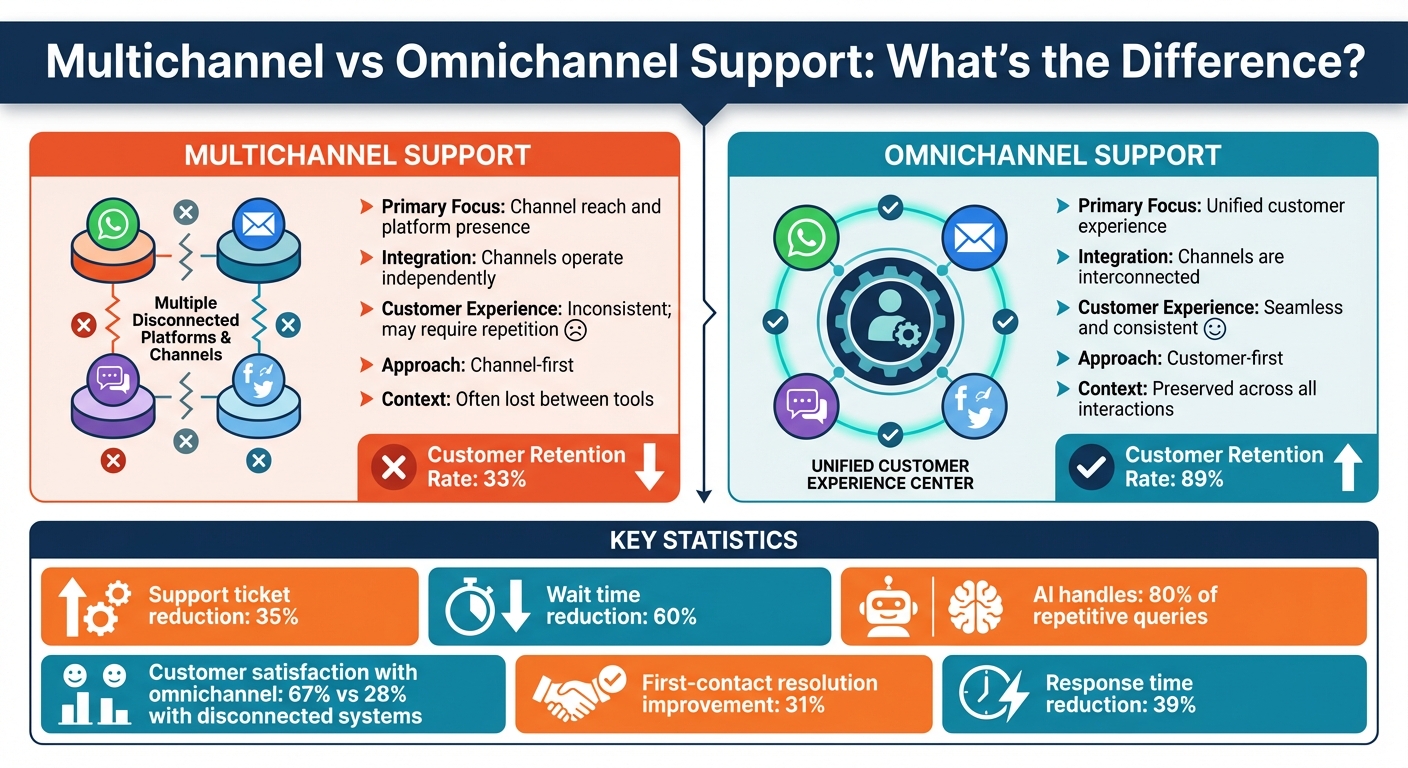
Multichannel vs Omnichannel Support: Key Differences and Benefits
What is Multichannel Support?
Multichannel support means your business interacts with customers through various platforms – like email, WhatsApp, website chat, and social media – but each channel operates independently. For example, emails are managed in one inbox, social media messages in a separate dashboard, and live chat through another tool. Each platform holds its own data, and your team has to juggle between them to respond.
The downside? These platforms don’t communicate with each other. Imagine a customer emails about an order, then follows up on WhatsApp an hour later. Your team won’t have the context of the earlier email. The customer ends up repeating their order number, explaining their issue again, and waiting while your agent pieces things together. This "channel-first" approach prioritizes being present on multiple platforms over creating a smooth customer experience.
Why Omnichannel Support Works Better
Omnichannel support, on the other hand, focuses on the customer experience by connecting all your platforms into a single, unified system. Whether a customer reaches out via WhatsApp, email, website chat, or social media, the same AI agent handles the interaction, pulling from a shared knowledge base and keeping a complete history of the conversation across all channels.
Here’s how it works: A customer asks about a product feature on your website chat at 2:00 PM. Later, at 8:00 PM, they send a follow-up question through WhatsApp. With omnichannel AI, the agent already knows what was discussed earlier and picks up the conversation without missing a beat. No repeated explanations. No lost context. If a human agent needs to step in, they’ll see the entire conversation history, ensuring the customer doesn’t have to start over.
The benefits are clear. While multichannel support emphasizes being available everywhere, omnichannel ensures a seamless and cohesive experience. Allyson Scott, VP of Strategy & Brand at Quiq, explains it best: "Omnichannel is about creating a brand-defining experience for your customers – one that molds a memorable, enduring relationship with them". With omnichannel, your messaging stays consistent, responses are accurate, and customers feel truly understood – no matter which platform they use.
| Feature | Multichannel Support | Omnichannel Support |
|---|---|---|
| Primary Focus | Channel reach and platform presence | Unified customer experience |
| Integration | Channels operate independently | Channels are interconnected |
| Customer Experience | Inconsistent; may require repetition | Seamless and consistent |
| Approach | Channel-first | Customer-first |
| Context | Often lost between tools | Preserved across all interactions |
sbb-itb-58cc2bf
Problems with Using Separate Support Tools
Managing customer interactions across multiple platforms – like email, WhatsApp, website chat, and social media – can quickly turn into a logistical nightmare. When each tool operates in isolation, it creates inefficiencies that frustrate both your team and your customers.
Lost Context Between Conversations
When platforms don’t talk to each other, conversations get fragmented. Customers are forced to repeat themselves, and agents waste time trying to piece together scattered details. Imagine a customer emails about a delayed order in the morning and sends a WhatsApp message later in the day for an update. Without a unified system, the agent sees two disconnected threads, requiring the customer to re-explain their issue and provide the same details again.
Golftini, a women’s golf apparel brand, struggled with this exact problem. Before switching to a unified system, they handled queries about sales, shipping, and returns across separate tools with no clear ownership. This led to 10–15% of customer queries being mishandled. The lack of a cohesive conversation history not only frustrated customers but also increased the workload for their team.
Higher Workload and Operating Costs
Managing multiple platforms doesn’t just waste time – it drives up costs. Agents spend hours switching between tools, re-entering information, and answering repetitive questions. In fact, around 70% of messages on platforms like WhatsApp are repetitive queries. Adding to the challenge, 73% of consumers report being frustrated when they have to re-explain their issue to different agents or across channels.
For small businesses, scaling human support to cover multiple channels 24/7 is a massive challenge. As Mike Murchison, CEO & Co-founder of Ada, explains:
"It’s nearly impossible and exceedingly expensive to support customers 24/7 on every channel with a human agent. They can typically only manage a few chats, emails, or one phone call at a time… But an AI Agent can."
Slower Response Times
Fragmented tools also slow down response times. Agents spend valuable time switching between platforms and hunting for context, which delays resolutions. Important messages can get buried in threads, especially outside of regular business hours. This inefficiency adds up, leaving customers waiting longer for answers.
Softorino, for example, saw a dramatic improvement after implementing an AI agent. By automating 60% of first-level responses with AI chatbots, they reduced support tickets by 35% and cut wait times by 60%. As Customer Success Manager Alex Novak shared:
"Setting up Quidget was surprisingly quick – It now handles 60% of our first-level responses, slashing wait times and letting our team focus on real customer needs."
The takeaway? Disconnected tools create a disconnected experience. Your team works harder, your customers wait longer, and operational costs keep rising. Companies with strong omnichannel engagement retain up to 89% of their customers, compared to just 33% for those with fragmented support. A unified AI-driven solution is no longer a luxury – it’s a necessity for delivering seamless support across all channels.
Benefits of Using One AI Agent Across All Channels
Managing fragmented support systems can feel like juggling too many balls at once. A unified AI agent simplifies this chaos, boosting efficiency and cutting costs while improving customer satisfaction. Here’s how:
Lower Costs Through Consolidation
Using a single AI agent means saying goodbye to multiple subscriptions and scattered tools. Instead of paying for separate platforms to handle email, WhatsApp, website chat, and social media, you can streamline everything into one system. This not only trims software expenses but also simplifies operations, saving your team time and effort.
Automation is another game-changer. AI agents can handle up to 80% of repetitive support tasks – like answering "Where is my order?" or "How do I reset my password?" – without needing a human touch. By automating these routine queries, your team can focus on more complex issues, handle higher volumes, and avoid overtime to clear weekend backlogs. The result? Lower costs and faster, around-the-clock responsiveness.
24/7 Support and Instant Responses
Your customers don’t stick to business hours, and neither should your support. A unified AI agent offers immediate, 24/7 assistance across all channels. Whether it’s a WhatsApp message at 2:00 AM or an email on a Sunday, customers get accurate answers right away.
Take Softorino, for example. After implementing a unified AI agent, they reduced their support ticket volume by 35% and slashed wait times by 60%. This kind of instant availability not only improves response times but also eliminates the dreaded Monday morning pile-up of unresolved tickets.
Better Customer Experience
A unified AI agent keeps track of the entire conversation history, so customers never have to repeat themselves. If someone starts a chat on email and later switches to WhatsApp, the AI remembers everything, ensuring seamless communication.
When the AI needs to involve a human agent, it hands off the full chat history, saving time and creating a smoother experience. This efficiency doesn’t just cut costs – it makes the customer journey feel effortless and professional.
Plus, a single AI agent ensures consistent messaging across all platforms. Whether it’s a casual reply on social media or a formal email, your brand tone stays on point, and the information shared is always accurate. This level of consistency builds trust and loyalty, giving customers the personalized, seamless support they expect in today’s fast-paced world.
What to Look for in an Omnichannel AI Platform
When selecting an omnichannel AI platform, focus on solutions that streamline operations, reduce expenses, and improve customer satisfaction. To tackle the fragmented support issues mentioned earlier, make sure the platform includes these essential features:
Support for Multiple Channels
Your platform should unify communication across channels like WhatsApp, email, website chat, and social media. For example, if a customer starts a conversation on Instagram and continues it via email, the AI should retain the full conversation history. Look for platforms that integrate with tools such as the WhatsApp Business API, Gmail, Facebook Messenger, Instagram, Telegram, and Slack. This unified system provides your team with a 360-degree view of customer interactions, enabling smarter routing and quicker resolutions. Such integration also simplifies AI deployment and ensures smooth transitions to human agents when needed.
No-Code AI Setup
Simplify deployment by choosing a platform that doesn’t require coding skills. Modern solutions allow you to train the AI by uploading documents (like PDFs or Word files), connecting to your internal wiki, or even just providing your website URL. This approach enables the system to learn from your content automatically. Many platforms offer deployment in as little as two minutes, eliminating technical hurdles and speeding up onboarding so you can start reaping the benefits almost immediately.
AI-to-Human Handoff
Automation is great, but seamless escalation is just as important. When the AI encounters a complex query or a situation that needs a personal touch, it should transfer the conversation to a human agent with all the necessary context. This includes the complete chat history, so customers don’t have to repeat themselves. Human agents, in turn, can dive straight into problem-solving, ensuring faster and more effective resolutions.
Performance Tracking and Analytics
Continuous improvement hinges on real-time insights. Your platform should provide analytics on metrics like AI resolution rates, first response times, customer satisfaction scores, and the frequency of handoffs to human agents. These insights help you identify bottlenecks, refine your AI’s training, and improve overall support processes. With a clear view of customer behavior and team performance, you can fine-tune your operations to deliver even better results.
| Feature | Key Benefits | What to Look For |
|---|---|---|
| Multiple Channels | Unified customer view and conversation history | Integration with WhatsApp, email, website chat, social media, and CRM systems |
| No-Code AI Setup | Quick deployment without technical expertise | Training via document uploads, URL crawling, or syncing with internal wikis |
| AI-to-Human Handoff | Smooth transitions with full context | Intelligent routing and detailed conversation summaries |
| Analytics | Actionable insights for better performance | Real-time tracking of metrics like agent productivity and channel effectiveness |
Together, these features ensure your omnichannel AI platform operates efficiently, enabling faster deployment and delivering a higher level of customer service.
How to Set Up One AI Agent for Omnichannel Support
Follow these steps to bring all your support channels together and create a seamless customer experience powered by AI.
Step 1: Choose the Right Platform
Start by picking a platform that supports key channels like WhatsApp, email, website chat, and major social media platforms. Look for a no-code solution that’s quick to deploy and doesn’t require technical expertise. A platform with a unified inbox is key – it consolidates all customer interactions in one place, giving your team a complete view of every conversation. Also, ensure the platform includes AI-to-human handoff capabilities, so complex issues can be seamlessly escalated to human agents without losing conversation context. Once the platform is selected, you’re ready to train your AI agent.
Step 2: Train Your AI Agent
Training your AI agent is simpler than you might think. Start by uploading your existing materials – FAQs, product guides, support tickets, or help center articles – into the platform’s centralized system. Most platforms accept multiple file formats (like PDFs or Word documents) and can even pull information directly from your website. This creates a single, consistent source of answers across all channels. You can also customize your AI’s tone and voice to match your brand, ensuring it feels like a natural extension of your team. For example, a 2025 case study showed that businesses using this approach managed to handle 60% of first-level queries and reduce support ticket volumes by 35%.
Step 3: Link All Your Channels
After training your AI, connect it to your communication channels through the platform’s dashboard. For WhatsApp, you’ll need a dedicated number and provider credentials. For email, link your Gmail or Outlook inbox using IMAP/SMTP settings. Add website chat by embedding a widget or sharing a link, and connect social channels like Facebook Messenger and Instagram using OAuth authentication. This integration ensures conversation histories remain intact, even if customers switch between channels during a single interaction.
Step 4: Monitor and Optimize
With everything set up, it’s time to track performance. Use the platform’s analytics tools to measure key metrics like first-contact resolution rates, which can improve by up to 31% when a complete interaction history is available. Keep an eye on response times too – connected systems often reduce these by approximately 39%. Customer satisfaction scores are another critical metric; businesses with omnichannel support typically see satisfaction rates around 67%, compared to just 28% for disconnected setups. Regularly update your AI’s training data, refine escalation rules, and refresh your knowledge base to keep the system aligned with your business needs. This continuous improvement allows your AI to handle more routine queries over time, freeing up your human team to tackle complex issues and maintain a consistent customer experience across all channels.
Conclusion
Managing customer support across WhatsApp, email, website chat, and social media can be overwhelming – especially when using separate tools that don’t share context. That’s where omnichannel AI support comes in. By unifying these interactions, it ensures that customer context seamlessly follows them across every channel. Plus, with 24/7 instant responses, customers never have to repeat themselves. The result? Businesses with robust omnichannel systems see retention rates as high as 89%, compared to just 33% with fragmented setups. This approach also slashes costs, reduces wait times, and improves first-contact resolution and overall satisfaction.
To get started, choose a platform that supports your essential channels, train the AI using your existing data, integrate the necessary tools, and monitor performance regularly. Moving from disconnected systems to an AI-driven, proactive support model can completely change the way you deliver customer care.
Quidget.ai takes this a step further by combining WhatsApp, email, website chat, and social media into one AI-powered agent. It can handle up to 80% of routine inquiries while seamlessly passing more complex cases to human agents – complete with the full conversation history. This efficient setup not only enhances customer service but also optimizes operations.
Want to simplify and unify your customer support? Try Quidget’s free trial today and see how one AI agent can transform your interactions across all channels – no credit card needed.


