


By 2026, 90% of customers expect instant responses, making chatbots essential for small businesses. With U.S. retail wages at $25/hour, 24/7 human support is costly, but AI chatbots can handle 80% of routine inquiries, saving time and resources. Here are four top options tailored for small teams:
- Quidget: A no-code AI agent builder that trains on your website and FAQs in minutes. Pricing starts at $79/month.
- Tidio: Ideal for e-commerce, integrates with Shopify, and starts at $29/month.
- ManyChat: Focused on Instagram, Facebook, and WhatsApp automation, priced from $15/month.
- Heyy: Centralizes multi-channel messages (Instagram, WhatsApp, email) for $49/month.
Quick Comparison:
| Tool | Best For | Starting Price | Key Features |
|---|---|---|---|
| Quidget | AI + live chat hybrid | $79/month | Multi-channel, 45+ languages |
| Tidio | E-commerce beginners | $29/month | Shopify integration, visual flows |
| ManyChat | Social media automation | $15/month | Instagram/Facebook focus |
| Heyy | Multi-channel teams | $49/month | Unified inbox, smart handoff |
Choose the chatbot that aligns with your customer needs and communication channels. Each option offers free trials or plans to help you get started.
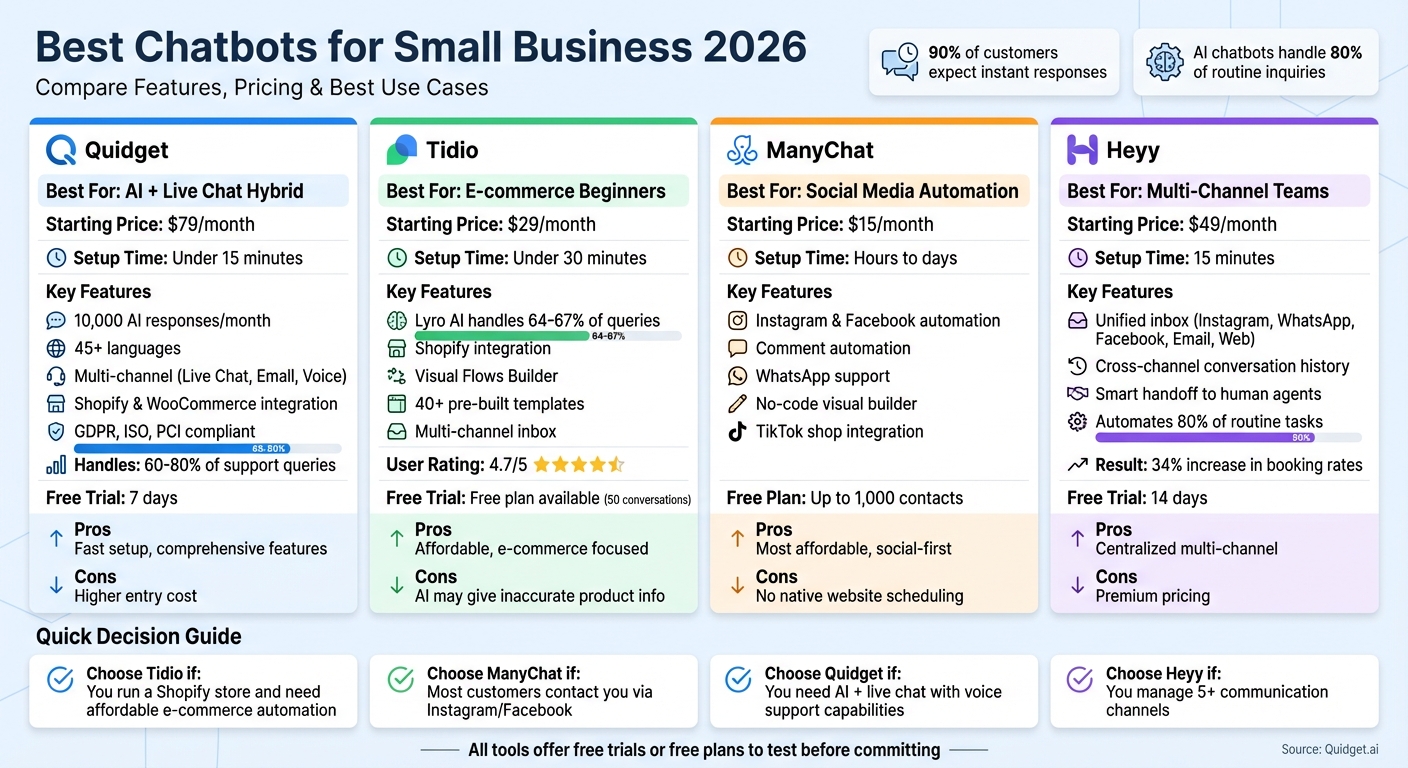
Best Chatbots for Small Business 2026: Feature and Pricing Comparison
AI Chatbots for Small Business (2026) | Never Miss a Lead Again 🚀
sbb-itb-58cc2bf
1. Quidget – AI Agent Builder for Customer Support & Sales
Quidget stands out as a highly-rated AI chatbot designed for small businesses in 2026. It’s tailored for teams looking for straightforward, no-code automation. The platform uses your existing content – like website pages, FAQs, and uploaded documents – to train itself and start answering customer queries in just about 2 minutes. That’s right, no coding skills required.
This chatbot can handle up to 80% of routine support queries. Think of common questions like, “Where’s my order?” or “How do I reset my password?” – these get instant responses. For more complicated issues, the chatbot passes the conversation, along with its full history, to a human team member for resolution.
Setup & Training
Setting up Quidget is quick and hassle-free. All you need to do is connect your website URL and upload any relevant documents. From there, the AI scans your content to learn about your business. It even supports over 45 languages with automatic detection, ensuring customers receive responses in their preferred language without needing manual adjustments.
A great example of its effectiveness comes from Softorino, a software company that adopted Quidget in early 2025 to manage Tier-1 support. The results? The AI now handles 60% of first-level responses, cutting down overall support ticket volume by 35%.
"Quidget’s quick setup now handles 60% of our first-level responses, slashing wait times and letting our team focus on real customer needs."
- Alex Novak, Customer Success Manager, Softorino
Once set up, Quidget’s features are perfectly suited to help small teams tackle everyday support challenges.
Features for Small Teams
Quidget works across multiple channels, including Live Chat, Email, and Voice. Its Voice AI feature can even listen and respond to customers in real time. Plus, it integrates with Gmail to provide AI-driven email responses. Security is a priority too – the platform is fully compliant with GDPR, ISO, and PCI standards, offering end-to-end encryption. Built-in reporting tools also highlight which queries need human intervention.
Platform Integration
Quidget seamlessly connects with tools that small teams often rely on, such as Zendesk, Freshdesk, Slack, WhatsApp, Calendly, Telegram, and Viber. For e-commerce businesses, it integrates directly with Shopify and WooCommerce to handle order-related questions. It’s also compatible with website builders like WordPress, Wix, and Webflow, making embedding a breeze. For more information, visit Quidget.ai.
These integrations, combined with flexible pricing options, make Quidget a practical choice for growing teams.
Pricing & Plans
Quidget offers scalable pricing to fit the needs of small business owners. There’s even a free tier that includes basic features, allowing you to test how well the AI handles your FAQ data. Paid plans start at $79/month for the Pro plan, which includes 10,000 AI responses, 5 AI chatbots, and access to advanced integrations. The Pro Plus plan, priced at $210/month, offers 50,000 AI responses, 50 chatbots, and branding removal. For larger needs, the Enterprise plan at $599/month provides custom integrations and dedicated account management. All plans come with a 7-day free trial – no credit card required.
For small teams just getting started, the free version is perfect for handling basic inquiries. As your business grows, the paid plans unlock features like multi-channel support, detailed analytics, and priority assistance, making Quidget a scalable solution for small business support in 2026.
2. Tidio
Tidio is a popular chatbot solution for small businesses, trusted by over 300,000 companies in 205 countries. Designed with a website-first approach, it’s especially useful for teams focused on e-commerce. One of its standout features is Lyro AI, an assistant powered by Anthropic’s Claude, which can automatically handle 64–67% of customer queries.
Getting started with Tidio is quick and easy – no coding required. You simply provide your website URL or upload FAQ documents, and setup takes just five minutes. What makes it even more appealing is the Visual Flows Builder, which includes more than 40 pre-built templates for tasks like lead generation, cart recovery, and routing FAQs.
Features for Small Teams
Tidio simplifies communication by bringing messages from live chat, email, Facebook Messenger, Instagram DMs, and WhatsApp into a single inbox. It also offers helpful tools like Typing Preview, canned responses, and live visitor monitoring, allowing teams to manage all customer interactions from one dashboard.
For e-commerce businesses, Tidio’s Shopify integration is a game-changer. Agents can view customer carts, check order histories, and track browsing activity in real time. For example, ADT Security saw a 17% increase in sales after adopting Tidio, while Ad Hoc Atelier, a fashion brand, nearly tripled its conversion rate from 0.35% to 0.9%.
"Most of our clients get Tidio up and running within minutes and are seeing the value of our product within the same day."
- Tytus Gołas, CEO and Co-founder, Tidio
However, it’s worth noting that Lyro AI can occasionally provide inaccurate product details, so it’s a good idea to review AI-generated conversations regularly. Tidio’s seamless handling of multi-channel messages is further enhanced by its wide range of integrations.
Platform Integration
Tidio integrates with major platforms like Shopify, WooCommerce, BigCommerce, WordPress, and Wix. Beyond e-commerce, it connects with over 30 tools, including HubSpot, Mailchimp, Klaviyo, and Google Analytics. It also works with Zapier, giving access to more than 8,000 additional apps. For scheduling, you’ll need third-party tools like Calendly or Google Calendar.
Pricing & Plans
Tidio offers flexible pricing options tailored to small teams. Plans are divided into two categories: the Customer Service Suite (live chat and ticketing) and Automation-only plans (Lyro AI and Flows).
- The Free plan includes 50 live chat conversations and 100 chatbot interactions per month, making it a great way to test the platform.
- The Starter plan costs $29 per month, offering 100 conversations, 10 operator seats, and social media integrations.
- The Growth plan ranges from $59 to $349 per month, supporting 250–2,000 conversations and adding features like advanced analytics and permissions.
For AI automation, the Lyro AI add-on costs $39 per month for 50 AI conversations, while the Flows add-on is $29 per month for 2,000 visitors. These add-ons are billed separately from the base plans. Tidio boasts a high user rating of 4.7/5 on G2, Capterra, and the Shopify App Store.
3. ManyChat
ManyChat is built for the Meta ecosystem, focusing on automating interactions across Instagram, Facebook, and WhatsApp. It’s a great solution for teams dealing with a high volume of customer conversations, particularly when most of those interactions happen on social platforms.
One standout feature is its comment automation. The AI can detect and respond to Instagram comments, then transition public interactions into private DMs – helping to convert conversations into sales opportunities.
"ManyChat built its reputation on Instagram and Facebook automation. If most of your customer interactions happen on social media, ManyChat handles it well."
- Paula Nwadiaro, Marketing Associate, Heyy
Let’s dive into how ManyChat supports small teams.
Features for Small Teams
ManyChat includes tools to grow subscriber lists and nurture leads through automated sequences. Small teams can easily broadcast updates and promotions to their entire subscriber base. Plus, the platform offers user-created templates that simplify setup, making it a go-to for small teams in 2026.
Its no-code visual flow builder makes it easy to create promotional funnels and lead qualification sequences. If you’re looking for a similar tool that works directly with your existing content, check out the Quidget blog for more on AI support. However, ManyChat doesn’t have built-in appointment scheduling, so you’ll need to integrate apps like Calendly or Google Calendar through Zapier.
Platform Integration
ManyChat integrates seamlessly with major social platforms like Instagram, Facebook Messenger, and WhatsApp. It also supports TikTok shops, which is a big plus for e-commerce businesses. For additional functionality, such as scheduling or managing other business tasks, Zapier can connect ManyChat to third-party apps. By streamlining customer interactions on social media, ManyChat also provides basic support features, making it a strong contender as a support chatbot.
Pricing & Plans
ManyChat offers a free plan that supports up to 1,000 contacts and includes basic automation features. Paid plans start at just $15 per month, making it a budget-friendly option for small businesses. Pricing adjusts based on your contact list size, with advanced tools like email and SMS capabilities available in the Pro plan. This flexible pricing structure ensures ManyChat remains accessible for small teams, even those operating on tight budgets and focusing on social selling.
4. Heyy
Heyy is built for small businesses that need to manage customer interactions across multiple social platforms. Instead of toggling between five separate inboxes, Heyy brings everything together in one workspace. It supports Instagram DMs, WhatsApp, Facebook Messenger, website chat, and email. Even better, the AI keeps track of customers across these channels. For instance, if a customer messages on Instagram today and WhatsApp next week, Heyy ensures the conversation history stays intact.
The platform refers to its chatbot as an "AI Employee" because it goes beyond basic, pre-programmed replies. Setup takes just 15 minutes – simply upload your business details or link your website. If the AI can’t handle a query, it seamlessly forwards the conversation, complete with context, to your team. This means customers never have to repeat themselves. Next, let’s look at how Heyy simplifies multi-channel communication for small teams.
"Heyy is what I’d use if I was running my own business today. Why? Because it nails the thing most AI agents struggle with: feeling natural across every channel your customers actually use."
- Paula Nwadiaro, Marketing Associate, Heyy
In late 2025, a plumbing business struggling to manage appointment requests across five platforms adopted Heyy. By automating repetitive scheduling tasks and centralizing all messages, they achieved a 34% increase in booking rates.
Features for Small Teams
Heyy’s ability to maintain context across platforms is a major advantage for small teams handling large volumes of messages. The AI can automate up to 80% of routine tasks, such as answering questions about order tracking or stock availability. Businesses can also analyze customer inquiries over a 24-hour period to identify the top 10 most common questions to automate first.
The platform’s smart handoff feature ensures that complex issues are routed to the right team member, complete with the full conversation history. Faster response times – within 5 minutes instead of an hour – have been shown to increase conversion rates by 90%. Additionally, small businesses report a 30-60% reduction in support workload when using AI tools like Heyy.
Platform Integration
Heyy integrates seamlessly with popular communication channels like WhatsApp, Instagram, Facebook Messenger, website chat widgets, and email. It also connects with CRMs, e-commerce platforms, and appointment booking systems. The no-code builder makes it easy to link your favorite tools during the 14-day free trial. For small businesses in 2026, Heyy’s focus on multi-channel functionality is a practical choice.
Pricing & Plans
Heyy’s pricing starts at $49 per month. While this may be higher than some single-channel tools, it consolidates multiple inboxes into one system, saving time and effort. The 14-day free trial doesn’t require a credit card, so you can test how well the platform handles multi-channel communication – especially on key platforms like Instagram and WhatsApp – before deciding. Custom pricing is also available for businesses that need advanced AI features.
For small teams managing conversations across various social platforms, Heyy offers a solid balance of cost and functionality. To learn more about AI chatbot solutions for small businesses in 2026, visit Quidget.ai.
Comparison: Pros and Cons
After exploring the detailed features of each platform, here’s a breakdown of the key factors to consider when choosing small business chatbot software for 2026.
Finding the right chatbot comes down to balancing cost, ease of setup, and channel coverage. Quidget is a standout option for teams needing a mix of AI automation and live chat support. Its 7-day free trial and no-code builder make it possible to launch in just minutes. Tidio, on the other hand, offers a free tier that’s great for e-commerce beginners, though its Lyro AI can occasionally provide incorrect product details. If your business focuses heavily on social media, ManyChat is an affordable choice at $15/month, though it doesn’t include native website scheduling. For those managing multiple channels, Heyy consolidates Instagram, WhatsApp, and web chat into one inbox for $49/month, making it a strong option despite its higher price point.
When it comes to setup, the complexity differs by platform. Both Quidget and Heyy allow you to go live in under 15 minutes, while ManyChat’s visual flow builder might take a few hours to master. Tidio strikes a middle ground, requiring about 30 minutes to get started.
Pricing structures also vary significantly. Quidget offers a flat $79/month plan for up to 10,000 AI responses, which helps avoid unexpected costs as your chatbot scales. In contrast, Tidio uses a usage-based pricing model, and ManyChat adjusts fees based on the number of contacts. Heyy keeps things simple with a $49/month fee that covers multi-channel support, potentially replacing the need for multiple tools.
For a quick snapshot of each tool’s strengths and challenges, check out the table below:
| Tool | Best For | Starting Price | Setup | Drawbacks |
|---|---|---|---|---|
| Quidget | AI + live chat hybrid | $79/month | Under 15 min | Higher entry cost compared to single-channel tools |
| Tidio | E-commerce beginners | $29/month | Under 30 min | AI may generate inaccurate product information |
| ManyChat | Social media automation | $15/month | Hours to days | Lacks native website scheduling |
| Heyy | Multi-channel teams | $49/month | Under 15 min | Premium pricing for small budgets |
Take 24 hours to monitor your customer inquiry channels and identify the chatbot that aligns with your team’s needs. Each tool offers unique advantages, so the best choice depends on your specific priorities.
Conclusion
Picking the right small business chatbot software for 2026 depends on your customer base and automation needs. For Shopify store owners seeking a fast setup, Tidio offers seamless e-commerce integration and a free tier, with paid plans starting under $30/month. If your focus is Instagram, Facebook, or WhatsApp automation, ManyChat is a strong contender, starting at about $15/month. For those needing a blend of AI responses and live chat handoff, Quidget provides 10,000 AI responses per month – perfect for small teams managing moderate support loads.
When deciding, think about your team’s size and technical expertise. Tools like Quidget and Heyy offer no-code setups that can be up and running in minutes, while ManyChat’s visual flow builder might take a bit longer to master. For startups on a tight budget, Tidio’s free plan is a great way to gauge its value before committing to a paid version.
"A basic AI chatbot running on your site today is infinitely more valuable than a perfect chatbot you are still researching next month." – Ruben Buijs, Founder, Boei
If your inquiry volume is low, start with a free plan and monitor AI logs weekly. When conversations reach around 1,000 per month, a flat-rate plan can help you manage costs effectively. Also, consider tools with safeguards against AI errors, like hallucinating product details or pricing, to maintain accuracy.
Ultimately, the best chatbot for 2026 is the one you actually implement. Choose a tool that aligns with your main communication channel, test it with your top 10 customer questions, and adjust as needed. To see if Quidget fits your workflow, visit Quidget.ai and try it free for 7 days.
FAQs
How do I choose the best chatbot for small teams in 2026?
When choosing a chatbot for your small team in 2026, it’s important to focus on tools that are budget-friendly, simple to implement, and don’t demand technical know-how.
Key features to look for include:
- The ability to handle repetitive questions efficiently.
- Multi-channel support, such as integration with WhatsApp, websites, and other platforms.
- Dependable AI-generated responses that feel natural and helpful.
For small businesses, opt for chatbot software that offers visual builders – these make customization and setup much easier. To keep costs manageable, aim for tools priced under $50 per month. This combination of affordability and functionality can help meet your team’s needs without unnecessary complications.
How do I stop my chatbot from giving wrong answers?
To minimize incorrect responses, select a chatbot equipped with features like hallucination prevention and human + AI collaboration for managing complex questions. Additionally, keep your knowledge base up-to-date and ensure the AI is trained with accurate, current information. These practices can significantly boost the chatbot’s accuracy and lead to more reliable answers.
What should I automate first with an AI chatbot for small business 2026?
Automating repetitive customer inquiries – like questions about pricing, product features, or order status – is a smart way to save time and improve efficiency. With automation, customers get instant, accurate answers anytime, day or night, while your team can shift their focus to more complex or high-priority tasks. No-code platforms make this process even simpler, allowing you to set up these systems without technical expertise. It’s a straightforward way to enhance support while freeing up your team’s bandwidth.


