

From Chaos to Clarity: How a 5-Person Team Automated Support Across 4 Channels and Saved 60% of Their Week

It’s 10:30 on a Tuesday night. You’re supposed to be done for the day, but your phone keeps lighting up.
An Instagram DM asks where an order is. WhatsApp pings with a delivery change. Email is filling up with returns and tracking complaints. Discord is doing what Discord does best: moving too fast for any sane person to keep up.
If you run a small business, that scene probably feels familiar. And the problem isn’t that you care too much about customers. It’s that support has quietly turned into four separate jobs wearing one name.
That’s where a lot of small teams get stuck. They want to be available everywhere their customers are, but the minute support spreads across Instagram, WhatsApp, email, and community chat, the work stops being “multi-channel” and starts becoming chaotic. Customers don’t see channels; they see your brand. And 76% of them expect consistent interactions across departments, which is hard to deliver when your team is bouncing between disconnected tools all day.
This isn’t just an enterprise problem anymore. Small businesses are adopting AI support quickly, and one widely cited figure puts chatbot usage at 74% among SMB customer service teams already using AI. The gap now is less about awareness and more about execution.
Here’s what that looked like for one five-person team using Quidget.
The problem
Let’s call the owner Sarah.
She runs a growing Shopify store with an active customer base and a community that actually talks back, which sounds great until you’re the one fielding every question. On paper, the business was doing well. Behind the scenes, her team was spending an absurd amount of time chasing messages, repeating answers, and trying not to miss something important.
The mess came from four places:
- Instagram DMs, full of quick pre-purchase questions like sizing, variants, and availability.
- WhatsApp, where people wanted fast answers about orders, delivery windows, and changes.
- Email, which became the holding pen for returns, damaged items, and anything that took more than two lines to explain.
- Discord, where community chat, product help, and support requests all bled into each other.
None of those channels was the problem on its own. The problem was the switching.
Open Instagram. Reply. Jump to email. Check Discord. Back to WhatsApp. Miss a message. Apologize. Start over.
That kind of context switching drains people faster than most founders realize. Businesses using unified inbox tools report productivity gains of up to 60%, largely because teams stop wasting time hopping between tools and hunting for context. Sarah’s team felt the inverse of that every day: slower replies, dropped threads, duplicated effort, and a constant low-grade sense that something was slipping through the cracks.
And once support starts eating the day, the rest of the business pays for it. Product work slows down. Marketing gets pushed. Growth projects stall. Everyone stays busy, but not with the work that actually moves the company forward.
The fix
Sarah didn’t need a data science team. She needed one place to work, a way to cut the noise, and a system that could handle the repetitive stuff without breaking the customer experience.
That’s where Quidget came in.
Step 1: Put every channel in one inbox
The first move was the simplest and probably the most important: stop managing support in four separate places.
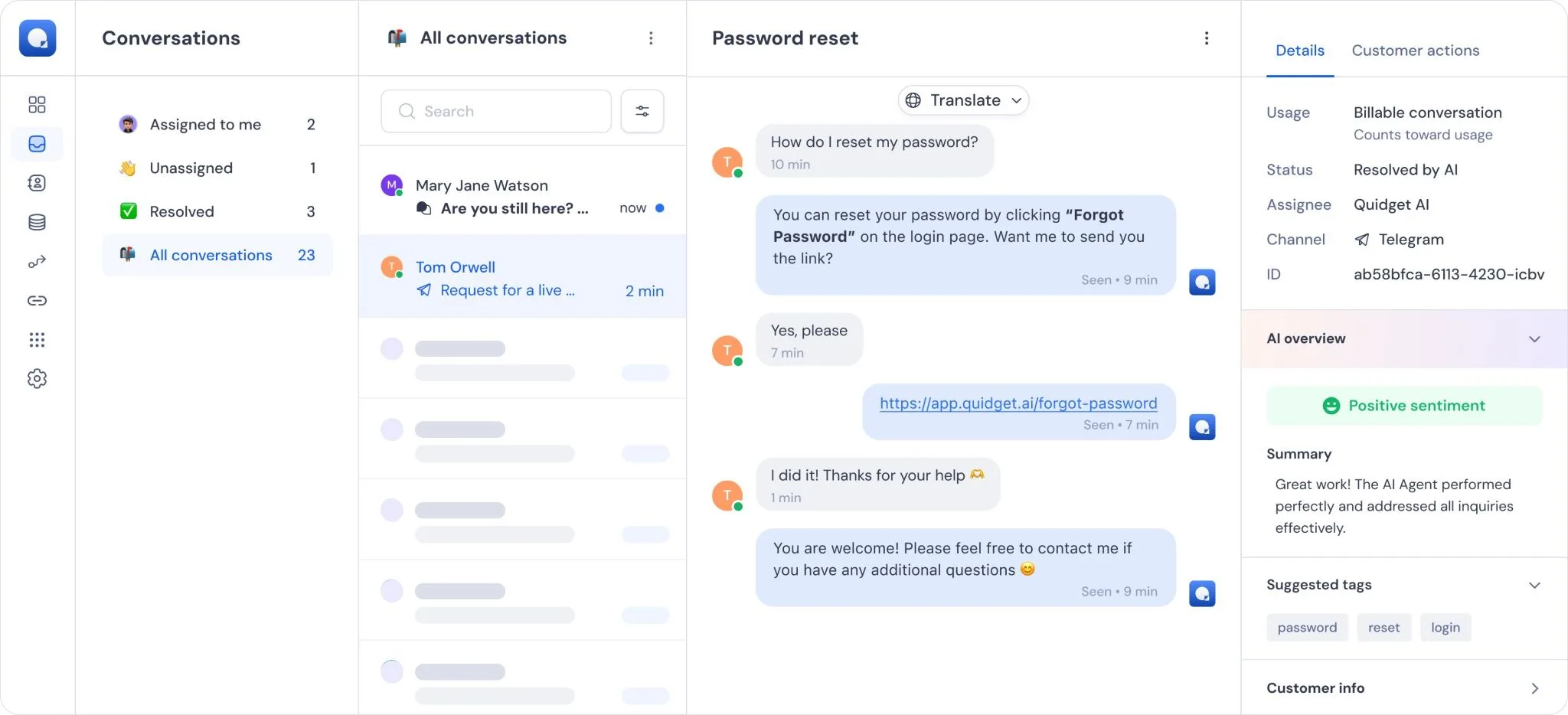
Sarah connected Instagram, WhatsApp, email, and Discord to Quidget’s unified inbox so the team could see every conversation in one dashboard. No more guessing where a customer wrote in. No more “Can someone check WhatsApp?” messages in Slack. No more opening five tabs before the day had properly started.
A unified inbox sounds boring until you’ve lived without one. Then it feels like oxygen.
Step 2: Use AI to sort the mess before a human touches it
Once everything was flowing into one place, the next problem became obvious: not every message deserved the same level of attention.
Some messages were simple. Some were urgent. Some were annoyed enough that they needed a real person immediately.
So Sarah turned on AI triage.
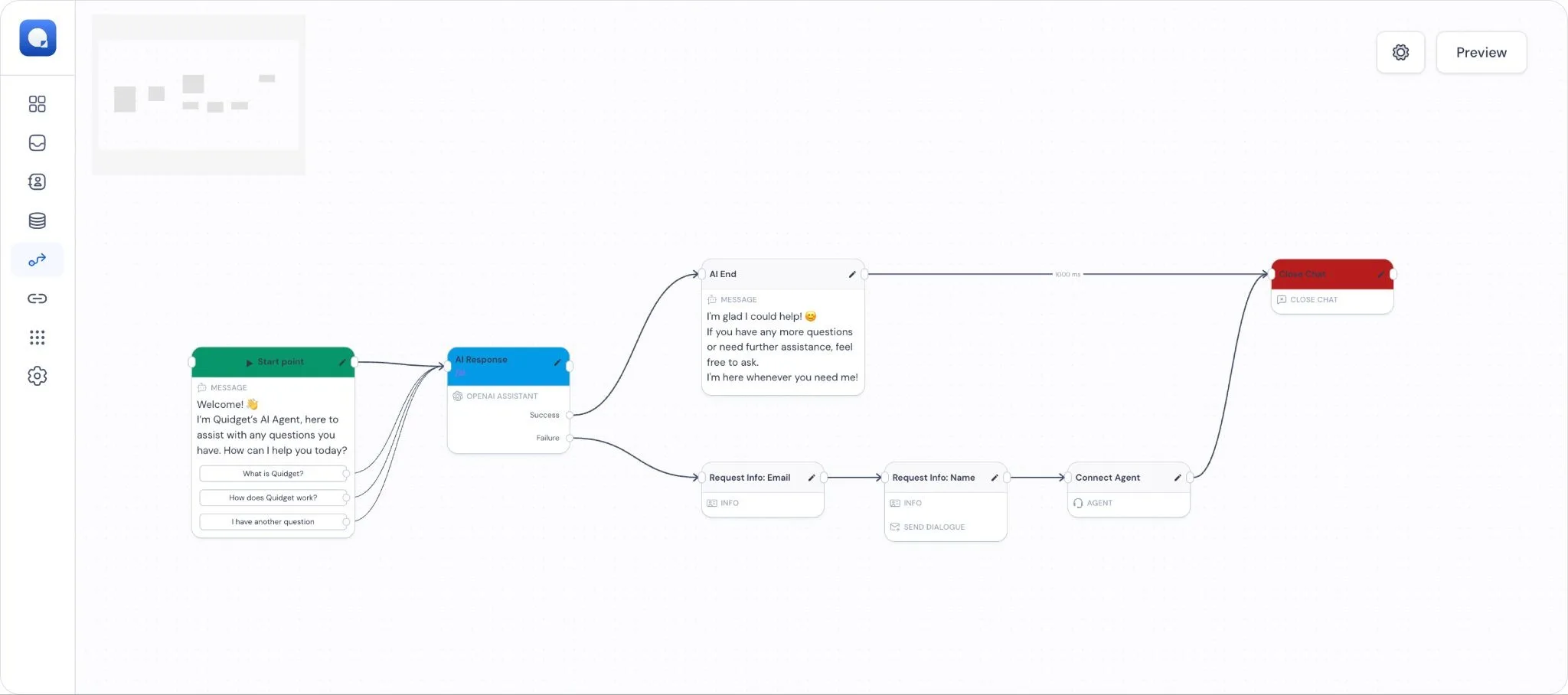
Instead of asking a team member to read every incoming message and decide what to do with it, Quidget handled the first layer of sorting. Routine questions could be tagged and answered automatically. High-friction issues could be flagged early. Anything that looked emotional, complex, or high-value could go straight to a human.
That matters more than it sounds. Automation of routine support work can reduce workload by roughly 50% to 60% when it’s set up well. The real win isn’t just saved time. It’s protecting human attention for the cases where judgment actually matters.
Step 3: Automate the repetitive questions
This is where the team started getting serious time back.
Quidget was trained on Sarah’s FAQs and connected to the store setup, which meant it could handle the questions that were showing up again and again anyway:
- “Where is my order?”
- “Do you have this in red?”
- “What’s your return policy?”
- “How long does shipping take?”
- “How do I set this up?”
These are not deep support problems. They’re repetitive interruptions.
AI agents can automate up to 80% of repetitive queries in the right environment. For Sarah’s team, that meant Instagram DMs about sizing could get answered instantly, WhatsApp could return tracking updates in seconds, Discord could absorb routine setup questions without pulling in a moderator, and simple policy emails no longer needed a person to write the same paragraph for the twentieth time that week.
That’s the part founders usually underestimate. You don’t need AI to solve everything. You need it to stop wasting your team on things that are already predictable.
Step 4: Know when to hand it off
Bad automation is obvious. It traps customers in dead ends, repeats canned lines, and makes people work harder just to reach a human.
Sarah didn’t want that, and honestly, neither should you.
So the system was set up with a clear handoff rule: when a conversation became unusual, sensitive, or frustrated, it moved to a human with the full chat history intact. No restarting. No “please explain again.” No awkward gap between the bot and the person.
That handoff is what makes automation useful instead of irritating. The AI handles speed. The human handles nuance.
Step 5: Measure what changed
Before Quidget, Sarah’s team was operating mostly on feeling. They knew support was heavy. They knew people were tired. They knew response times were slipping. But they couldn’t easily see where the pressure was coming from or which channel was causing the most drag.
With everything centralized, that changed.
Now they could track ticket volume, deflection, response time, and customer satisfaction in one place. They could see whether Monday mornings were a WhatsApp problem, whether Discord was generating too many avoidable support questions, and whether the AI was actually reducing workload or just moving it around.
That visibility matters because integrated omnichannel tools can cut service costs by up to 35% and reduce wait times by 39% when teams stop operating in silos. You can’t improve what you can’t see.
The results
Thirty days in, the difference was obvious.
Not “we feel a bit more organized” obvious. Operationally obvious.
Here’s how the numbers shook out for Sarah’s five-person team:
| Metric | Before Quidget | After Quidget | What changed |
| Hours spent on support | 40+ hours/week | ~16 hours/week | About 60% of the team’s week was freed up |
| First response time | 4–6 hours | Under 2 minutes | Customers stopped waiting around for basic answers |
| Routine ticket deflection | 0% | 75% | AI handled 3 out of 4 repetitive questions |
| Customer satisfaction (CSAT) | Dropping | Up by 22% | The experience became faster and more consistent |
That 22% lift fits the broader pattern companies see when AI is used well in customer service, with some reporting gains of up to 25% in satisfaction scores. And the time savings were big enough that Sarah didn’t need to hire another support agent just to stay afloat.
That’s the real business case.
Not “AI is exciting.” Not “automation is the future.” Just this: the team got its time back, customers got faster answers, and support stopped hijacking the rest of the company.
If you’re trying to run a lean business, that matters more than any buzzword ever will.
And there’s a longer-term payoff too. Companies with strong omnichannel strategies retain 89% of their customers, compared with 33% for those without them. That’s not a vanity stat. It’s what happens when customers stop feeling like they’re dealing with four disconnected versions of the same brand.
You don’t need to keep doing support the hard way. You need one system, clear rules, and enough automation to remove the obvious bottlenecks.
If you want to see what that looks like in budget terms, start with affordable AI support pricing for SMBs.
FAQs
What is a unified inbox?
A unified inbox is one dashboard that pulls messages from multiple channels, like email, WhatsApp, Instagram, and similar tools, into a single view so your team can reply from one place.
How can AI help with Instagram DMs?
It can read incoming DMs, recognize common questions like shipping, stock, pricing, or sizing, and send an immediate answer when the request is straightforward. That means fewer missed sales opportunities and less time spent typing the same reply over and over.
Can I automate WhatsApp support safely?
Yes, as long as you use an official integration and keep a clean human handoff in place. The safe setup is simple: let automation handle tracking, FAQs, and basic scheduling, then route anything sensitive, unusual, or frustrated to a real person.
Will automation make support feel robotic?
It will if you do it badly. If you automate everything, hide the human option, and write replies that sound like policy documents, customers will notice. If you automate the repetitive layer and hand off the messy stuff properly, support usually feels faster, cleaner, and less frustrating.
Is this realistic for a small team?
That’s exactly who this setup is for. The whole point is to help a small team stop operating like four separate help desks stitched together with panic and browser tabs.


