

The AI Handoff Problem: 5 Triggers for Bot-to-Human Escalation (+ Best Practices)

The Moment That Makes or Breaks AI Support
You’ve spent weeks on prompts, RAG pipelines, and testing. You launch your AI support agent. First response times drop by 43%, and cost per ticket falls through the floor. The dashboard looks beautiful.
Then you check post-support CSAT. And your stomach drops.
Even top-performing AI agents resolve 70–90% of routine queries without human intervention. But the moment they fail and fumble the handoff, customer loyalty takes a hit. I’ve watched teams celebrate deflection rates while their NPS quietly cratered because the remaining escalated tickets got treated like digital refugees.
The AI Handoff Problem is that invisible friction point. According to ETS Labs, 68% of bot-to-agent handoffs lose critical context. That single failure causes an immediate 31% drop in CSAT and adds an average of 23 seconds to handle times. When a bot can’t resolve an issue and offers no clear escalation path, it damages satisfaction faster than a long hold time ever could.
A seamless handoff isn’t just a technical feature. It is the single most important interaction pattern for AI-human harmony. Get it right, and the customer never notices the seam. Get it wrong, and no amount of model tuning will fix the relationship.
Here is how to bridge the gap between your AI agents and human teams without losing your customers or your mind.
Why Most AI-to-Human Handoffs Fail
Many B2B SaaS companies and enterprise CX teams treat AI implementation as a discrete project rather than an ecosystem. They deploy a bot, hook it to a ticketing system, and assume the transition will handle itself.
It won’t.
4 Critical Failure Modes
When handoffs break, they usually collapse into one of four distinct patterns:
- Context Amnesia (The Loop): The customer explains a complex API integration issue to the AI. The bot hits its limit and transfers the chat. The human agent arrives and says, “Hi! How can I help you today?” The customer is forced to repeat themselves. When this happens, CSAT instantly drops by 31%.
- Blind Routing: The AI acts as a traffic controller with no map. It reads “charge” and dumps a billing dispute into a technical tier-3 queue. Now a backend engineer is staring at an invoice complaint, and the customer is heating up.
- The Abrupt Cold Drop: The conversation cuts off with a generic “Please wait while I connect you.” No warning, no timeline, no reassurance. This poor UX design causes 25–35% of users to abandon the conversation entirely.
- The Broken Feedback Loop: The AI escalates a ticket, a human agent resolves it brilliantly, and… nothing happens. The resolution data stays siloed. The bot never learns, so it fails the exact same way tomorrow.
The Real Cost of Failure
This isn’t a minor operational headache. It’s an expensive leak in your balance sheet.
Consider the automation trap. If your AI handles the easy 40% of ticket volume but makes the hard 60% worse through fractured handoffs, your Average Handle Time (AHT) on escalations skyrockets. You’re also burning inference costs to alienate users. And if you lose an enterprise account because your bot choked during a critical outage? That one bad handoff just cost you tens of thousands in ARR.
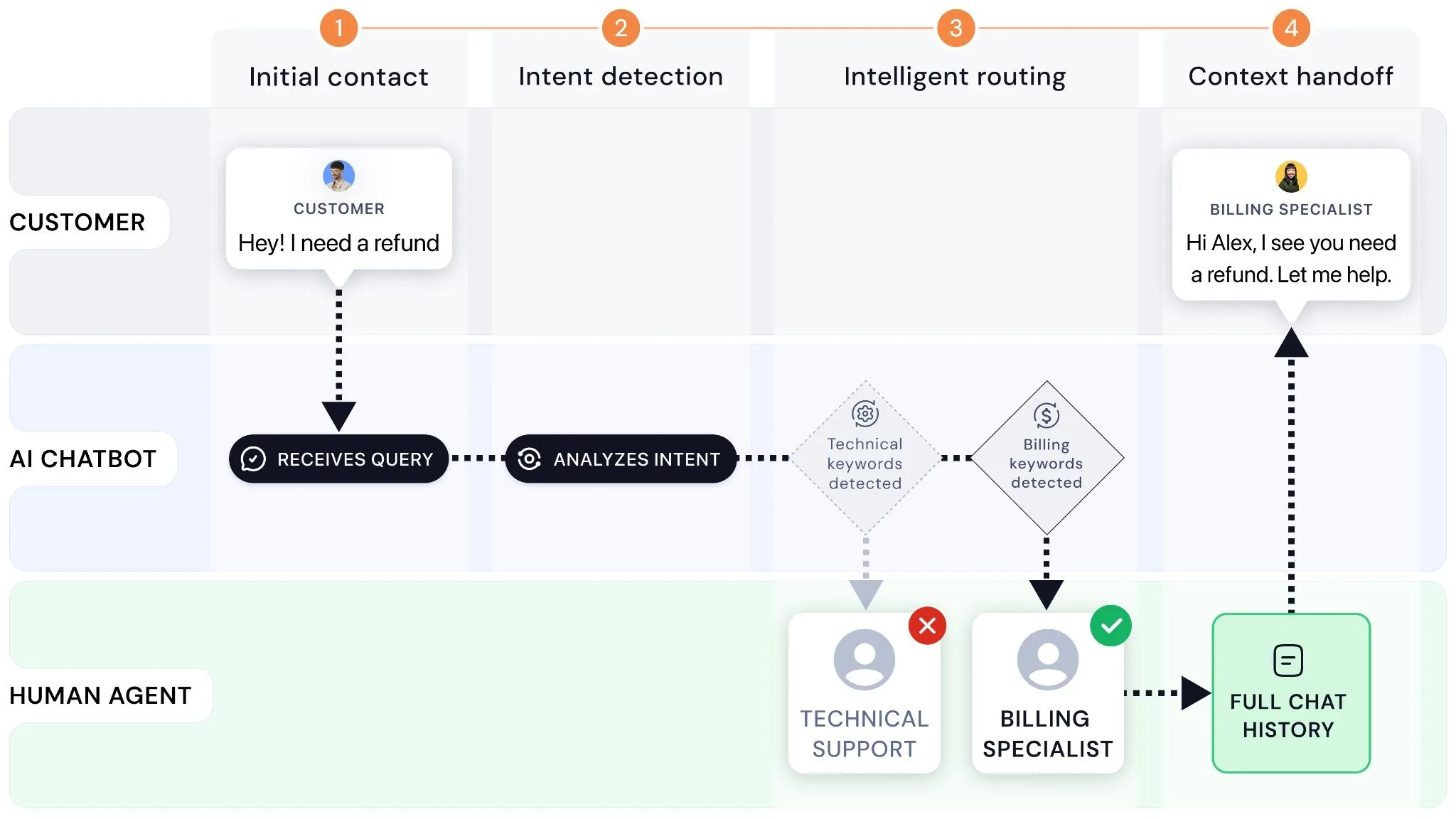
5 Escalation Triggers – When to Hand Off to a Human
To avoid the automation trap, your system needs explicit, vendor-agnostic rules that dictate exactly when the AI should step back.
Here are the five universal escalation triggers every CX operations manager should configure.
1. Confidence-Based Triggers (Technical)
Don’t let the bot guess if it knows the answer. Use your system architecture to measure certainty.
- RAG Confidence Scores: Set a strict threshold. If your Retrieval-Augmented Generation system returns a confidence or semantic similarity score below 0.65, the AI should trigger a fallback chain rather than hallucinating an answer.
- Generation Vector Metrics: If the distance between the user’s query vector and your internal knowledge base documentation is too wide, flag the ticket for human review.
2. Customer Signal Triggers (Behavioral)
Customers will tell you when they’ve had enough, either explicitly or implicitly.
- Direct Opt-outs: If a user types “let me talk to a person,” “agent,” or “human,” bypass all defense layers.
- Behavioral Loops: If a user asks the same question three different ways within a single session, the bot is stuck in a conversational loop. Track session state and escalate on the third attempt.
- Sentiment Analysis: Run real-time sentiment scoring on user inputs. If the score dips into highly negative territory, detecting anger, heavy sarcasm, or capital letters, auto-escalate before they threaten to churn.
3. Business Logic Triggers (Policies & Rules)
Some decisions require human empathy, nuance, or specific operational authority.
- VIP Triage: Cross-reference the user’s email or account ID with your CRM. If they belong to a tier-1 enterprise account or high-value segment, route them to a human team immediately for white-glove treatment.
- Compliance & Governance: Any query involving strict regulatory elements (fraud alerts, legal threats, or account cancellations) should bypass the AI entirely to protect your business from liability.
4. Conversation Flow Triggers (Structural)
Sometimes the infrastructure itself breaks down, and your handoff rules must act as a safety net.
- The Multi-Fallback Limit: If the bot triggers its standard “I’m sorry, I didn’t quite catch that” message twice in a row, the conversation flow has broken down. Escalate.
- API Breakdowns: If an integration timeout occurs or a backend database fails to return a response within a set number of seconds, transition the user to a live agent seamlessly rather than displaying a raw system error.
5. High-Stakes Topic Triggers (Content-Based)
Certain keywords indicate that the conversation is too volatile for an LLM to navigate safely.
- Hardcoded Keywords: Maintain a strict regex pattern match list for sensitive topics like refund, cancel my subscription, lawyer, complaint, or breach.
- The AI Boundary: According to a Carnegie Mellon study reported by The Register, AI agents get multi-step tasks wrong approximately 70% of the time. If the customer’s request requires chain-of-logic troubleshooting across multiple third-party tools, route it to a human specialist from the start.
How to Build a Seamless Handoff Workflow (Step by Step)
Designing a great handoff requires configuring conditional logic to bridge the gap between machine efficiency and human intelligence.
Step 1: Define Your Escalation Thresholds (Triage Rules)
Map your triggers to a clear routing matrix. Your software stack should follow this logic:
| If Customer Signal Is… | And Confidence Score Is… | Then Action Taken Is… |
| General Product Inquiry | ≥ 0.70 | Allow AI to generate response |
| General Product Inquiry | < 0.70 | Trigger RAG fallback → Escalate to human |
| Keyword: “Cancel Account” | Any | Hard route to Customer Retention team |
| VIP Customer Account | Any | Immediate warm transfer to Account Manager |
| Negative Sentiment Detected | Any | Interrupt AI generation → Live chat takeover |
Step 2: Configure Automated Context Transfer (Shared Memory)
When the threshold is met, package the conversation data into a single payload. Never send raw, unstructured chat logs to your agents. Instead, use an LLM utility step to summarize the payload before the human arrives:
- The Core Intent: A single sentence explaining what the user wants (e.g., “User is trying to update their billing credit card but keeps encountering a 402 error code.”)
- Attempted Solutions: What links or answers the bot already presented, ensuring the agent doesn’t repeat the same steps.
- Metadata Pack: The customer’s subscription tier, browser info, and authentication status.
Step 3: Choose Your Handoff Type (Warm vs. Cold)
- Warm Handoff (Recommended Standard): The AI sets expectations transparently: “I want to make sure you get the right help with this billing error, so I’m looping in Sarah from our finance operations team. I’m passing over our notes right now so she can pick up exactly where we left off.”
- Cold Handoff (Emergency Only): Used for security anomalies or fraud detection where the AI cuts off access immediately and opens a high-priority ticket in the human queue without displaying internal routing mechanics.
- Hybrid / Human-in-the-Loop (HITL): The AI drafts a response but holds it in a staging queue. A human agent reviews, tweaks, and clicks Send. The customer believes they are talking to a highly efficient assistant, while your business maintains a safety filter over the output.
Step 4: The Human Agent’s Takeover Protocol
Train your human support team to read the AI summary before typing. Their opening line should acknowledge the history explicitly:
Excellent Takeover Example:
“Hi Alex, I see you’ve been working with our assistant to debug the API connection error and that the last test returned a 401 unauthorized code. Let’s look at your authorization headers together so we can fix this.”
This approach instantly lowers the customer’s defenses because it proves their time wasn’t wasted.
Step 5: Close the Feedback Loop
Every time an agent takes over a ticket, they should tag the root cause of the escalation (e.g., AI_Missing_Knowledge, AI_Looping, Complex_Troubleshooting). Use these tags weekly to update your documentation, patch your prompts, and systematically lower your escalation rates over time.
Measuring Handoff Success – Metrics That Matter
If you aren’t measuring your handoffs, you are flying blind. To determine the financial and cultural ROI of your AI implementation strategy, track these four core metrics on a unified dashboard.
Core Metrics
| Metric | Definition | Target |
| Escalation Rate | Percentage of total AI-initiated conversations requiring human intervention | 20–30% |
| AI Resolution Rate (Deflection Rate) | Percentage of tickets solved and closed by AI without human touch | 70–80% |
| Context Retention Rate | Percentage of escalated tickets where the human agent reviews the structured summary rather than asking the user to repeat themselves | >95% |
| Post-Escalation CSAT | Customer satisfaction score of escalated tickets, measured separately from AI-resolved tickets | >95% |
The Operational Sweet Spot
A healthy customer support ecosystem scales efficiently when your team hits 70–80% automatic resolution on Tier-1 tickets, while maintaining a 95%+ CSAT score on escalations.
If your deflection rate rises but your post-escalation CSAT plummets, your AI is likely gatekeeping support. It is trapping frustrated customers in a loop to artificially inflate deflection metrics, which will ultimately drive up your customer churn rate.
Avoiding the Handoff Trap – 5 Mistakes to Avoid
- Treating AI Like a Legacy IVR Tree: Do not force customers through rigid, frustrating chat choices that ignore their open-text inputs.
- Making Customers Beg for a Human: If a customer has to ask for an agent multiple times, you have already compromised the relationship. Anticipate their frustration using sentiment triggers.
- Failing to Unify Your Systems: Running an AI bot from one vendor and your agent workspace on another without a deep API integration creates data silos that break context preservation. Keep your data unified.
- Escalating Too Early: If your confidence threshold is set too conservatively (e.g., < 0.85), the bot will hand off basic questions it could easily answer. This floods your human queues with simple tickets and ruins your automation ROI.
- Escalating Too Late: Forcing an angry customer to interact with an AI model for ten minutes before transferring them guarantees a negative review. Know when to walk away.
FAQ: AI Handoff Questions Answered
Q1: What is the difference between a warm handoff and a cold handoff?
A warm handoff passes the full conversation transcript, intent analysis, and user metadata to the human agent while setting clear expectations for the customer. A cold handoff transfers the user to a queue with no background information, forcing them to repeat their problem from scratch.
Q2: How do I set the right confidence threshold for my use case?
Start with a threshold of 0.65 to 0.70. Monitor your logs for a week: if the AI is giving wrong answers (hallucinations), raise the threshold. If it’s escalating simple questions that it answers correctly in your testing environment, lower the threshold slightly.
Q3: When should AI never handle a ticket?
AI should never attempt to handle billing disputes, refund requests, data deletion updates (GDPR/CCPA compliance), account cancellations, or situations where the customer exhibits severe emotional distress. These scenarios demand human empathy and authority.
Q4: Can a conversation hand back to AI after human resolution?
Yes. Bi-directional handoff patterns are highly effective. For example, a human agent can step in to resolve a complex account provisioning issue and then pass the chat back to the AI by saying, “Now that your account is active, our assistant can guide you through setting up your first dashboard project.”
Q5: How do I measure if my handoff design is working?
Track your Post-Escalation CSAT and Average Handle Time (AHT) on Escalated Tickets. If your handoff design is successful, your human agents will resolve escalated tickets faster because they have immediate access to the necessary context, and your CSAT scores will remain steady.
Handoff Is a Trust Signal, Not a Failure Mode
Escalation isn’t a sign of AI failure. It’s a core design principle that acknowledges an AI agent’s natural limits.
By designing a clear, context-aware bridge between your AI models and human teams, you protect your customer relationships while maximizing automation efficiency. This approach keeps your human agents focused on high-value, empathetic problem solving, rather than hunting for basic account details.
Take a look at your current support workflows today. Identify your weakest handoff point, configure a clear confidence or sentiment trigger, and stop letting context disappear into the ether. Your customers and your support team will thank you.
What is the biggest friction point in your current customer support workflow? Let’s discuss how optimizing your AI-to-human transition strategy can protect your customer satisfaction scores.


