

Training Your AI Support Agent on Years of Email History: A Practical RAG How-To

The Goldmine in Your Inbox
Most support teams are sitting on a massive knowledge base and barely using it.
It lives in years of customer emails: bug reports, billing questions, setup issues, account changes, escalations, and the small edge cases that never make it into the help center. Product docs tell customers how things are supposed to work. Support emails show how they actually break.
That distinction matters.
If you want an AI support agent to answer like your best human reps, feeding it a few polished knowledge base articles usually isn’t enough. Good support depends on context, precedent, tone, and pattern recognition. In other words, it depends on the messy, real-world history your team has already built.
The practical way to unlock that history is with RAG.
The RAG Promise: Context-Aware, Grounded Support
RAG, short for Retrieval-Augmented Generation, is a way to improve a large language model by having it pull from an authoritative knowledge source outside its training data before it generates an answer.
That matters because LLMs on their own can be outdated, generic, or confidently wrong. AWS puts it plainly: a model without retrieval can rely on static training data, produce non-authoritative answers, and miss current or company-specific information.
A RAG workflow changes that. Instead of asking the model to answer from memory, you first retrieve the most relevant source material, then pass that context into the prompt. The model still writes the response, but it does so with evidence in front of it.
For support, that is a much better setup.
Customers do not care whether the answer sounds smart. They care whether it is correct, current, and consistent with what your team would actually say.
Why Email History Is a Strong Fit for RAG
When teams start exploring AI support, they often jump straight to fine-tuning because it sounds more advanced. In many support use cases, that is the wrong first move.
AWS’s guidance is fairly clear here: if you need a question-answering system over custom documents, start with a RAG-based approach; use fine-tuning when you need the model to perform additional tasks or adapt more closely to your organization’s style.
That distinction is useful in customer support because support knowledge changes constantly. Product behavior changes. Pricing changes. Policies change. Workarounds change. RAG is better suited to that reality because it can incorporate new documents quickly, while fine-tuning is slower, more specialized, and less practical when source material changes often.
Email is especially valuable because it captures what formal documentation tends to miss:
- How customers phrase real problems.
- Where they get stuck.
- Which answers actually resolved the issue.
- What context support reps needed to move the case forward.
- Which edge cases keep resurfacing.
Those patterns are gold if your goal is to make an AI agent more useful than a generic chatbot.
There is also a measurable business case for applying AI to long email threads. In an AWS case study on Epilot, the company reports that AI summaries reduced email processing time by 87 percent, and its senior product engineer says users save 87 percent of their time with the feature.
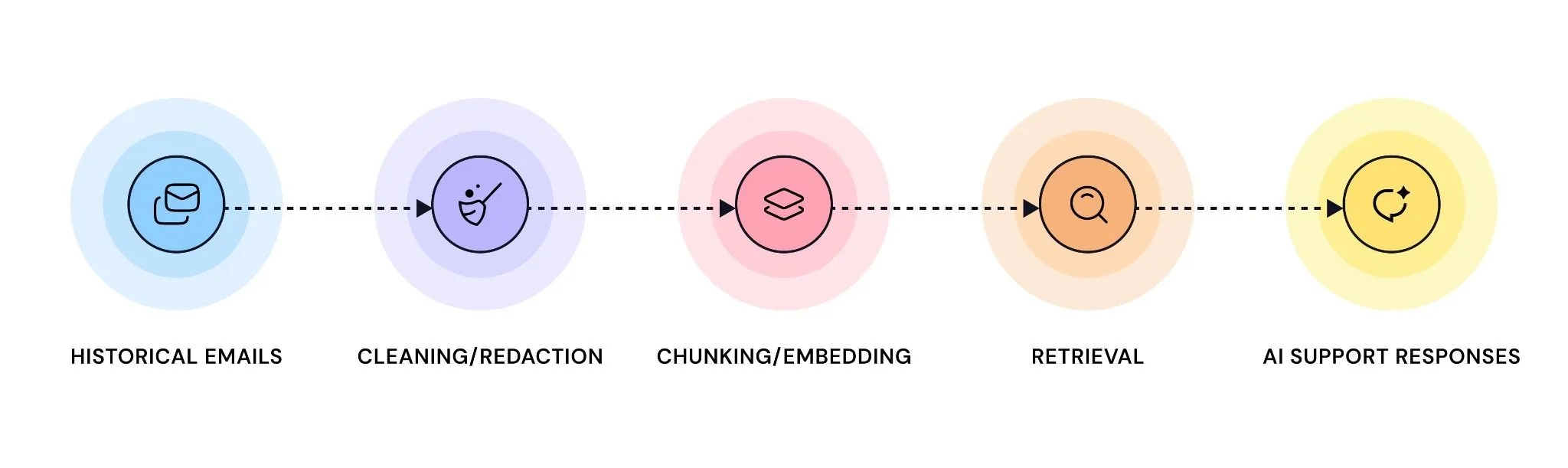
Step 1: Select the Right Data
The first mistake most teams make is trying to ingest everything.
That sounds ambitious, but it usually creates noise. Old support threads often contain outdated policies, deprecated product behavior, legacy pricing, and inconsistent service standards. If you teach your system from all of it at once, you increase the odds that it retrieves the wrong answer for the right question.
A better approach is to start with a smaller, cleaner slice of data.
TechTarget’s RAG implementation guidance recommends a repeatable data preparation strategy that begins by surfacing your most valuable sources, then filtering out irrelevant or outdated information before retrieval even starts.
For email-based support, that usually means prioritizing recent, resolved tickets and deprioritizing:
- Very old threads.
- Tickets tied to retired product versions.
- Internal-only escalations with no reusable answer.
- Chains that were never properly resolved.
You are not building an archive. You are building a decision system.
Step 2: Clean and Redact the Data
This is the unglamorous part, and it is the part people most often underestimate.
Raw email data is a mess. You get signatures, disclaimers, nested replies, broken formatting, forwarding artifacts, HTML leftovers, and chunks of quoted text that add zero value to retrieval.
TechTarget explicitly recommends cleaning and standardizing text formats, breaking documents into appropriate segments, extracting and preserving metadata, and using version control for updates as part of a serious RAG data strategy.
That advice is not academic. It has direct implications for support quality. If the retriever keeps surfacing footer clutter, obsolete message fragments, or the wrong part of a long thread, the model will produce worse answers no matter how strong the underlying LLM is.
You also need to treat privacy as a first-class requirement.
TechTarget recommends role-based access controls, data lineage tracking, audit logging, content filters, and clear policies for handling personally identifiable information in enterprise RAG systems. AWS makes a related point from the model side: RAG gives developers more control over what the model can retrieve and lets them restrict access to sensitive information by authorization level.
So before any email history is embedded, scrub what should not be exposed. That includes passwords, payment details, API keys, personal identifiers where relevant, and any internal content your support agent should never surface.
Step 3: Chunk and Embed the Content
Once the source material is clean, you need to make it searchable.
RAG systems do this by converting text into embeddings and storing those representations in a vector database so the system can retrieve information by meaning, not just by exact keyword match. AWS describes embeddings as the mechanism that converts external data into numerical representations and stores them in a vector database for later retrieval.
In practice, this means you should not feed an entire 20-message thread into the system as one giant block. Split content into coherent chunks that preserve meaning without burying the answer.
TechTarget recommends breaking documents into appropriately sized segments and preserving metadata, then using retrieval methods such as hybrid search, reranking, metadata filters, and query reformulation to improve relevance.
For support data, chunking by individual message or by logical conversation turn is usually a sensible starting point. Keep the unit focused enough that retrieval pulls a usable answer, not half a thread and three unrelated signatures.
Step 4: Build the Retrieval-and-Generation Loop
At runtime, the pipeline is straightforward.
A customer submits a question. The system converts that query into an embedding, retrieves the most relevant chunks from the knowledge store, adds them to the prompt, and asks the LLM to generate a response grounded in that retrieved context. That retrieval-augmentation-generation flow is the core of how AWS describes RAG.
The nuance is in retrieval quality.
TechTarget warns that many RAG projects stumble here and recommends combining keyword and semantic search, reranking retrieved documents, narrowing context with metadata filters, and using query reformulation to improve search effectiveness.
That is especially important in support, where two tickets can look superficially similar but require very different answers. “I can’t log in” and “my SSO token expired after an account migration” are not the same problem, even if they share some vocabulary.
Good retrieval is what keeps your AI support agent from sounding plausible while being wrong.
Step 5: Test, Measure, and Iterate
A support agent is never finished.
It needs active monitoring because the knowledge base changes, the product changes, and customer behavior changes. The AI system that looked great in a demo can still fail in production if retrieval quality drifts or outdated documents keep resurfacing.
TechTarget recommends ongoing governance for RAG systems, including dashboards for performance monitoring, tracking which sources were retrieved, evaluating user satisfaction, watching for bias, and managing cost and resource spikes.
That is the right mindset.
Do not judge the system by whether the prompt produced a nice-looking answer in testing. Judge it by operating metrics:
- Response time.
- First-response usefulness.
- Escalation rate.
- Ticket deflection.
- CSAT.
- Agent productivity.
If those do not move in the right direction, the system is not doing its job.
When RAG Beats Fine-Tuning — and When It Doesn’t
RAG is usually the best first architecture for support knowledge because it can reference current documents, work without retraining, and provide source references in responses. AWS also notes that RAG reduces hallucination risk by grounding the model in retrieved context.
That said, RAG is not the answer to everything.
AWS’s guidance also points out that RAG is not ideal when the main task is summarizing entire documents, and that fine-tuning can be the better option when you need the model to more closely reflect your organization’s style or perform additional specialized tasks.
So the practical decision is simple:
- If the problem is access to changing support knowledge, start with RAG.
- If the problem is behavior, style, or a specialized generation pattern, consider fine-tuning later.
- In some cases, combine both.
That is a more useful decision framework than treating fine-tuning as the default “advanced” option.
How Quidget Makes This Easier
In theory, building this stack yourself is manageable.
In practice, it means stitching together data export, cleaning, redaction, chunking, embeddings, vector search, retrieval logic, prompt design, permissions, monitoring, and maintenance. That is a lot of engineering overhead for a team whose real goal is simply to answer customers faster and better.
That is the gap Quidget’s no-code AI support agent is built to close.
Instead of owning the full RAG stack from scratch, teams can connect support data sources, automate the heavy lifting around preparation and deployment, and get to a usable support agent faster.
For SMBs in particular, that tradeoff is often the smart one. Shipping a reliable support workflow beats spending weeks assembling infrastructure you never wanted to maintain.
Your Best Support Answers Already Exist
If your support team has been answering customer emails for years, you already have the raw material for a far more useful AI agent than a generic chatbot.
The work is not in “training the AI” in the abstract. It is in choosing the right slice of historical data, cleaning it properly, protecting sensitive information, designing retrieval carefully, and measuring whether the system actually improves customer support outcomes.
Do that well, and your inbox stops being dead history.
It becomes one of the most valuable support assets you own.
Frequently Asked Questions
What are the five steps to RAG success?
A practical workflow looks like this:
- Select the right data.
- Clean and redact it.
- Chunk and embed it.
- Build retrieval and generation.
- Test, measure, and improve.
That structure aligns with established RAG implementation guidance around data preparation, retrieval design, security, and governance.
Is RAG better than fine-tuning for customer support?
Usually, yes.
If your support knowledge changes often and your main need is question answering over internal documents, AWS recommends starting with RAG rather than fine-tuning. Fine-tuning makes more sense when you need additional tasks, stronger stylistic control, or a combined architecture on top of a retrieval layer.


